EFD1000 PFD Pilot’s Guide
CHAPTER 5, CUSTOMIZING THE EFD1000 PFD
EFD1000 PFD Pilot’s Guide
EFD1000 PFD Pilot’s Guide Page 5-11A-01-184-00 REV B
On aircraft with aps, setting the upper and lower thresholds of the white and/or yellow
bands to the same value disables the applicable band. When disabled, the band does
not display.
When using the V-speed textual markers, the pilot must rst ENABLE the display of the
markers and then set values for each V-speed. The display setting is on page 1 and value
settings are on page 4 and 5 of the Menu. The value range for V-speed textual markers is
0 – 450 or LOCKED. The default setting is 0, unless previously set to another value. When
the value is 0 the V-speed is individually disabled and the marker is not rendered on
the Airspeed Tape. Once values are set, the pilot can choose to disable all the V-speed
textual markers to aid in screen declutter.
ENABLE V-speed Textual Labels
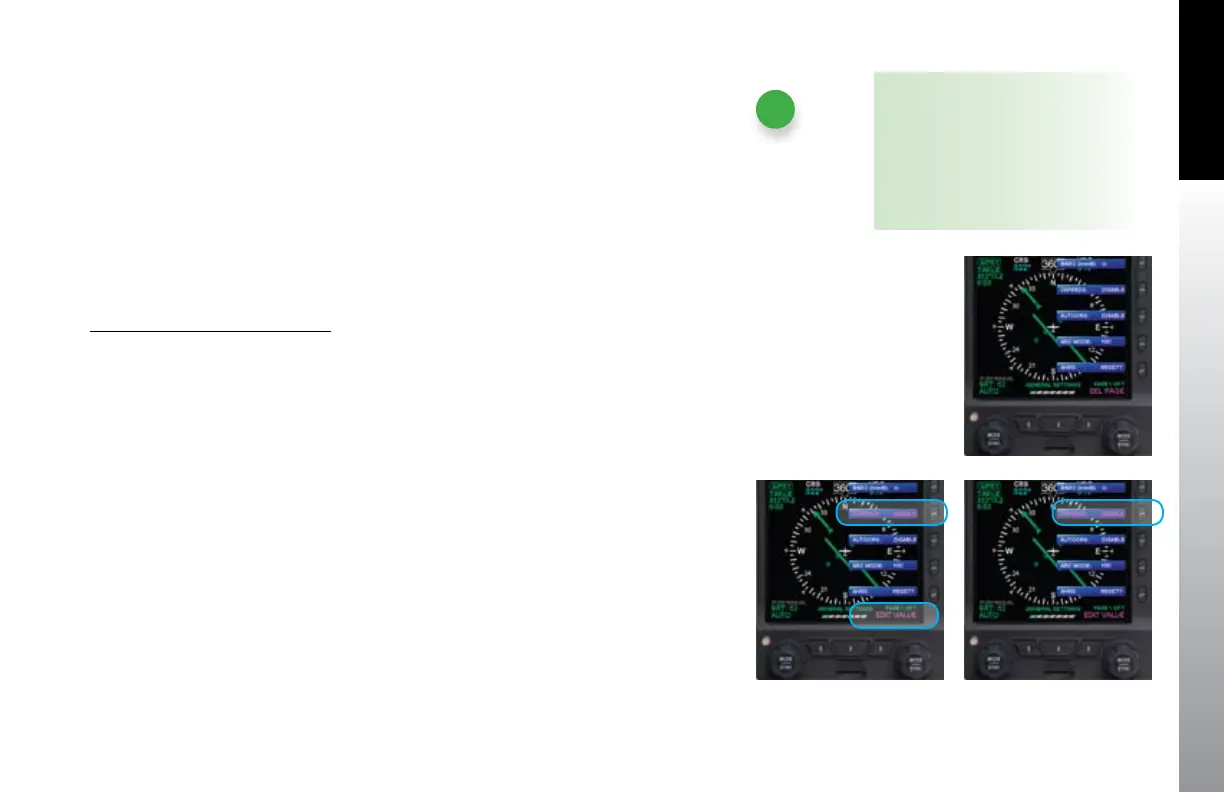
1. Push the MENU key. The Menu displays on the Navigation Display.
2. Rotate the Right Knob counterclockwise until Page 1 of the Menu displays
(Figure 5-19).
3. Push the VSPEEDS Menu Key (Key 2). The menu label turns magenta and the
EDIT VALUE label displays above the Right Knob (Figure 5-20).
4. Rotate the Right Knob to select ENABLE. The textual V-speed labels are
enabled (Figure 5-21).
5. Push the MENU key to exit the Menu.
Figure 5-21
VSPEEDS Enabled
Figure 5-20
Editing VSPEEDS
Figure 5-19
Menu, GENERAL SETTINGS, Page 1 of 7
NOTE
A typical installation sets the Airspeed
Textual Markers to UNLOCKED,
allowing the pilot to edit the indicated
V-speed labels. If the V-speed setting
was LOCKED during installation, no
editing is allowed.



 To Next Page