MP-20x Telephone Adapter 92 Document #: LTRT-50609
User's Manual
9.3.1 MAC Filtering
You can filter wireless users according to their MAC address, by either allowing or denying
access.
¾ To define MAC filtering:
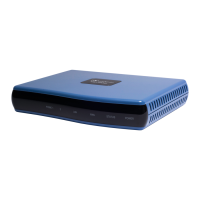
1. In the Wireless tab's screen, from the 'MAC Filtering Mode' drop-down list, select
either 'Allow' or 'Deny'.
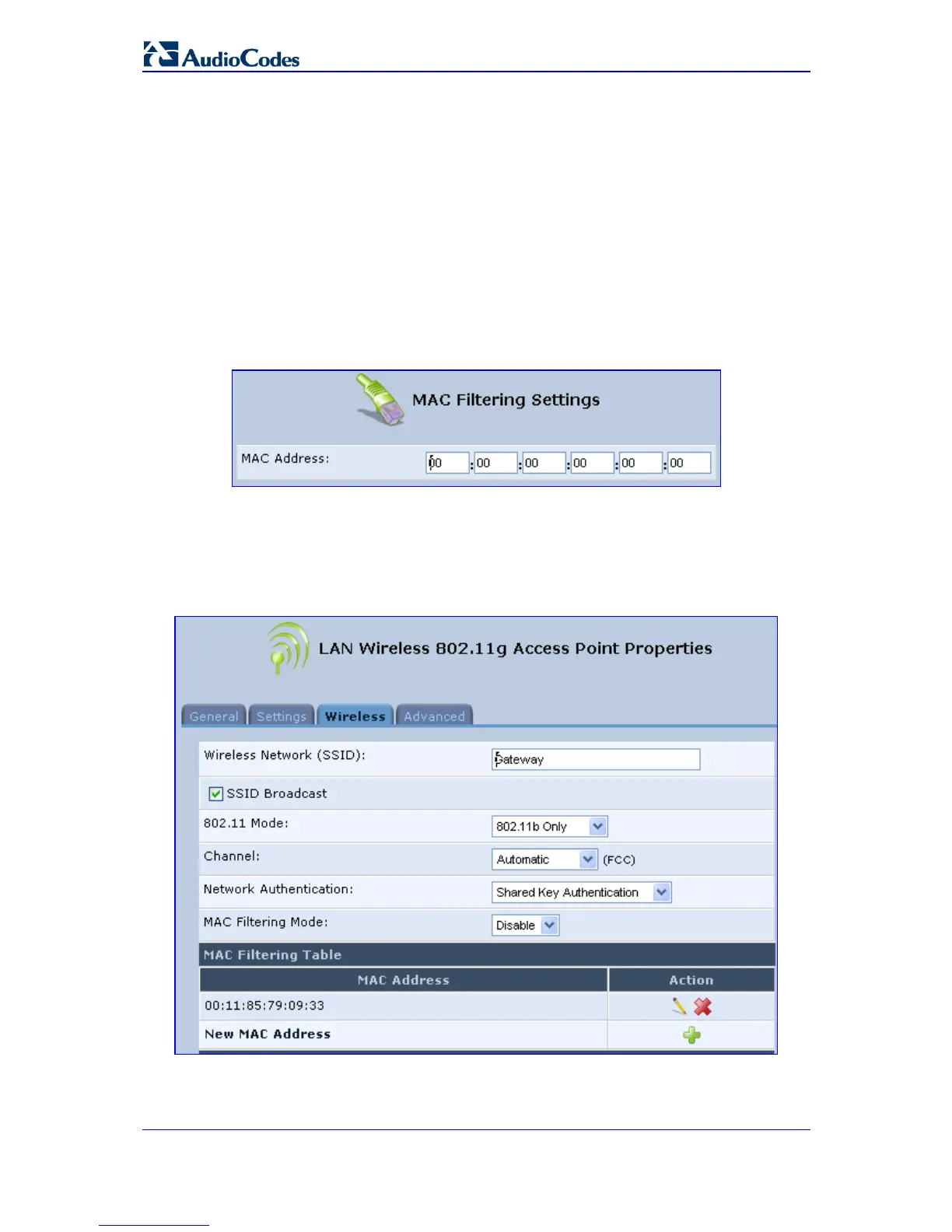
2. In the 'MAC Filtering Table', click New MAC Address; the 'MAC Filtering Settings'
screen appears.
Figure 9-5: MAC Filtering Settings Screen
3. In the 'MAC Address' field, enter the MAC address to be filtered.
4. Click OK; a MAC address list appears, upon which the selected filtering action
(allow/deny) will be performed.
Figure 9-6: MAC Address Added to MAC Filtering Table


 To Next Page