MP-20x Telephone Adapter 60 Document #: LTRT-50609
User's Manual
5.7 Configuring Speed Dial Settings
Use the 'Speed Dial Settings' screen to associate a called party's contact parameters
(including the IP address of his/her ATA and Line ID) with a number that you'll dial to call
the called part. The number of speed-dialing codes that can be defined is unlimited. Use
the screen to define a destination type: Proxy, Local Line or Direct Call.
Note: When connecting MP-20x to a World-Wide SIP Server (refer to 'Connecting
MP-20x's VoIP to a VoIP Service Provider' on page 65), you don't need to
configure 'Speed Dial Settings'.
¾ To configure speed dialing:
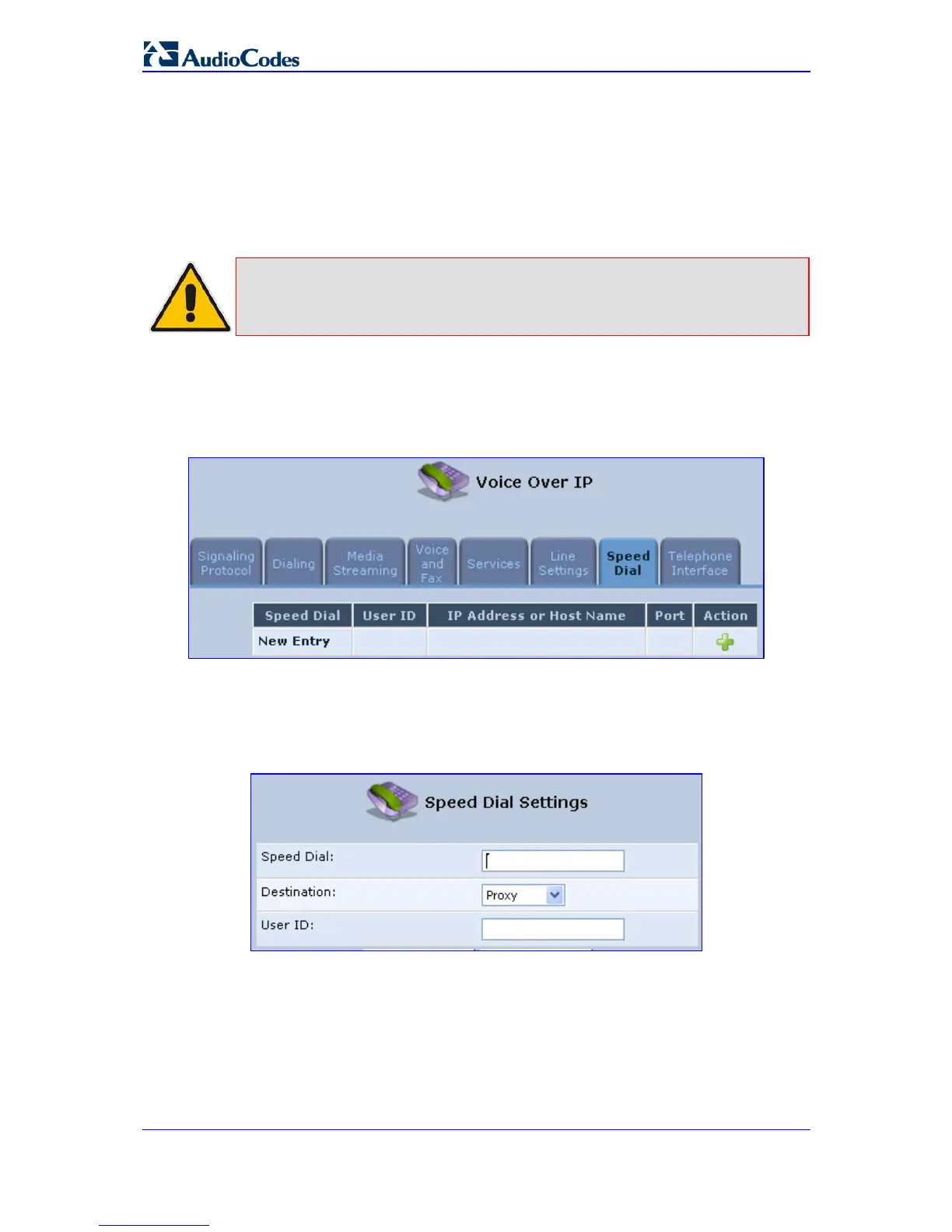
1. In the 'Voice Over IP' screen, click the Speed Dial tab; the 'Speed Dial' screen opens.
Figure 5-9: Voice Over IP - Speed Dial Screen
Click New to add a new speed dial entry; the 'Speed Dial Settings' screen appears.
The figure below shows how a proxy speed dial is configured. The proxy IP address is
'Office' and number to speed-dial is 123.
Figure 5-10: VoIP - Speed Dial Settings


 To Next Page