www.ayyeka.com | +1 (310) 876-8040 | info@ayyeka.com 85
4. In the Stream Management table, make sure that Data Streams is selected in the top right drop-down
box.
5. Locate the stream in the Stream Management table, and note its Type (stream type) and # (stream
number). In the example shown in Figure 66, the Wind Gust Speed stream’s Type=Serial, and
Number=3.
6. Perform the following:
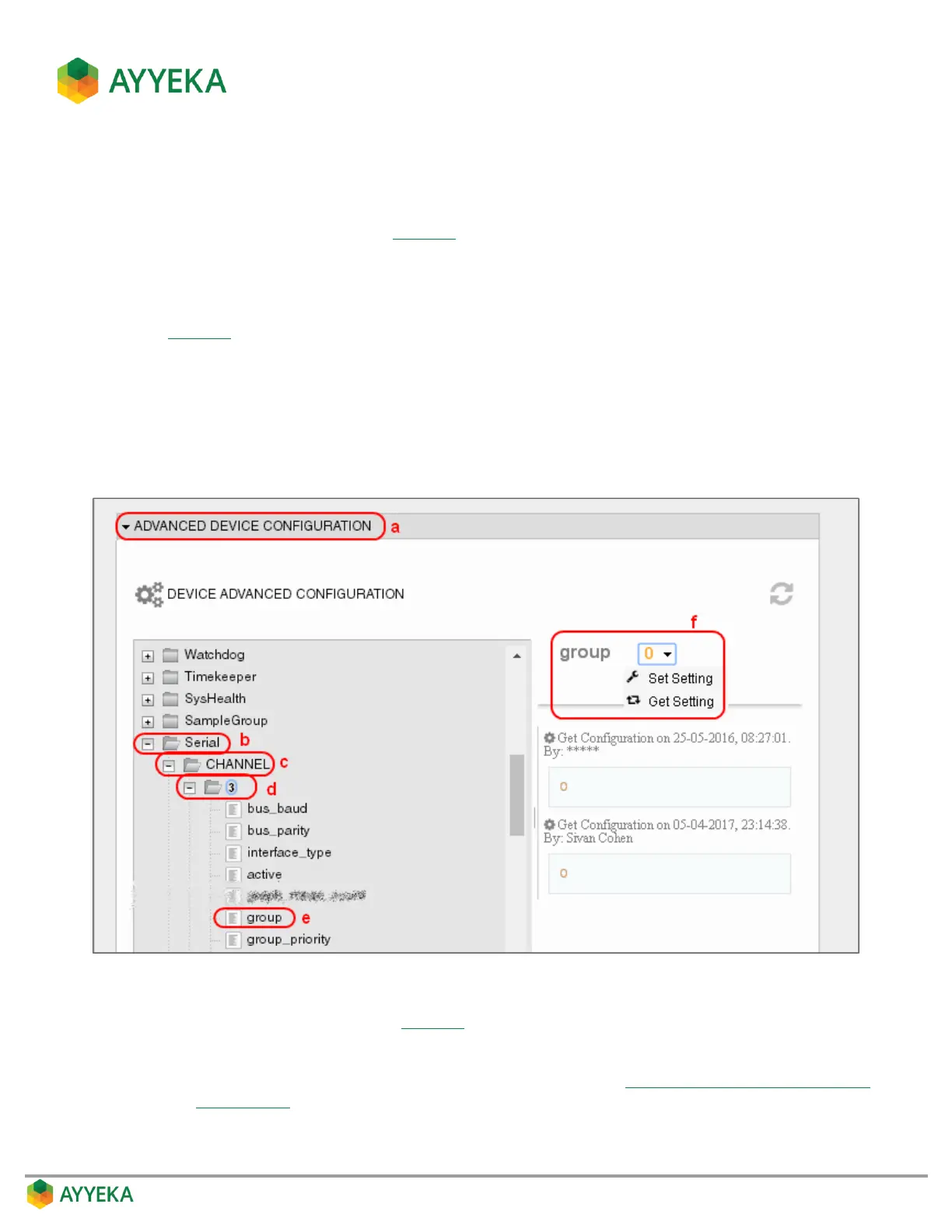
a. Scroll to below the Stream Management table, and click Advanced Device Configuration (Step a in
Figure 67).
b. In the configuration tree, expand the node whose name is the stream’s type. In our example, this is
the Serial node.
c. Expand the CHANNEL node.
d. Expand the node whose name is the stream’s number. In our example, this is the 3 node.
e. Select the group node
Figure 67: Determining the sample group
f. Set the value of group (step f in Figure 67) as follows:
Group=0: This stream is not associated with any Sample Group.
Its value is custom set, and can be changed as described in Setting a Stream’s Custom Sampling
Interval Value.



 To Next Page