Zones
The Zone option from the PROGRAMMING menu will allow you to access
the software-zone parameters.
The same parameters can be programmed for all the devices associated
with software zones.
You can use the Zones option to associate output device groups with input
points.
The software zones parameters will be applied automatically to all the de-
vices associated with the cone concerned.
If a device is associated with several software zones, the last software
zones to be programmed will determine the valid parameters.
Therefore, the last parameter will be the valid parameter.
Select the Zone option from the PRO-
GRAMMING menu (press 5) to access
and program the parameters of the soft-
ware zones.
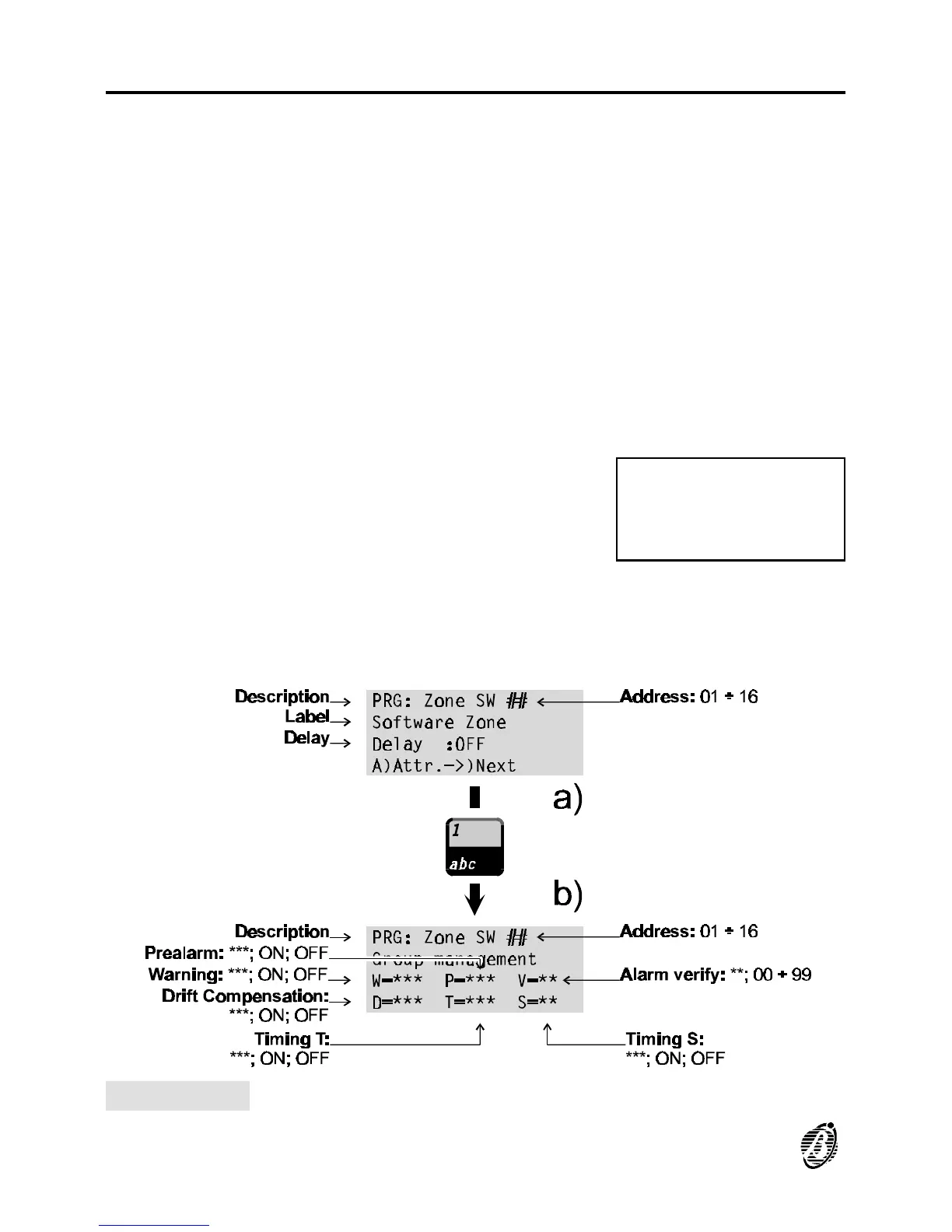
The display will be as per figure 23a. Position the cursor on the third line
and press 1 to access the parameters shown in figure 23b.
1=Auto 2=Devices
3=PassWD 4=MesINI
5=Zones 6=Opt 7=Sys
8=Ver 9=Def Ø=Tel
Figure 23 Software Zone parameters
56 Analogue Fire Control Panel FireClass200










 To Next Page