Formatting a Label
BBP
®
35/37 User’s Manual 56 Rev A
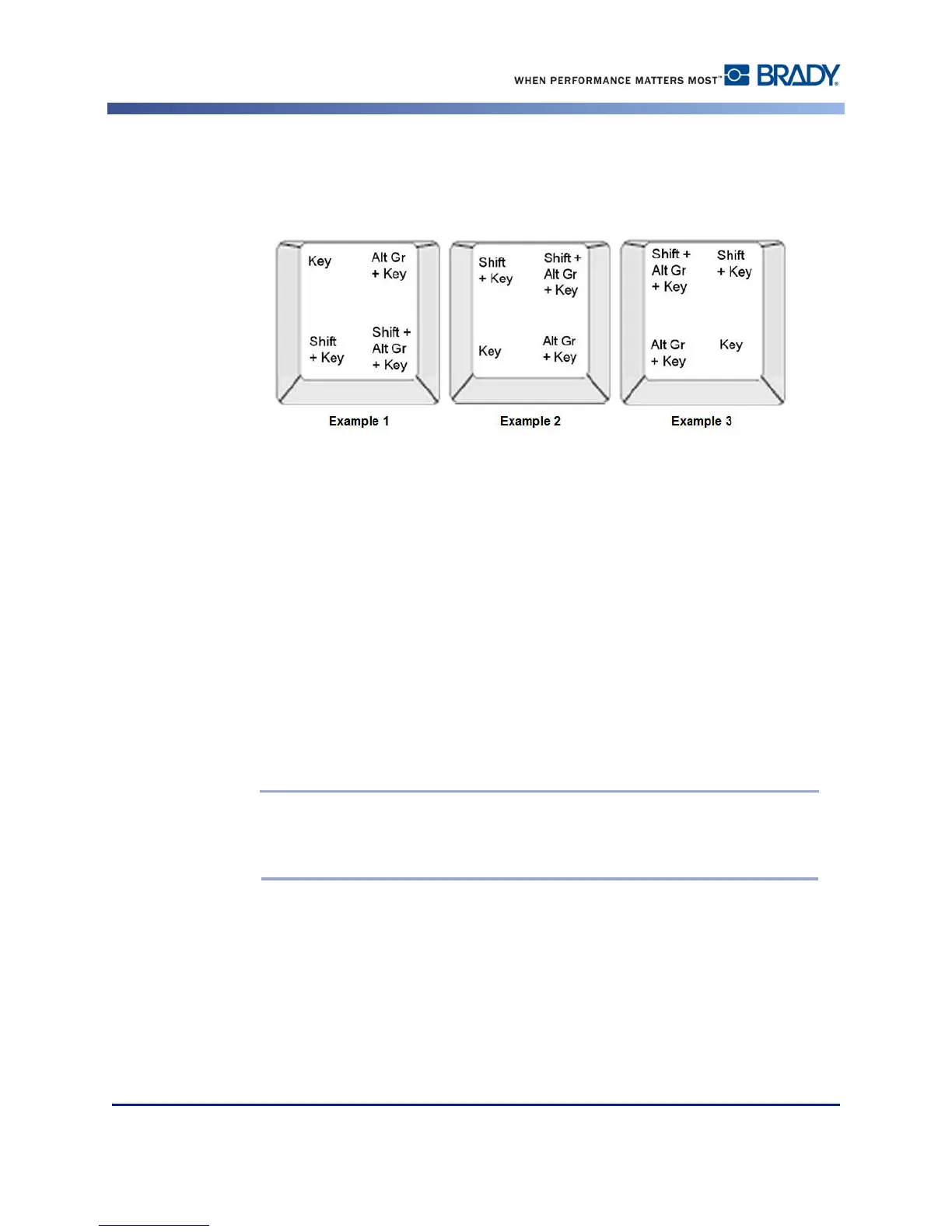
In Figure 6, Example 1 shows how to access characters in normal operation (caps lock and
Alt-GR keys not activated). Example 2 shows how to access characters when caps lock is on.
Example 3 shows how to access characters using the Alt-GR key.
Figure 6 • Keystroke Combinations
Understanding Keystroke Combinations
• The term "Key" represents the physical key on which the accent character is located.
• The Alt-GR key is also referred to as the "switch" key.
• The "+" sign indicates that two or more keys should be pressed simultaneously.
• A comma separating a keystroke combination indicates that the first set of keys should be
released before typing the next keystroke combination.
Typing Accented Characters
Typing the key combinations may vary depending on the keyboard configuration you are
using. The following shows an example of using each of the four key combinations.
Note: See “Appendix B - Character Mapping & Keyboard Layoutsn page 216 for
a list of accent characters available with specific keyboards and the keyboard
configurations.



 To Next Page