Printer Maintenance
BBP
®
35/37 User’s Manual 186 Rev A
Cleaning Upper Guide and Cut Pad
Overtime, dust and adhesive builds up on the upper guide and the cut pad. These parts can be
removed for cleaning.
Materials Required
• Magnetic screw driver
•BBP
®
35/37 Cleaning Kit
• Isopropyl Alcohol
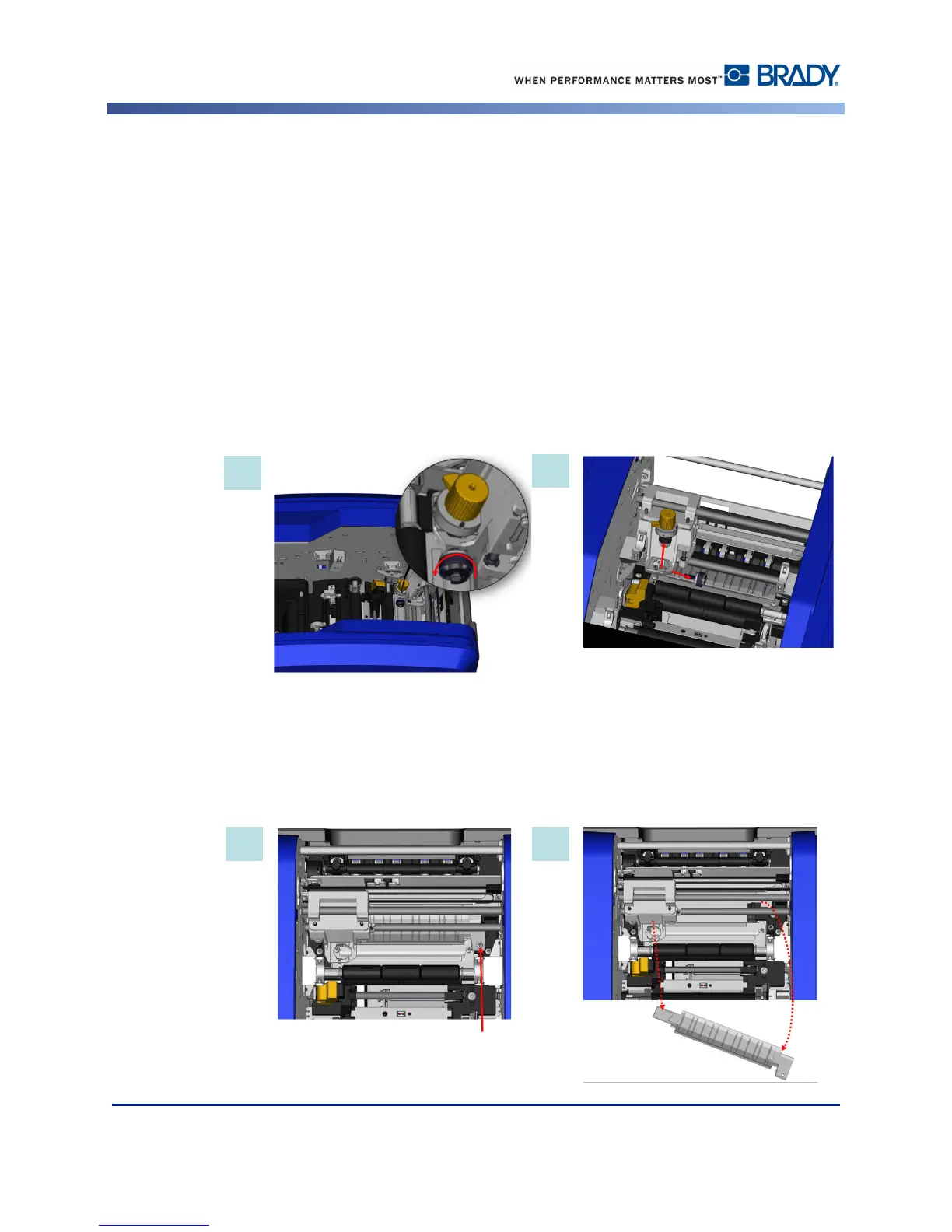
To remove the Upper Guide and Cut Pad:
1. Unscrew the XY plotter thumbscrew completely to remove it.
2. Grasp the cutter module and gently pull up to remove it from the carriage.
3. Using a magnetic screw driver (so screws do not drop into the printer) remove the upper
guide screw.
4. To remove the upper guide, gently loosen the unscrewed end of the upper guide, then
swing the guide out from under the XY cutter carriage.
5. Use a moistened wipe from the cleaning kit to clean the upper guide.



 To Next Page