31
Chapter 1
Using 9600 Mobile Computer
1.7 CRADLES
1.7.1 CHARGING & COMMUNICATION CRADLE
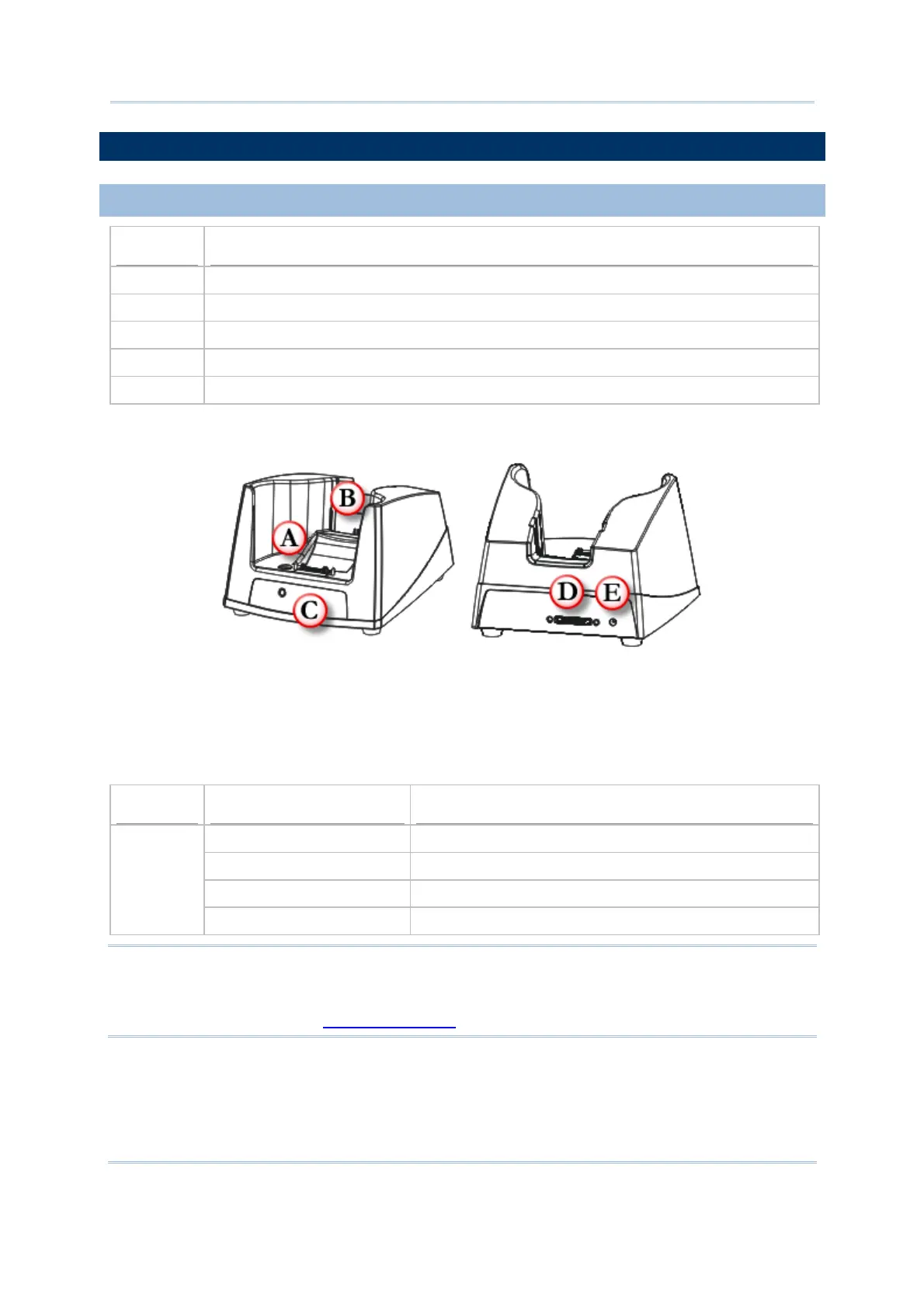
Item Description
A Charging slot for seating the mobile computer
B Charging slot for spare battery
C LED Indicator (POWER)
D Cable Connector (for USB or RS-232)
E Power Jack
The cradle provides one LED indicator on the front panel to indicate power status.
Indicator
Status Description
Off Power not ready
Green, solid Power ready / Charging done
Red, solid Charging spare battery
POWER
Red, flashing Error occurs, e.g. battery not ready
Note
Note: (1) When error occurs, please try re-position the spare battery in the slot. If it
persists, please check battery, adaptor or cradle.
(2) For charging status of the mobile computer, please check the LED on top of
the screen. Refer to
1.5.1 Status LED.
Figure 11: Charging & Communication Cradle



 To Next Page