37
Chapter 2
Learning Windows CE Basics
2.1.2 TASKBAR
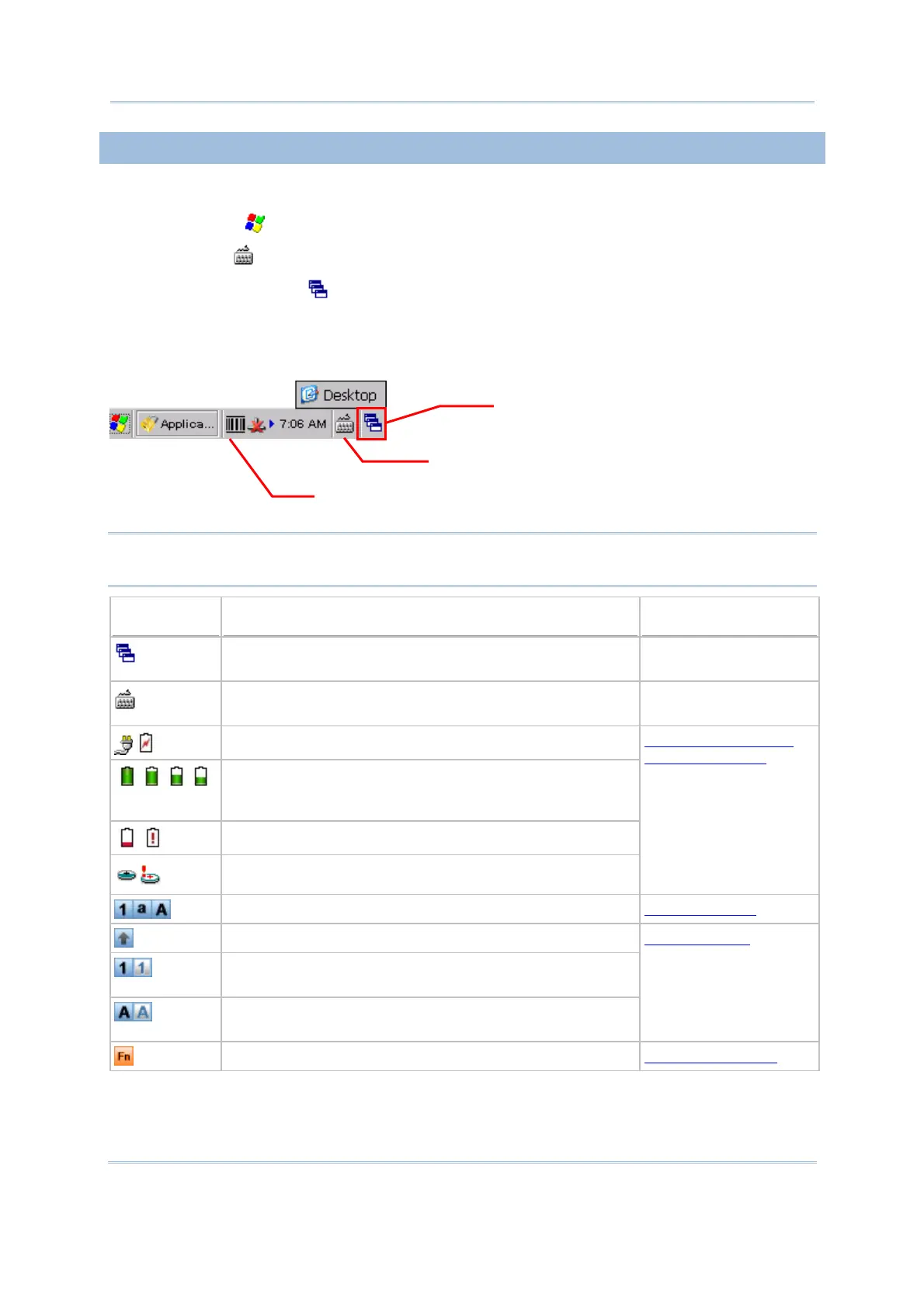
The taskbar is at the bottom of the screen for displaying the following:
Start button
SIP button
Switch Task button
Status icons for various connections, minimized program windows, and so on.
Note: To configure different connections, go to Start | Settings and select Network
and Dial-up Connections.
Icon Description See Also
Tap it to switch to desktop or any task, such as a running
program or window.
Switch Task
Tap it to change the input method. Software Input Panel
(SIP)
It indicates external power source is connected.
It indicates the amount of battery charge remaining in
the main battery. The higher the green level, the more
power in the main battery.
It indicates the main battery status.
It indicates the backup battery status.
1.1.1 Understanding
the Battery Icons
It indicates the current input mode of keypad.
1.3.2 Alpha Key
It indicates Shift is enabled (on 29-key keypad).
It indicates Shift is enabled (in numeric mode on Qwerty
keypad).
It indicates Shift is enabled (in alpha mode on Qwerty
keypad).
1.3.3 Shift Key
It indicates Fn is enabled. (= Function mode)
1.3.4 Function Key
IP
witch Task
Status Icons &
inimized Programs



 To Next Page