47
Chapter 2
Learning Windows CE Basics
2.4 USING WINDOWS EXPLORER
2.4.1 ADD A PROGRAM TO START MENU
1) Go to Start | Programs and select Windows Explorer.
2) Navigate through file folders to find the program you desire.
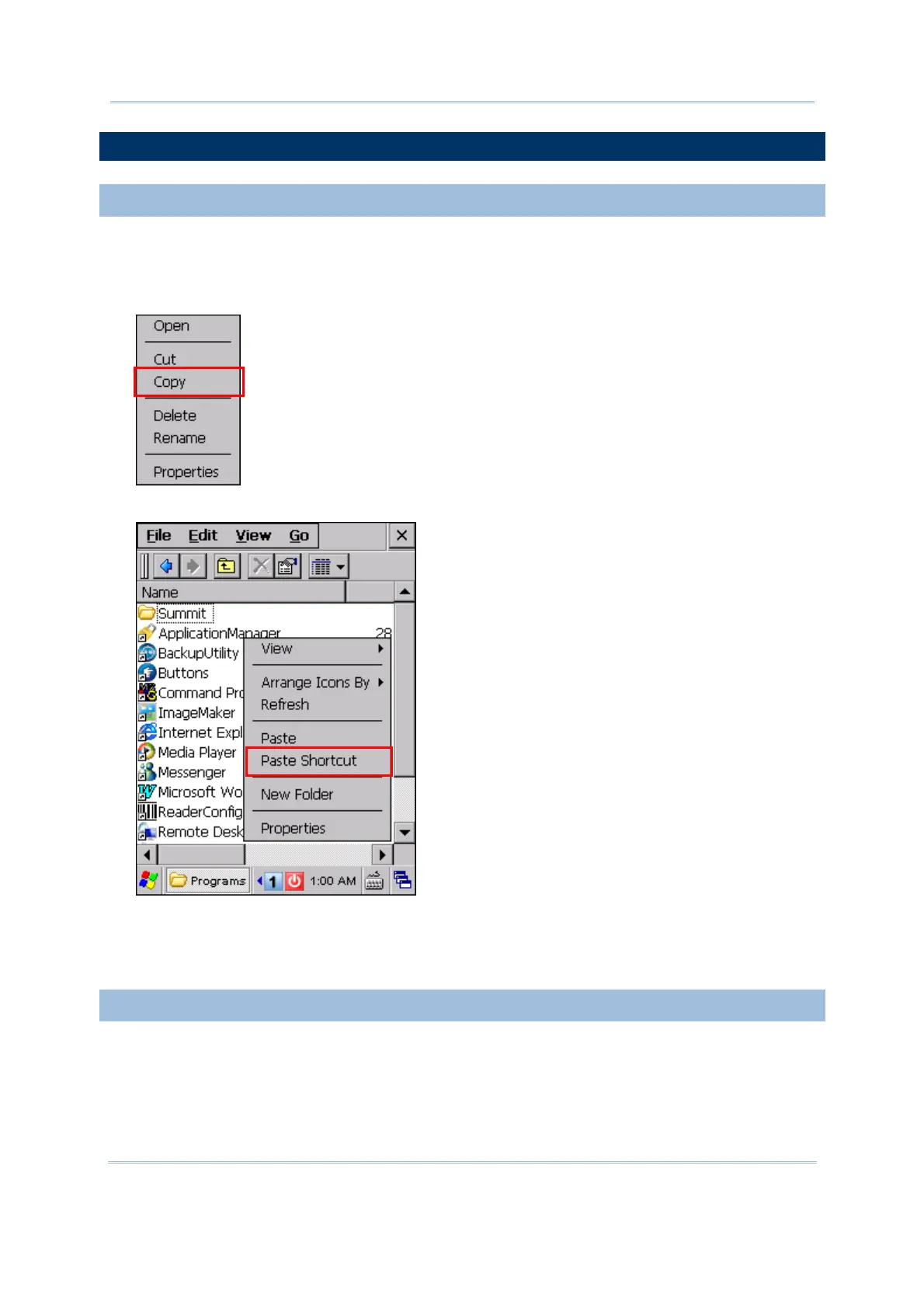
3) Tap and hold the program to select [Copy] from the pop-up menu.
4) Navigate to the Programs folder – My Device\Windows\Programs.
5) Tap and hold anywhere blank on the screen to select [Paste Shortcut] from the
pop-up menu. The new program will be added to the Programs folder.
6) Go to Start | Programs and the new program will appear now.
2.4.2 CREATE A NEW FOLDER
1) Go to Start | Programs and select Windows Explorer.
2) Navigate through file folders to find where you wish to create a new folder.
3) Tap and hold anywhere blank on the window and select [New Folder] from the pop-up
menu. A subfolder will be created.



 To Next Page