Chapter 2 Operating Principles
2-3.
Operation Panel
2-65 CL-E700 series
8. Press the [PAUSE] ( ) key several times to return to “Service Mode” main menu.
9. To operate other submenu, repeat from Step 3. Otherwise, turn off the power to
terminate Factory/Service mode.
Operation procedure for “Service Counter/Cut Center” submenu:
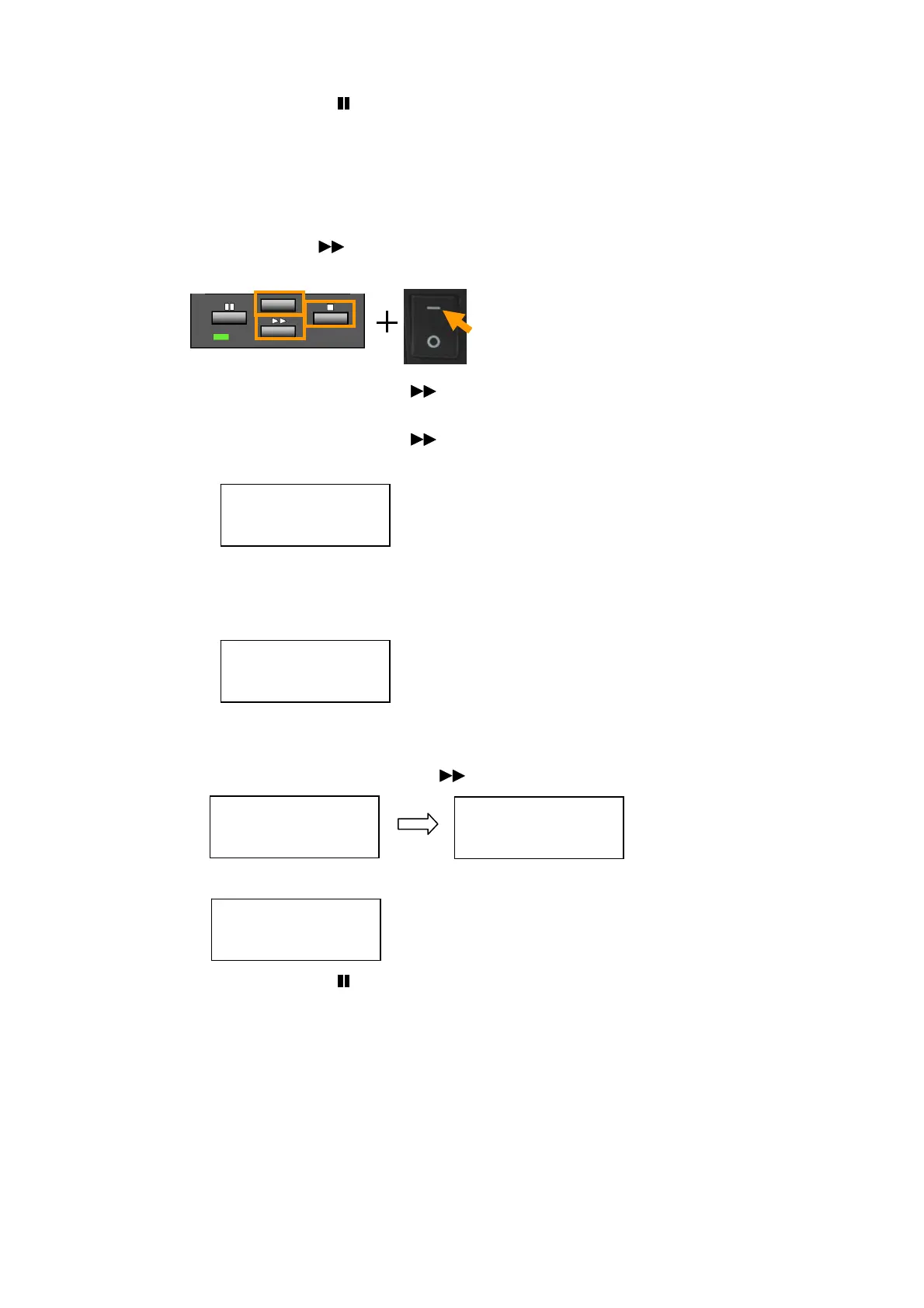
1. Enter Factory/Service mode by turning on the power while pressing and holding the
[MENU], [FEED] (
) and [STOP] (■) keys.
“Factory Setup” main menu appears.
2. Press the [MENU] or [FEED] (
) key until “Service Mode” main menu appears.
3. Press the [STOP] (
■) key to enter Service mode.
4. Press the [MENU] or [FEED] (
) key until a desired submenu appears.
[When selecting “Service Counter”]
5. Press the [STOP] (
■) key to select “Service Counter” submenu.
Then, the service counter length since the service counter is reset last is displayed.
* To reset the service counter, proceed to the next step. Otherwise, jump to Step 7.
6. Resetting the service counter:
1) Press the [STOP] (
■) key.
2) Press the [MENU] or [FEED] (
) key and select “Yes”.
3) Press the [STOP] (
■) key to execute resetting.
7. Press the [PAUSE] ( ) key twice to return to “Service Mode” main menu.
8. To check other submenu, repeat from Step 3. Otherwise, turn off the power to
terminate Factory/Service mode.
Service Mode
Service Counter
Length
0123.456 km
Reset?
No
Reset?
Yes
Length
0000.000 km


 To Next Page
 Loading...