All content © 2017, cmotion GmbH. All specications subject to change without notice. http://www.cmotion.eu
87/112
Scale Sync
The more advanced lens synchronization feature identied as “SYNC” in the hand unit menu
allows you to create up to 32 precise oset positions for each paired lens axis. This feature is
particularly useful for optically matching zoom scales.
Note: Two motors must be assigned to the lens axis/scale you want
to synchronise before you begin. If only one motor is assigned to a
particular scale, that scale will appear grey in the “SYNC” menu.
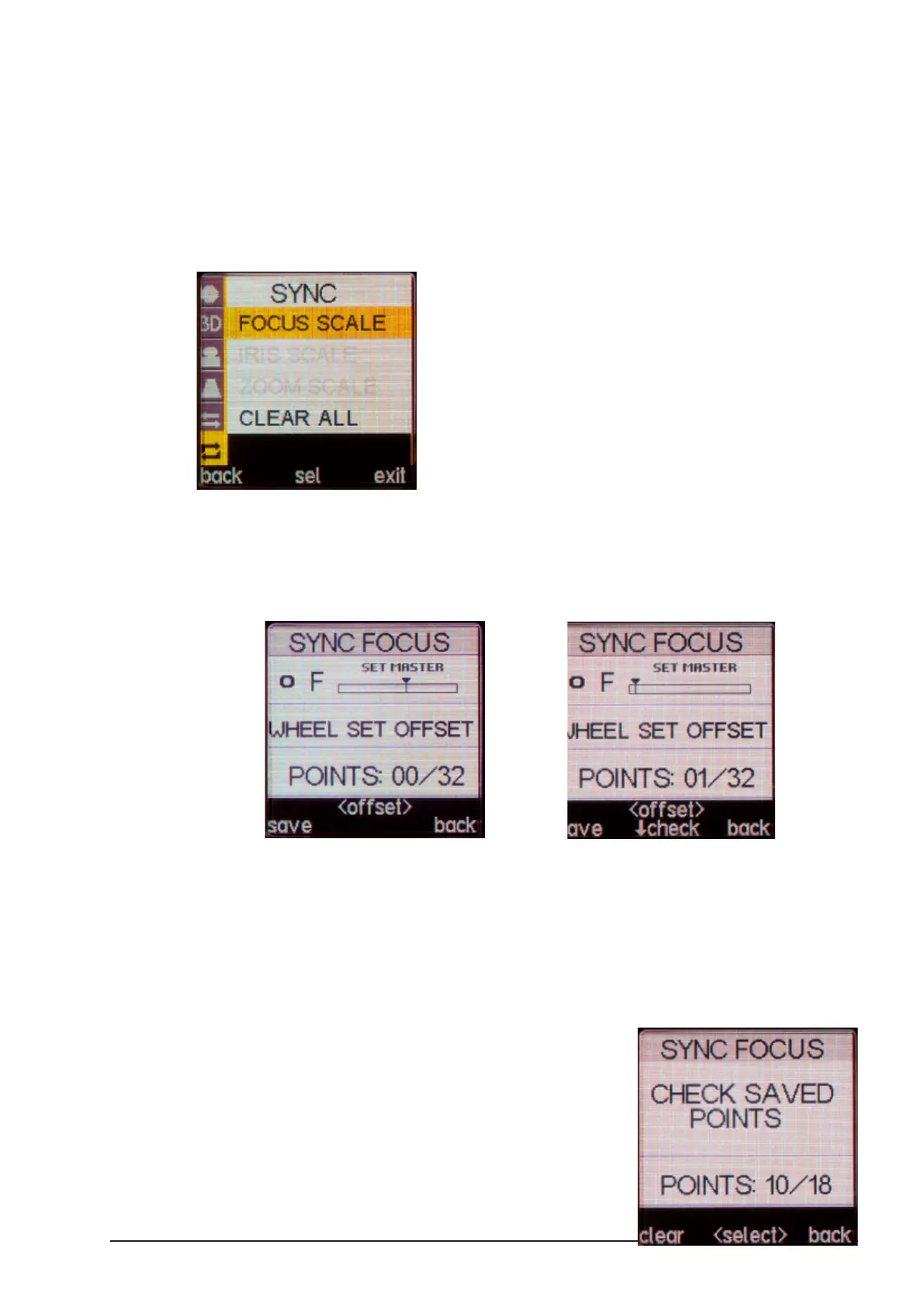
This example shows how to sync Focus on a pair of lenses.
■Press the “SELECT” button twice to enter the Menu.
■Select “SYNC” followed by the scale you want to synchronize, e.g. “FOCUS
SCALE”.
■The SYNC FOCUS screen will open and the “Master” focus motor position will be
displayed.
■Turn the knob so that the ‘Master’ focus scale is set to its closest focal distance.
■Turn the “SELECT” wheel to independently adjust the “Slave” focus motor to the
same value.
■Press the LENS (“save”) button to store this synchronization point. POINTS 1/32
will be displayed.
■Repeat this process until you have created
an oset for each ‘Slave’ value that does not
match the ‘Master’ value.



 To Next Page