EasyManua.ls Logo

Cooper Security M750 - Page 9

Cooper Security M750
140 pages
Print Icon
To Next Page IconTo Next Page
To Previous Page IconTo Previous Page
Loading...
Engineering Manual Introduction
7
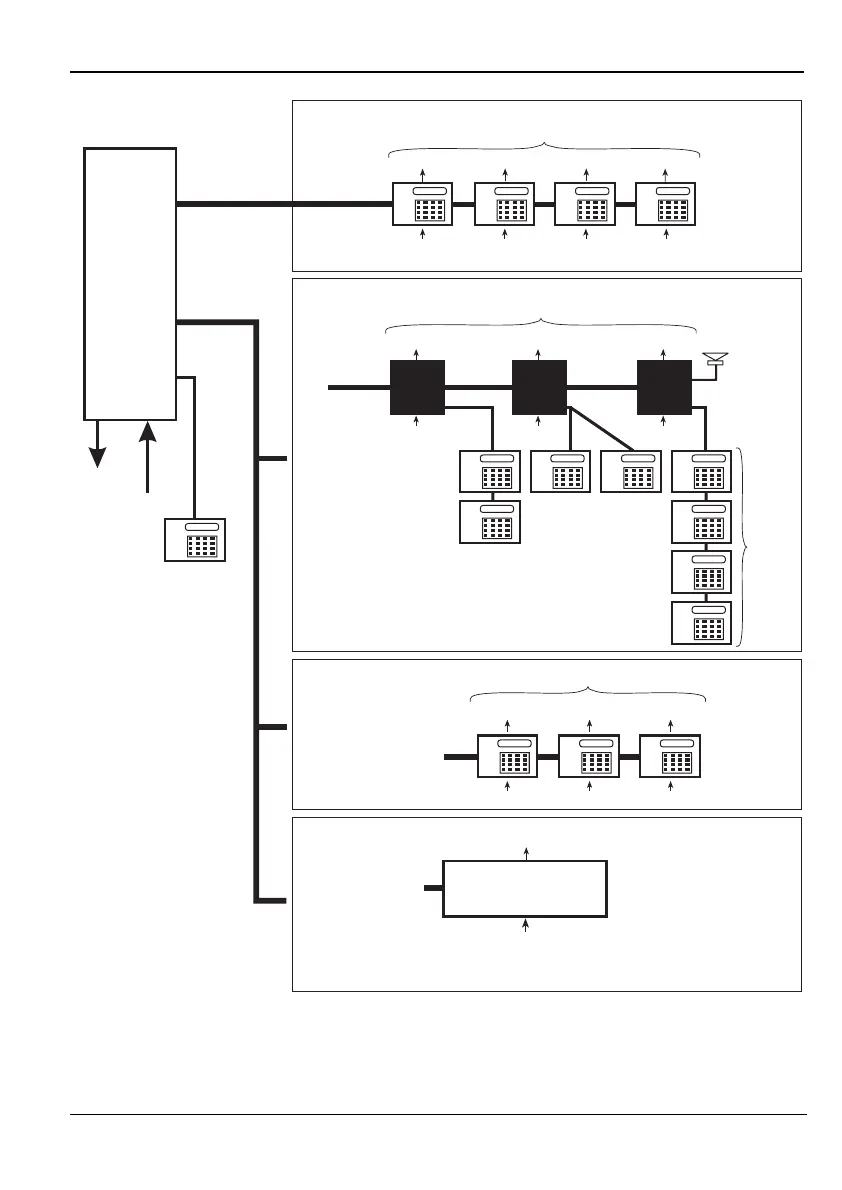
Network 1
Network 2
550, 600,
800 or 750
CONTROL
PANEL
3 Outputs
8 Zones
6 Outputs
24 ID Zones
Network2-Wiring Option 3
MIDNode or ID Node
Network Wiring = 4 Core
Network2-Wiring Option 2
Remote Keypads/LEC2s
Max 3
Network Wiring = 6 Core
Network 1 (Supports only remote keypads and LEC2s)
Engineer’s keypad
(cannot have zones
or outputs)
Max 4
100m max to
furthest
keypad/LEC2
1 Output
2 Zones
1 Output
2 Zones
1 Output
2 Zones
1 Output
2 Zones
NOTE:
Do not connect an
XNode/MNode to the
same network as an ID
Node or keypad
Network2-Wiring Option 1
XNodes and/or MNodes
An XNode/MNode is
able to drive 4 Remote
Keypads and a
Loudspeaker
100m max
100m max to
furthest keypad
300m max
to furthest
XNode/
MNode
Network Wiring = 4 Core
2 Outputs
8 Zones 8 Zones
Max 3
8 Zones
Max 4
2 Outputs 2 Outputs
XNode/
MNode
1
XNode/
MNode
2
XNode/
MNode
3
100m max
1 Output
2 Zones
1 Output
2 Zones
1 Output
2 Zones
100m max to
furthest
keypad/LEC2
Network Wiring = 6 Core
Only one MIDNode/IDNode
can be connected
(configured to occupy
addresses 1, 2 and 3)
MIDNode or IDNode
Figure 1. Network Architectures for M550, M600, M750 and M800 Control Panels

Table of Contents

Other manuals for Cooper Security M750

Related product manuals