Installation – RF Path Elements P/N 709C011801 Page 115
5.2.3.3 Acoustic Ceiling Mount Installation
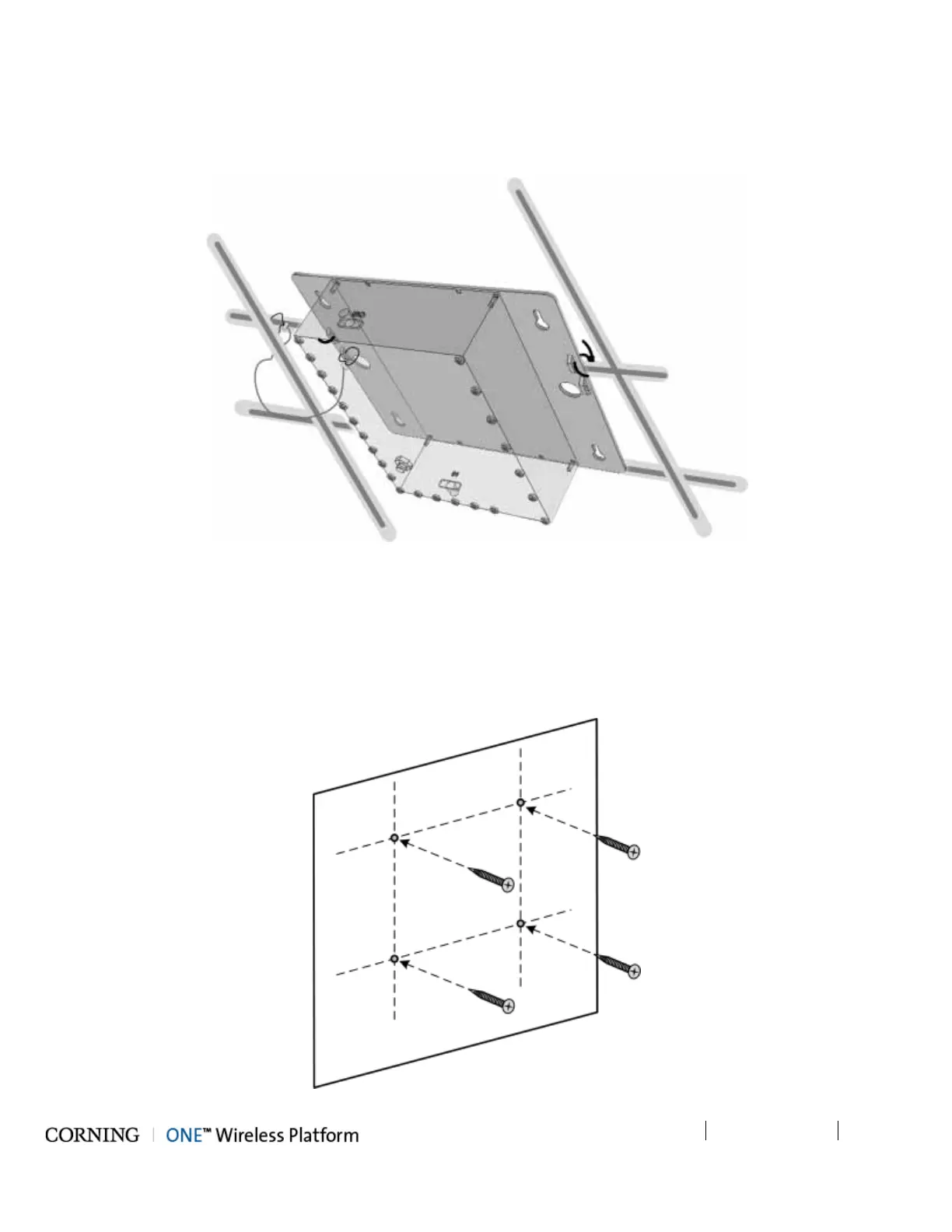
In acoustic ceiling mount installations, the Cavity Filter can be fastened to the grid by slipping tie wraps through slits on the
bracket (Item C in Figure 5-73) and securing the assembly to the grid with the provided safety cable. Refer to Figure 5-75.
Figure 5-75. Illustration of Cavity Filter Mounted on Acoustic Ceiling Grid
5.2.3.4 Wall Mount Installation
To mount Cavity Filter on Wall
1. Using the four key holes (Item A in Figure 5-73) as a guide, mark the location of the holes to be drilled in the wall.
2. Drill the holes in the wall corresponding to the diameter of the anchors to be used (not provided).
Figure 5-76. Marking and Inserting Anchors in Wall



 To Next Page