Installation – RF Path Elements P/N 709C011801 Page 86
Note: Main HEU refers to HEU with HCM, whereas HEU units with ACM modules are referred to as Auxiliary HEUs.
5.1.3.8 Power Up
Refer to HEU section 5.1.2.10 for details on connecting the AC/DC PSM modules.
Note: The PSM modules are common for both HEU and OIU chassis.
Verifying Normal Operation
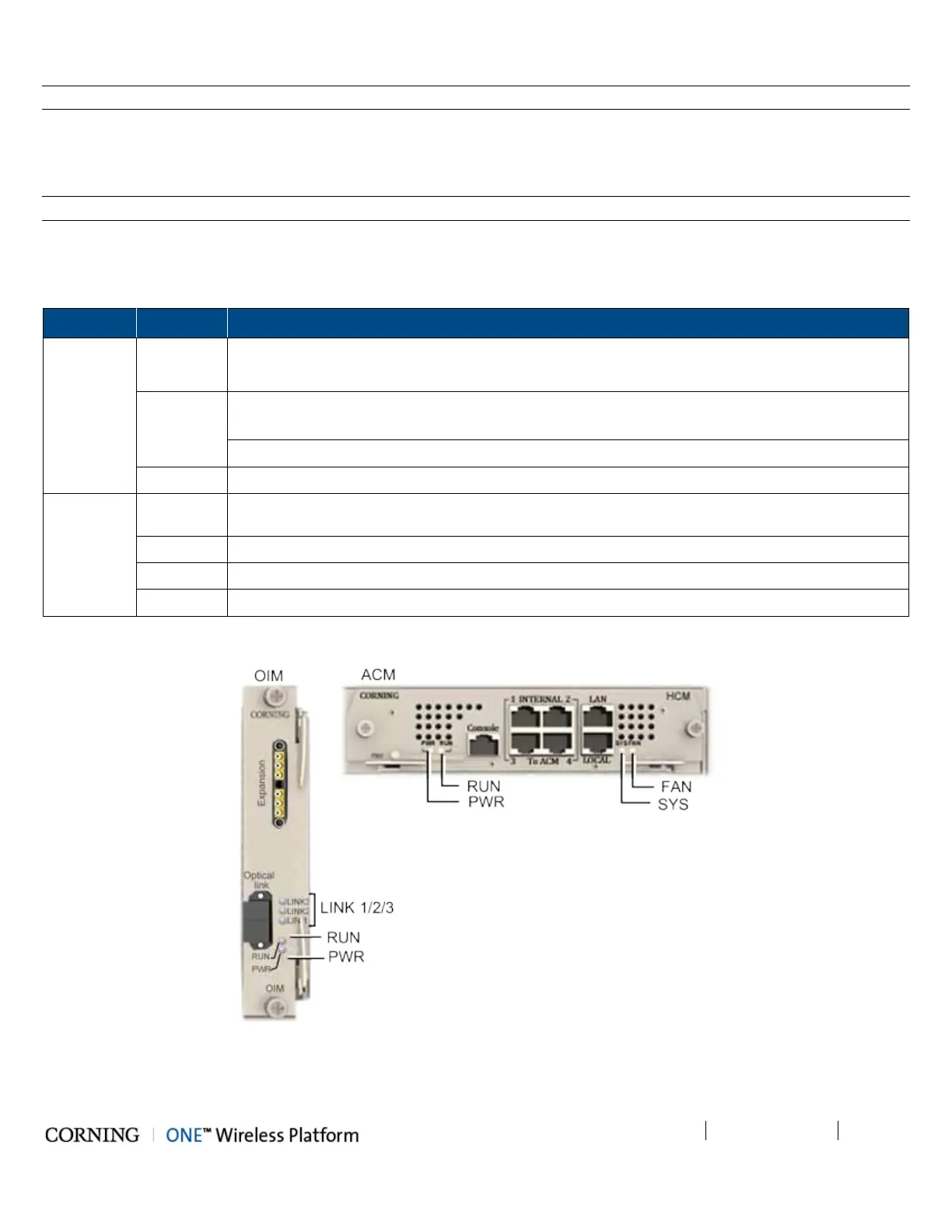
If OIU chassis is powered on, verify that the OIM and ACM (see Figure 5-34) module LEDs indicate normal operation:
Module LED Description
OIM LINK 1/2/3 Steady Green - Optical link power to/from the connected remote is normal
Blinking Green - Optical power from remote is lower than required
RUN Blinking Green - OIM module SW has initialized and is up and running
Off – Power off
PWR Steady Green - Power input detected in OIM
ACM PWR Steady Green - Power input detected by ACM
RUN Blinking Green – ACM module SW up and running
SYS Steady Green - Overall status of the managed system is ok
FAN Steady Green – Normal operation status for all fans
Table 5-7. OIM and ACM LED Descriptions
Figure 5-34. OIM and ACM Module Status LEDs



 To Next Page