Installation – RF Path Elements P/N 709C011801 Page 75
For PSM-DC
General information:
• The PSM-DC is provided with six terminal rings (PN: 708A043001)
• Type of terminal ring provided: PMNF2-3R-C or PMV2-3RB-3K (depending on availability)
• PSM-DC power source rating: 48 V DC; 9A max.
To power up the PSM-DC module:
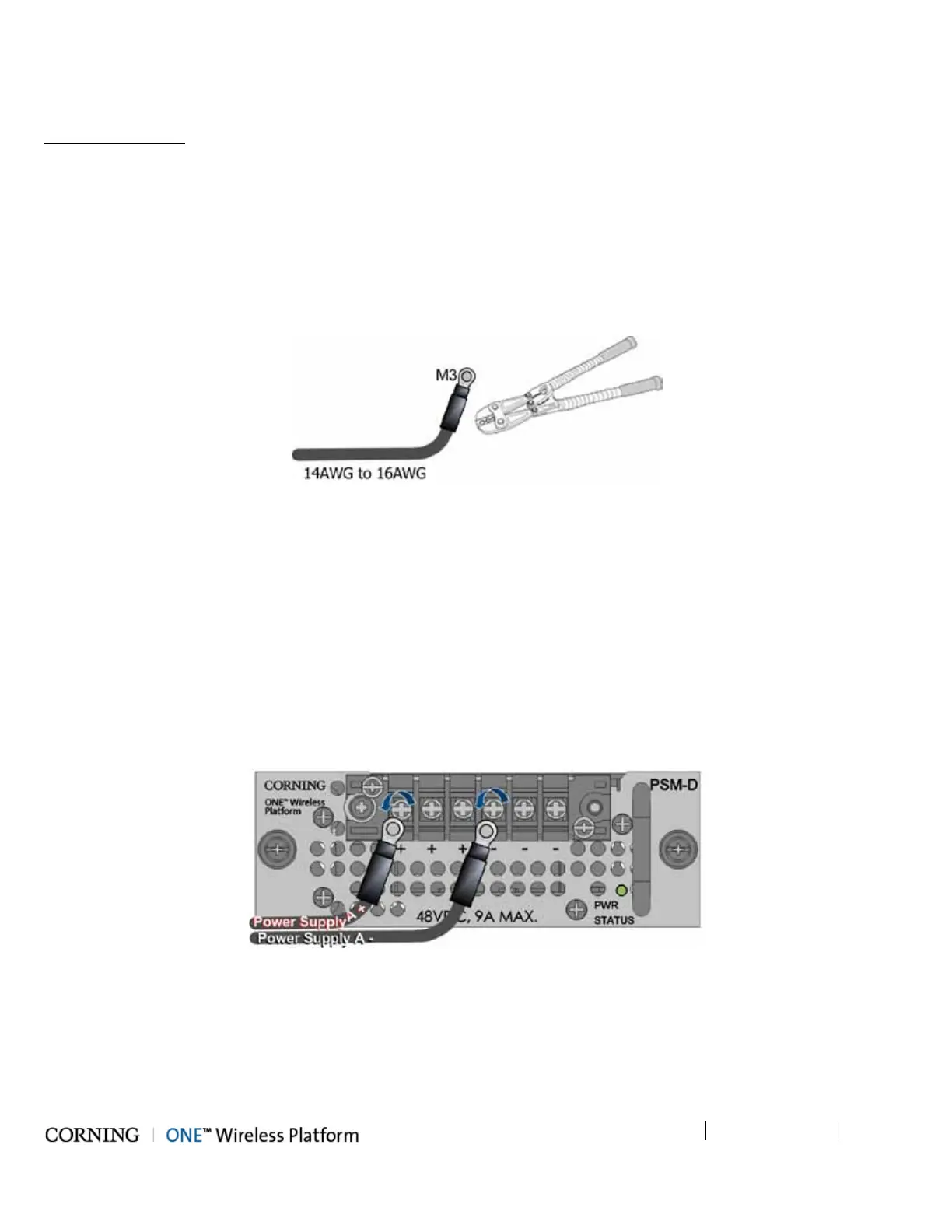
1. Crimp the provided terminal rings onto the DC wire pairs.
IMPORTANT! Make sure to use an appropriate crimper – do not use a plier!
Figure 5-19. Crimping the Terminal Rings onto the DC Wire
Required information:
• Type of terminal ring crimped onto DC wires – PANDUIT ring terminal:
• Compatible wire size: 1.5 – 2.5mm² wire range/14AWG to 16AWG
• M3 stud size
• No. of required wire pairs:
• Remote feed - three pairs; 100 W max. per pair
• Local Plant feed - two pairs; 100 W max. per pair
2. Connect crimped terminal rings to DC connectors.
IMPORTANT! Verify that the DC power source is OFF before connecting the wire pairs!
Figure 5-20. Connecting PSM-DC Wire Pairs
• Max. current consumption per pair:
• Remote feed = 1.55 A
• Plant feed = 4.65 A
• For optimal cable management, route all wire pairs to the left side of the rack



 To Next Page