Making Use of Layers
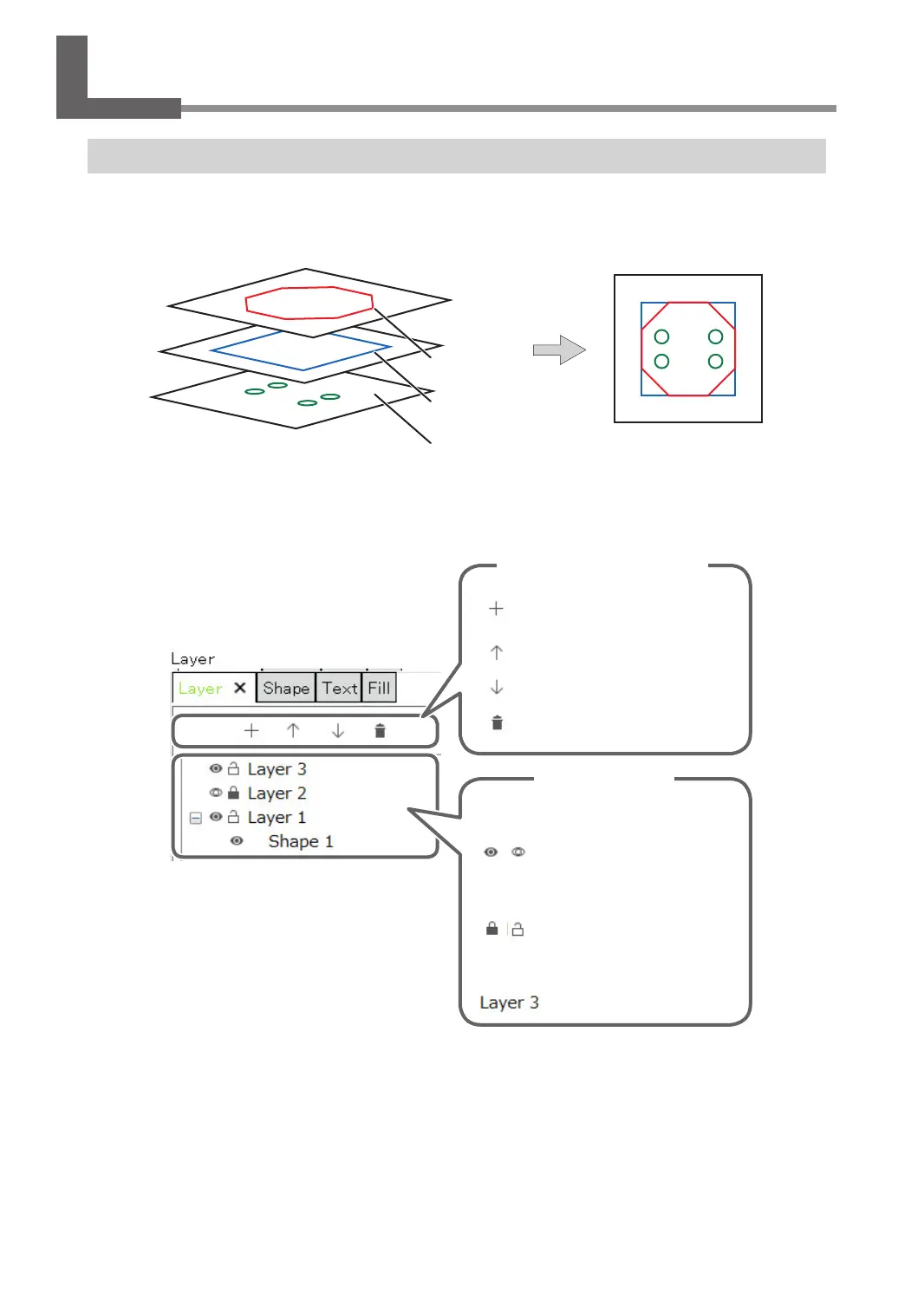
Just like a celluloid picture, dierent shapes can be created on each layer. These multiple shapes can then be
overlaid and certain shapes can be hidden to create an overall design.
Layer 2
Layer 1
Layer 3
Draw on each layer When all layers are displayed
With Dr. Engrave Plus, you can select to engrave/not engrave shapes by drawing them on dierent layers and
showing/hiding the layers. You can also change the engraving depth for each layer.
[Layer] panel
Add a new layer
Move one layer up from the
selected layer
Move one layer down from the
selected layer
Delete a layer
Operations related to layer control
Double-click a layer to change its settings.
Operation by layer
Switch between display/hide
The shape of the displayed
layers will be engraved.
Lock/Unlock
Shapes on locked layers
cannot be edited.
Layer name
Things You Can Do When Creating Engraving Data
124
Chapter 5 Various Engraving Methods



 To Next Page