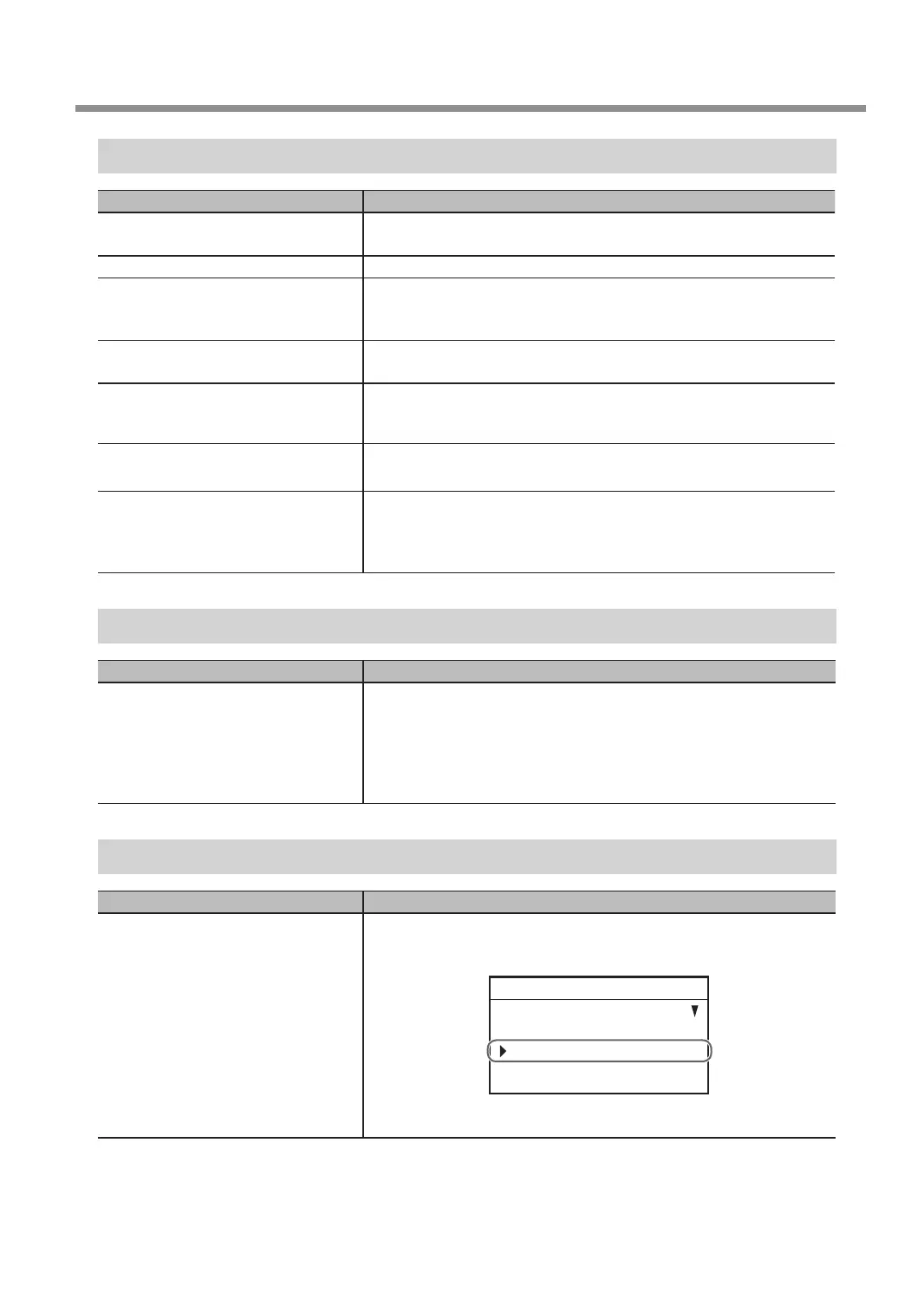
The Machine Does Not Move When Engraving Data Is Sent
Check Action
Is the cable connecting the computer
and this machine connected?
Connect the cable securely.
" Setup Guide
Is the front cover open? Close the front cover, and then press [ENTER/PAUSE].
Is operation paused? When the machine is paused, engraving stops and some operations are
restricted. Cancel the paused state.
" P. 21 “Pausing and Resuming Engraving”
Is the driver installed correctly? Install the driver with the correct procedure, and then connect the cable.
" Setup Guide
When using a LAN connection, are the
settings for the machine and computer
correctly congured?
Check that the IP address, etc. have been set correctly.
" Setup Guide
Isn't an error message displayed in the
display screen?
Perform the operation after responding to the error message.
" P. 144 “Responding to an Error Message”
Was the engraving data sent after the
main screen of the handy panel was
displayed?
When sending engraving data from a computer, congure settings and
complete other handy panel operations, display the main screen, and
then send the engraving data.
" P. 54 “Step 5: Starting Engraving”
The Spindle rotates but Does Not Move From Its Position When Engraving Data Is Sent
Check Action
Have the origins been set at correct
positions?
If the origin positions are incorrect, the range over which to perform
engraving may be outside of the operating range. In this situation, the
spindle will rotate but will not move, and operation will stop. Check
whether the origins have been set to correct positions.
" P. 39 “Step 2: Setting the XY Origin”
" P. 108 “4. Install the cutter and set the Z origin point.”
The Spindle Does Not Rotate
Check Action
Is [SPINDLE REVOLUTION] under
[SETTINGS] set to [ON]?
If it is set to [OFF]:
Use the handy panel and go to the [SETTINGS] menu, and then set
[SPINDLE REVOLUTION] to [ON].
SETTINGS
OPERATING MODE
SPINDLE REVOLUTION ON
AUTO Z CONTROL OFF
012345678901234567 READY
" P. 10 “Main Menu”
Troubleshooting (Machine Problems)
127
Chapter 6 Appendix



 To Next Page