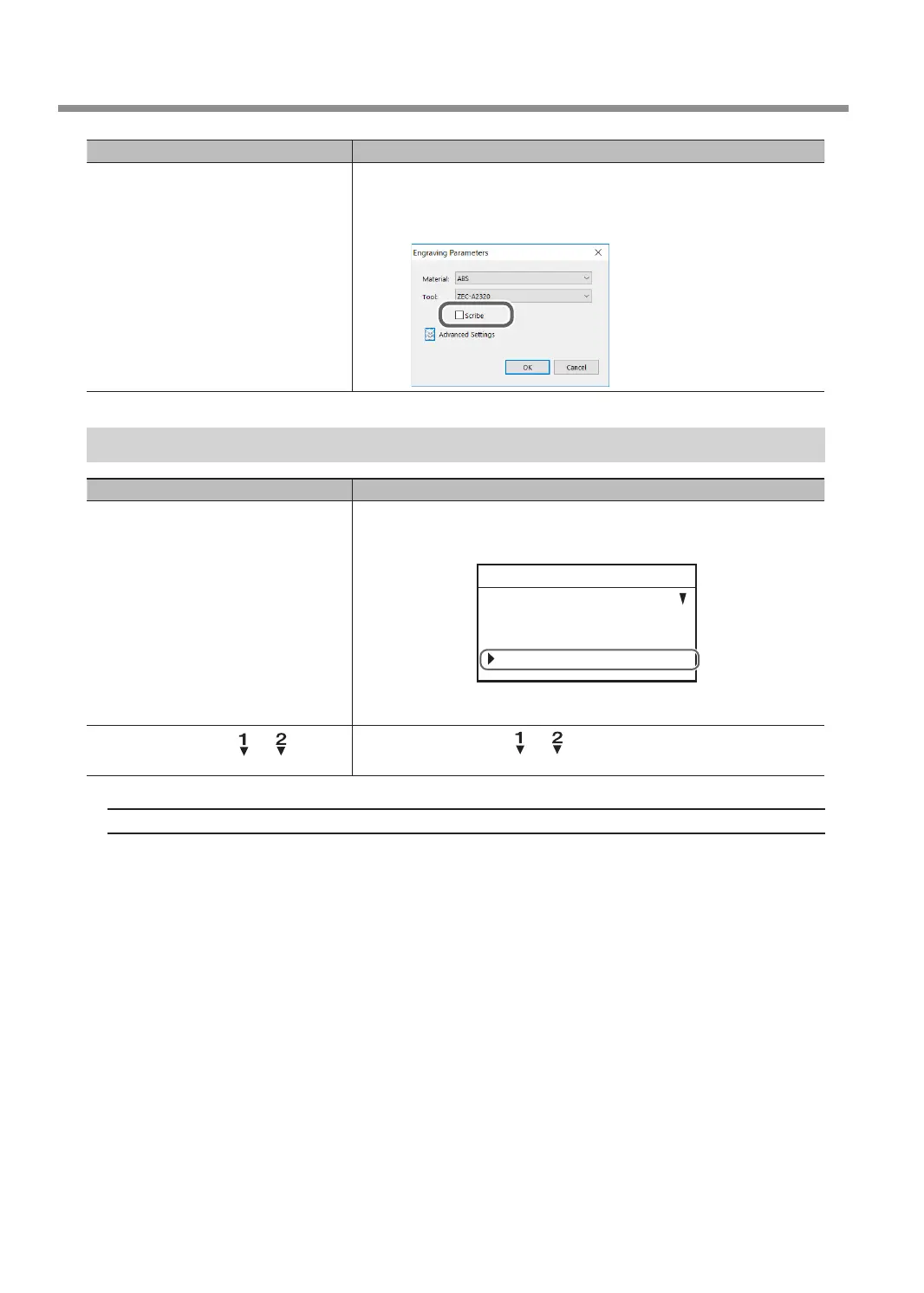
Check Action
Has the [ZDC-A2000] or [ZDC-A4000]
diamond scraper been selected for
[Tool] on the [Engraving Parameters]
screen in Dr. Engrave Plus?
Alternatively, is the [Scribe] check box
selected?
When you select a diamond scraper, the [Scribe] check box is selected
automatically, and the spindle does not rotate so as to perform scribing
for the engraving. Select a different tool or clear the [File] > [Engraving
Parameters] > [Scribe] check box.
Descent Does Not Stop
Check Action
Is [AUTO Z CONTROL] under
[SETTINGS] set to [ON]?
If it is set to [OFF]:
Use the handy panel and go to the [SETTINGS] menu, and then set
[AUTO Z CONTROL] to [ON].
SETTINGS
OPERATING MODE
SPINDLE REVOLUTION ON
AUTO Z CONTROL ON
012345678901234567 READY
" P. 10 “Main Menu”
Is the lock lever set at or
position?
Set the lock lever at the or position.
" P. 62 “Setting the Lock Lever”
If the Problem Still Exists
Turn o the power and contact your authorized Roland DG Corporation dealer.
Troubleshooting (Machine Problems)
128
Chapter 6 Appendix



 To Next Page