Electrical connection Proline Promass E 500 PROFIBUS PA
54 Endress+Hauser
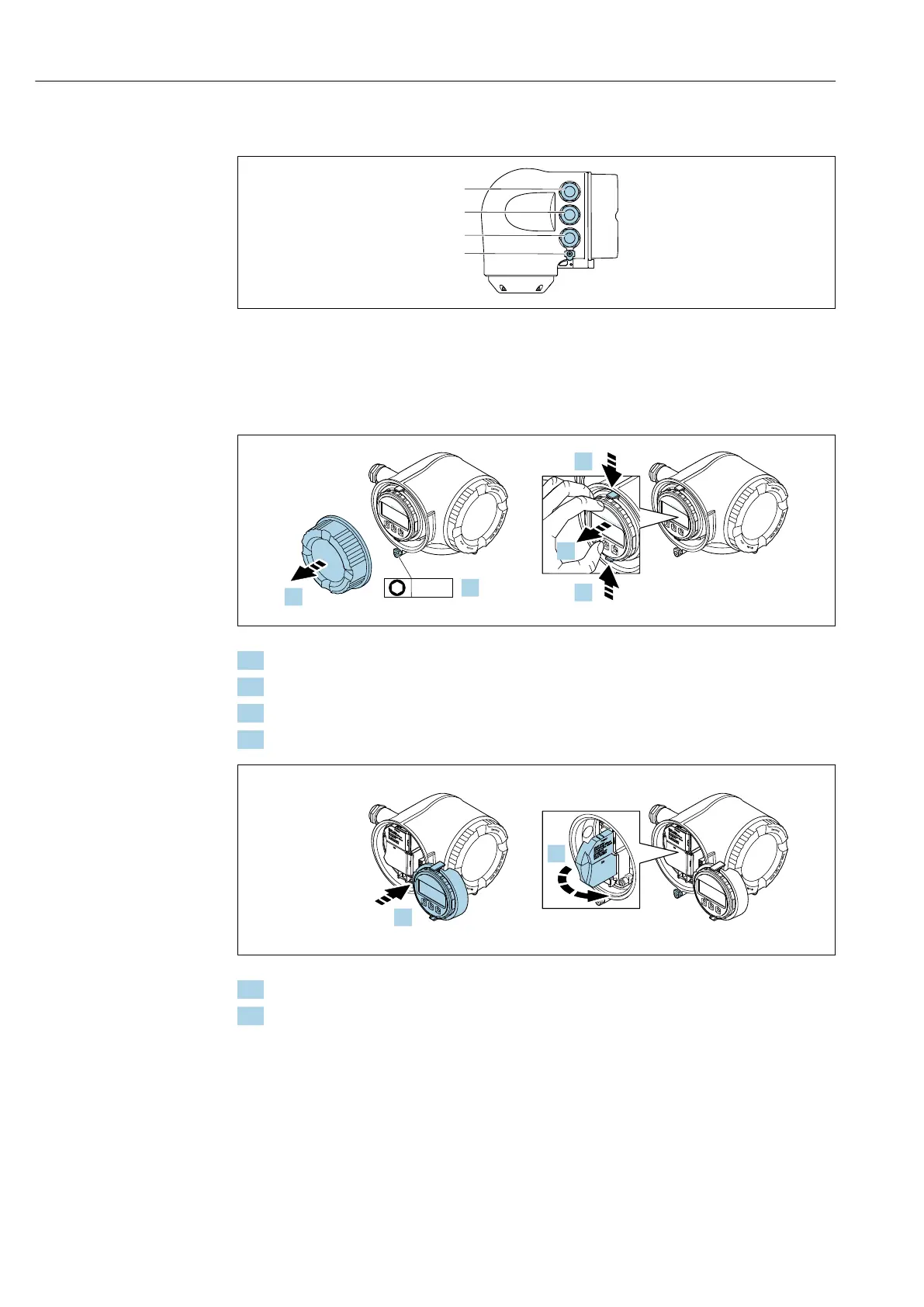
7.4.2 Connecting the signal cable and the supply voltage cable
A0026781
1 Terminal connection for supply voltage
2 Terminal connection for signal transmission, input/output
3 Terminal connection for signal transmission, input/output or terminal connection for network connection via
service interface (CDI-RJ45)
4 Protective earth (PE)
N
i
c
h
t
u
n
t
e
r
a
r
e
ö
f
f
n
e
n
+
E
ESC
–
1.
2.
N
i
c
h
t
u
n
t
e
r
a
r
e
ö
f
f
n
e
n
+
E
ESC
–
+
E
ESC
–
3.
3.
4.
3 mm
A0029813
1. Loosen the securing clamp of the connection compartment cover.
2. Unscrew the connection compartment cover.
3. Squeeze the tabs of the display module holder together.
4. Remove the display module holder.
N
i
c
h
t
u
n
t
e
r
a
r
e
ö
f
f
n
e
n
Nicht unter
Spannung öffnen
Do not open when
energized
Ne pas ouvrir
sous tension
Power
I/O
+
E
ESC
–
5.
N
i
c
h
t
u
n
t
e
r
a
r
e
ö
f
f
n
e
n
Nicht unter
Spannung öffnen
Do not open when
energized
Ne pas ouvrir
sous tension
Power
I/O
+
E
ESC
–
Power
Nicht unter
Spannung öffnen
Do not open when
energized
Ne pas ouvrir
sous tension
I/O
6.
A0029814
5. Attach the holder to the edge of the electronics compartment.
6. Open the terminal cover.














 To Next Page