Operation options Proline Promass E 500 PROFIBUS PA
72 Endress+Hauser
8.3.3 Editing view
Numeric editor
+0.000 Xx
0 1 2 3 4
+
5
1
2
3
4
6 7
8
9
–
A0034250
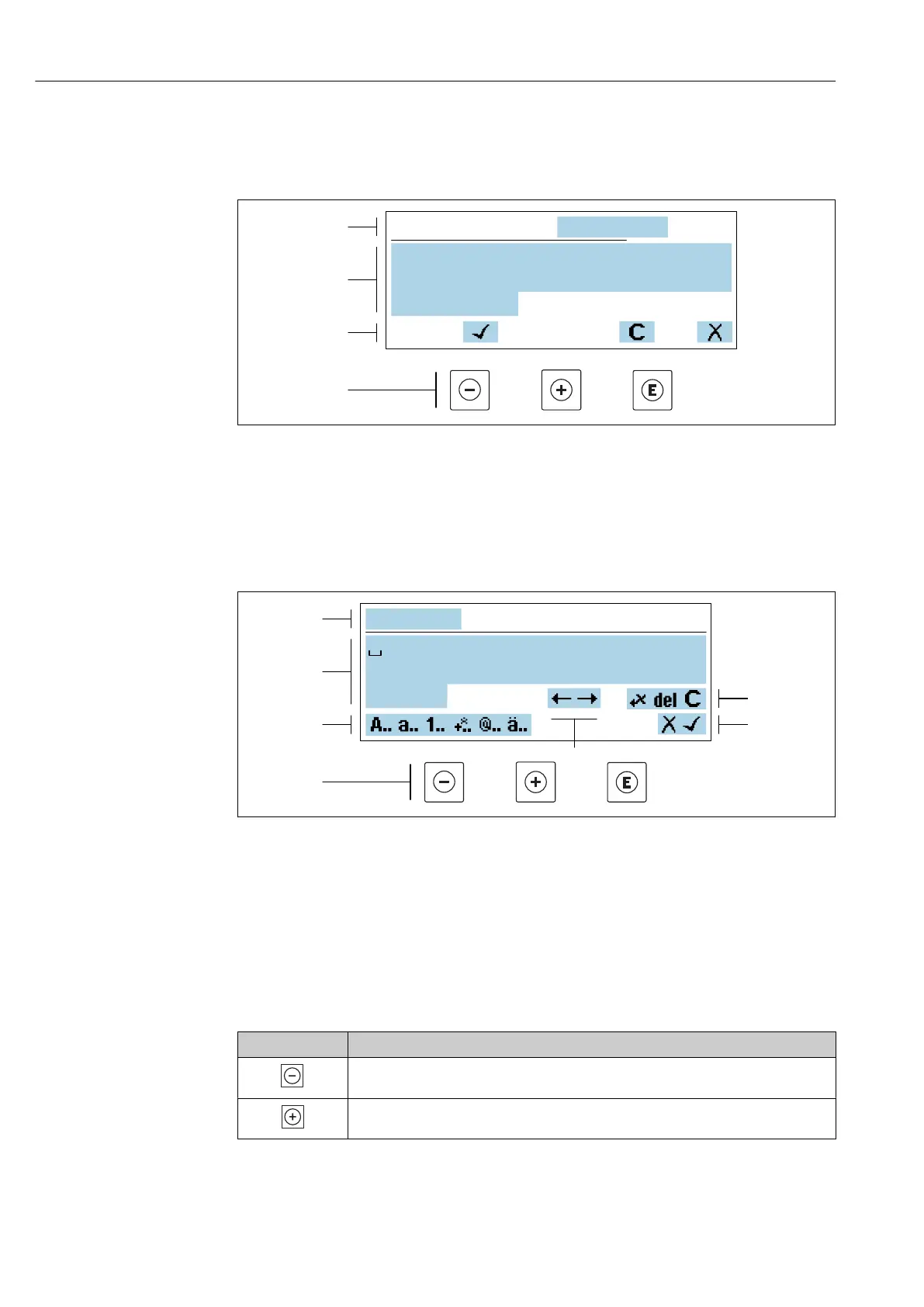
29 For entering values in parameters (e.g. limit values)
1 Entry display area
2 Input screen
3 Confirm, delete or reject entry
4 Operating elements
Text editor
Xxxxxxx
A B C D E F G H I J K
M N O P Q R S T U V W
X Y
L
Z
1
2
3
5
6
7
4
A0034114
30 For entering text in parameters (e.g. device tag)
1 Entry display area
2 Current input screen
3 Change input screen
4 Operating elements
5 Move entry position
6 Delete entry
7 Reject or confirm entry
Using the operating elements in the editing view
Operating key Meaning
Minus key
Move the entry position to the left.
Plus key
Move the entry position to the right.














 To Next Page