Proline Promass E 500 PROFIBUS PA Electrical connection
Endress+Hauser 61
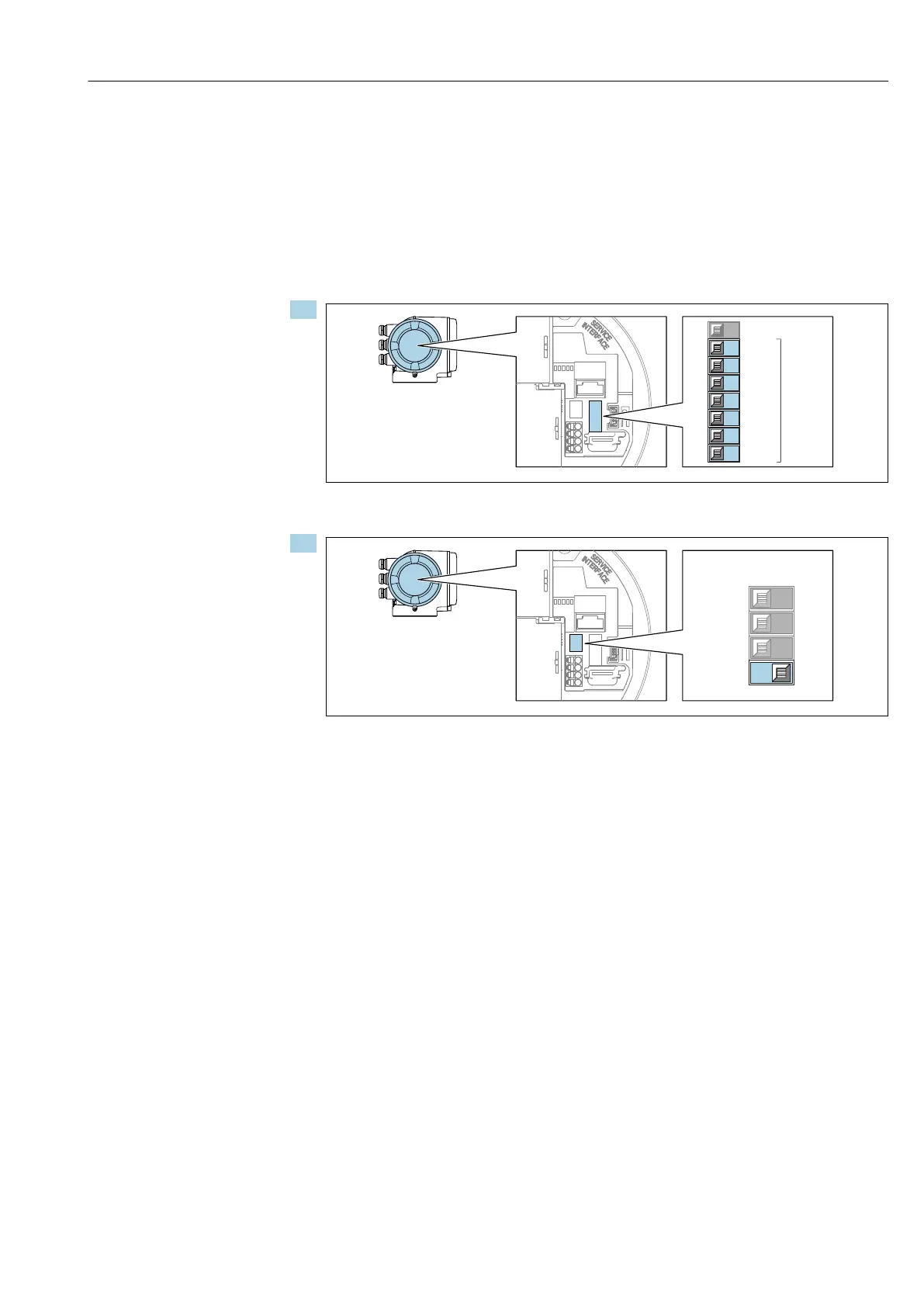
Software addressing
‣
To switch addressing from hardware addressing to software addressing: set DIP switch
No. 4 to Off.
The device address set in the Device address parameter (→ 112) takes effect
after 10 seconds. The device is restarted.
Proline 500 transmitter
Hardware addressing
1.
1
2
3
4
5
6
7
8
128
64
32
16
8
4
2
1
PROFIBUS address
not used
A0029637
Set the desired device address using the DIP switches in the connection compartment.
2.
A0029633
To switch addressing from software addressing to hardware addressing: set the DIP
switch to On.
The change of device address takes effect after 10 seconds. The device is
restarted.
Software addressing
‣
To switch addressing from hardware addressing to software addressing: set DIP switch
No. 4 to Off.
The device address configured in the Device address parameter (→ 112) takes
effect after 10 seconds. The device is restarted.
7.7.2 Activating the default IP address
Activating the default IP address by DIP switch: Proline 500 - digital
Risk of electric shock when opening the transmitter housing.
‣
Before opening the transmitter housing:
‣
Disconnect the device from the power supply.














 To Next Page