Spectrum X rear panel
• Support for branding with multiple layers, animation, DVE, and dynamic data.
• Support for Polaris Play: Playlist Control automation.
For instructions on creating a UHD player, see the SystemManager User Guide.
Spectrum X channel mode configurations
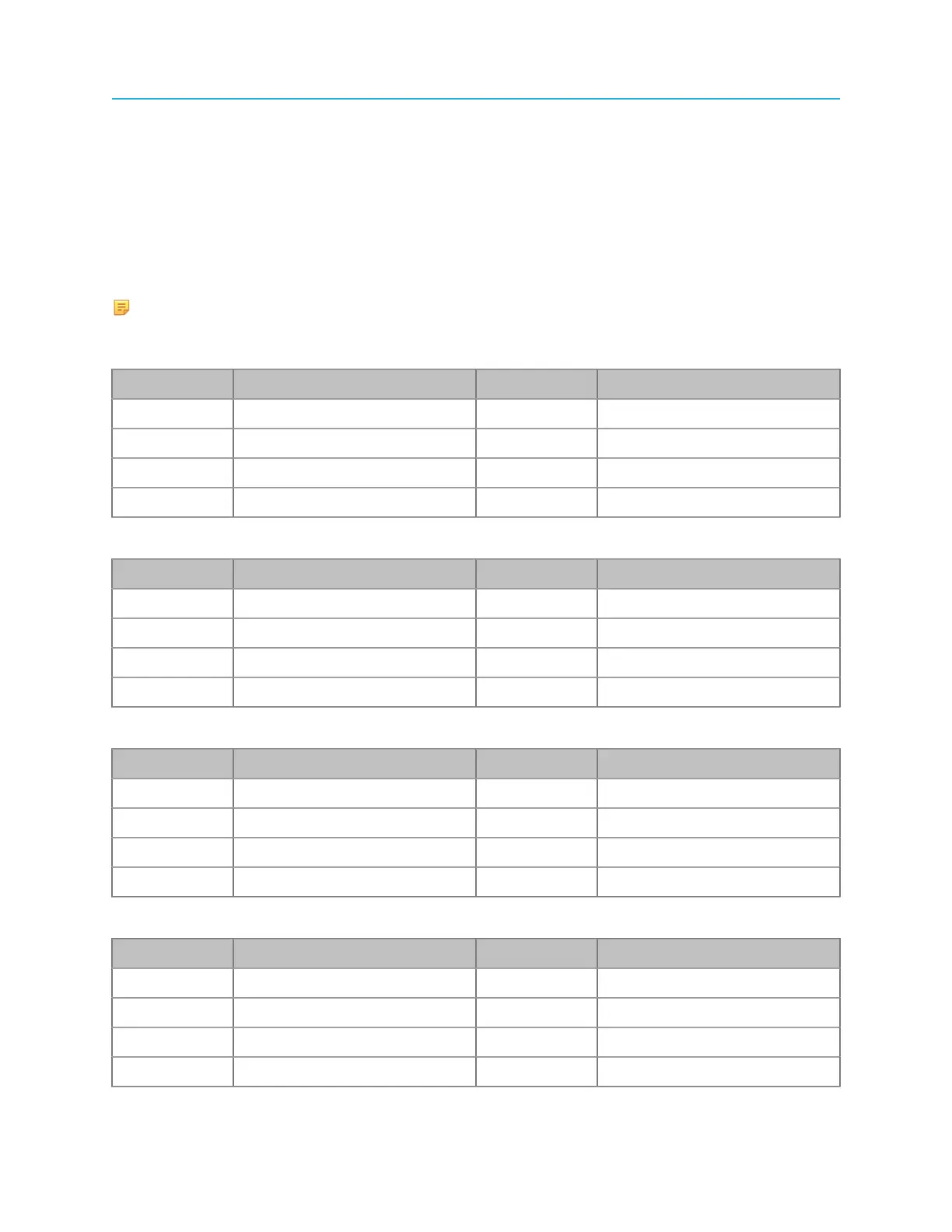
The Spectrum X offers eight DIN 1.0/2.3 connectors for video input and output. The connector
configurations vary according to Standard Channel mode and Enhanced Channel mode.
NOTE: In the following tables, "Clean Primary/Secondary" refers to video output with no
graphics or overlays.
Table 4-1: Standard Channel configuration 1 (SC1)
Connector Description Connector Description
I/O 1 Ext In 1 (Channel A) I/O 5 Ext In 1 (Channel B)
I/O 2 Out, Primary (Channel A) I/O 6 Out, Primary (Channel B)
I/O 3 Out, Secondary (Channel A) I/O 7 Out, Secondary (Channel B)
I/O 4 Out, Primary (Channel A) I/O 8 Out, Primary (Channel B)
Table 4-2: Standard Channel configuration 2 (SC2)
Connector Description Connector Channel B
I/O 1 Ext In 1 (Channel A) I/O 5 Ext In 1 (Channel B)
I/O 2 Ext In 2 (Channel A) I/O 6 Ext In 2 (Channel B)
I/O 3 Out, Secondary (Channel A) I/O 7 Out, Secondary (Channel B)
I/O 4 Out, Primary (Channel A) I/O 8 Out, Primary (Channel B)
Table 4-3: Enhanced Channel configuration 1 (EC1)
Connector Description Connector Description
I/O 1 Ext In 1/Key 1 I/O 5 Ext In 4/Key 2
I/O 2 Ext In 2/Fill 1 I/O 6 Ext In 5/Fill 2
I/O 3 Out, Secondary I/O 7 Ext In 6
I/O 4 Out, Primary I/O 8 Out, Clean Primary
Table 4-4: Enhanced Channel configuration 2 (EC2)
Connector Description Connector Description
I/O 1 Ext In 1/Key 1 I/O 5 Ext In 4/Key 2
I/O 2 Ext In 2/Fill 1 I/O 6 Ext In 5/Fill 2
I/O 3 Out, Secondary I/O 7 Out, Clean Secondary
I/O 4 Out, Primary I/O 8 Out, Clean Primary
105 Spectrum System 8.4 Installation Guide



 To Next Page