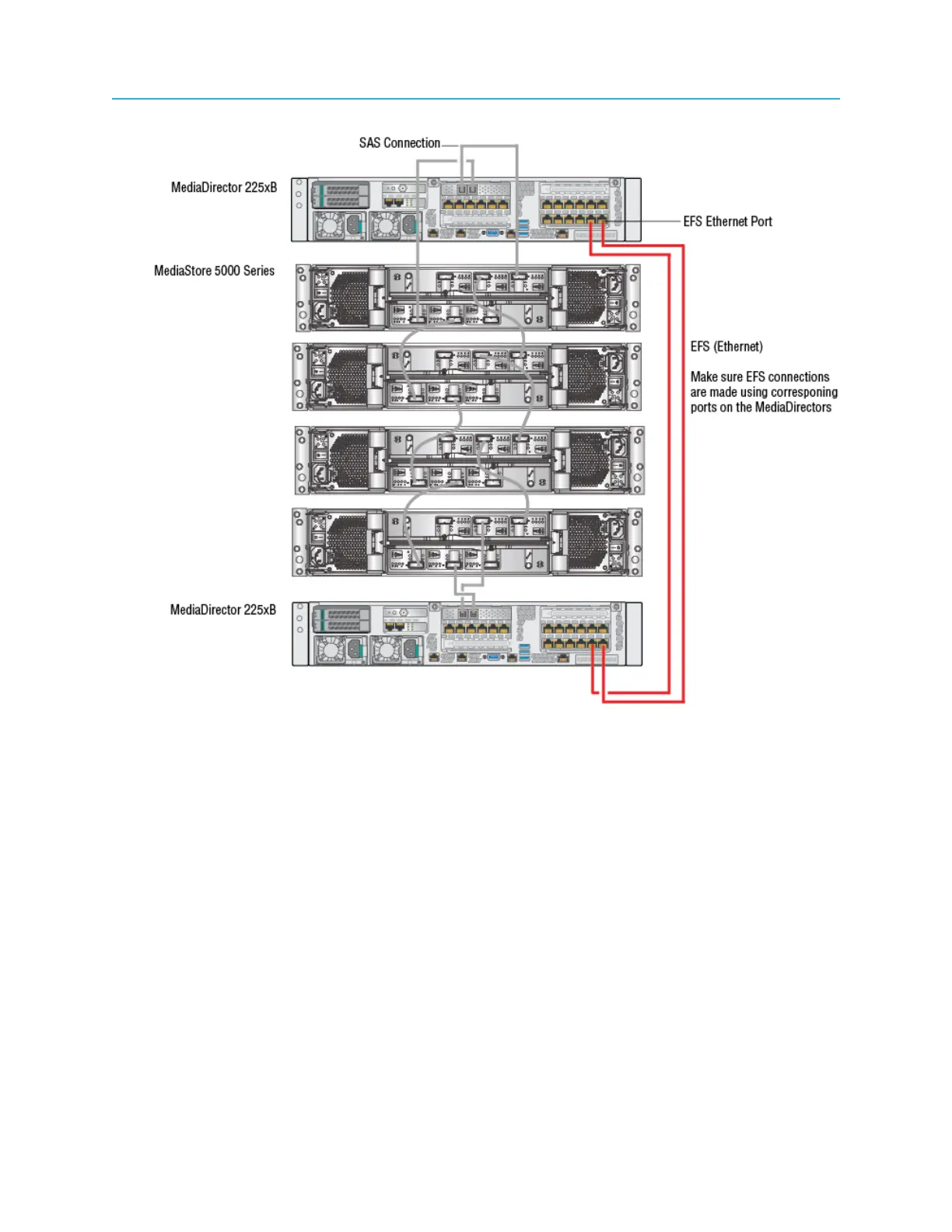
Connecting MediaDirectors in an EFS configuration
Figure 2-20: Two MediaDirectors 2252B units connected in an EFS configuration
1. Make sure the MediaStores are connected via SAS.
2. On the Ethernet card assigned to EFS on the first MediaDirector, connect an Ethernet cable to an
EFS Ethernet port. Connect the other end of the cable to the corresponding EFS Ethernet port on the
second MediaDirector.
3. On the Ethernet card assigned to EFS on the first MediaDirector, connect an Ethernet cable to a
second EFS Ethernet port. Connect the other end of the cable to the corresponding EFS Ethernet port
on the second MediaDirector.
Connecting 3 MediaDirectors 2252B or 2251B units in an EFS
configuration
If you are configuring three MediaDirector 2252B or 2251B units in an extended file system (EFS)
configuration, connect the MediaDirector units using the EFS Ethernet ports.
Please note the following about cabling the MediaDirectors with EFS Ethernet:
• EFS is a feature that requires a license. Consult with your Harmonic Sales Representative for more
information.
51 Spectrum System 8.4 Installation Guide



 To Next Page