Connecting to the Ethernet network
What to do next
Once you have connected to your 2022-6 network, you must enable and configure 2022-6 on your
Spectrum X. For details on configuring your Spectrum X for 2022-6, see the SystemManager User Guide.
Connecting to a transport stream network
With Spectrum 8.3 and later, you can configure a Spectrum X in internal storage mode, a MediaDirector
2252B or 2251B, or a MediaCenter 2200B to record a selected program from a network transport stream
to the Spectrum file system.
Before you begin
Review the SystemManager User Guide for information on how to configure transport stream ingest.
For transport stream ingest, the player records directly to the video server and is not attached to an I/O
module.
Follow the connection instructions that apply to your Spectrum video server.
IMPORTANT: Do not connect NICs used for transport stream ingest to the same VLAN
used for system management.
NOTE: Use only CAT 6 Ethernet cables or better.
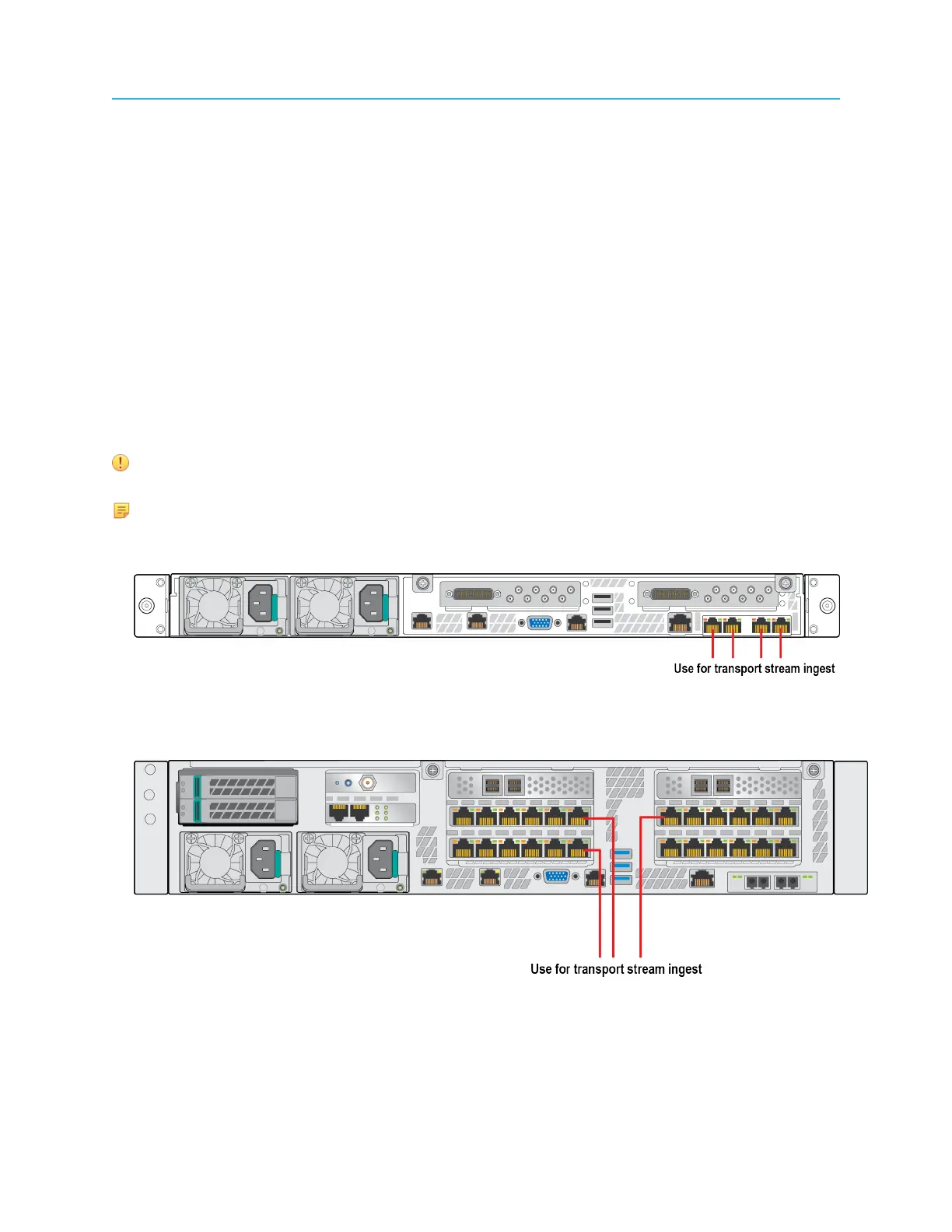
• Spectrum X: Connect one or more of the NICs from the four-port 1 Gb Ethernet card on the right-hand
side of the Spectrum X (eth2, eth3, eth4, eth5) to a VLAN or a switch dedicated to transport streams.
Figure 2-26: Connecting the Spectrum X to a transport stream
• MediaDirector 2252B or 2251B: Connect any of the MediaPort Ethernet Array ports to a VLAN or a
switch dedicated to transport streams.
Figure 2-27: Connecting the MediaDirector 2252B to a transport stream
• MediaCenter 2200B: Connect any of the MediaPort Ethernet Array ports to a VLAN or a switch
dedicated to transport streams.
59 Spectrum System 8.4 Installation Guide



 To Next Page