Chapter 9: MediaStore 5100 and 5000 series hardware reference
Key Component Description
2 I/O Modules The MediaStore contains two I/O Modules for interfacing
to additional MediaStores via SAS connection. Both
modules are the same (mechanically and electronically).
Each module includes three SAS ports and Status LEDs.
• The Primary I/O Module is installed in the top bay
(facing the rear).
• The Secondary I/O Module is installed upside-down in
the bottom bay.
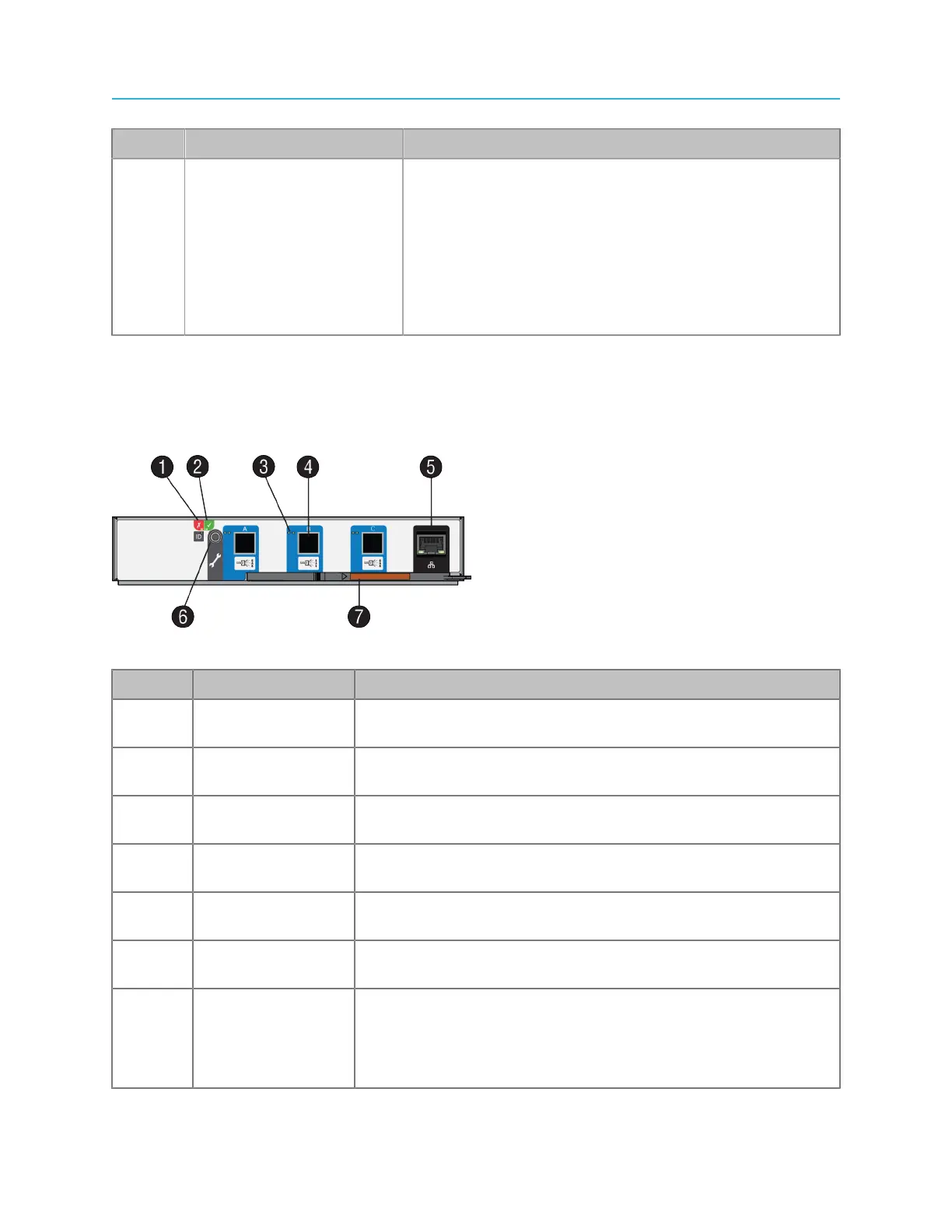
MediaStore 5100 series I/O module components
Two Input/Output (I/O) Modules are mounted in the rear of the MediaStore. Both modules are the same
— mechanically and electronically. The Primary I/O module is the module installed in the top slot. The
Secondary I/O module is the module installed in the bottom slot.
Figure 9-7: MediaStore 5100 series I/O module
Key Component Description
1 I/O Module Fault
LED
The I/O Module Fault LED states are described in “MediaStore
5100: I/O module status LEDS”.
2 I/O Module OK
LED
The I/O Module OK LED states are described in “MediaStore
5100: I/O module status LEDS”.
3 SAS Link Activity
LEDs
The SAS Connector Activity LEDs are described in “MediaStore
5100: SAS link activity LEDs”.
4 12 Gb/s SAS
connectors
Each I/O module has three SAS connectors, with 4 links per port.
5 Ethernet
connector
For Service Use only
6 For Service Use
Only
For Service Use only
5 Handle Each I/O module includes a Handle that is used for removing and
inserting the module.
Refer to the Spectrum MediaStore Component Replacement
Guide for operating instructions when replacing an I/O Module.
200



 To Next Page