Serial control connections for a MediaPort 7000 and a ChannelPort
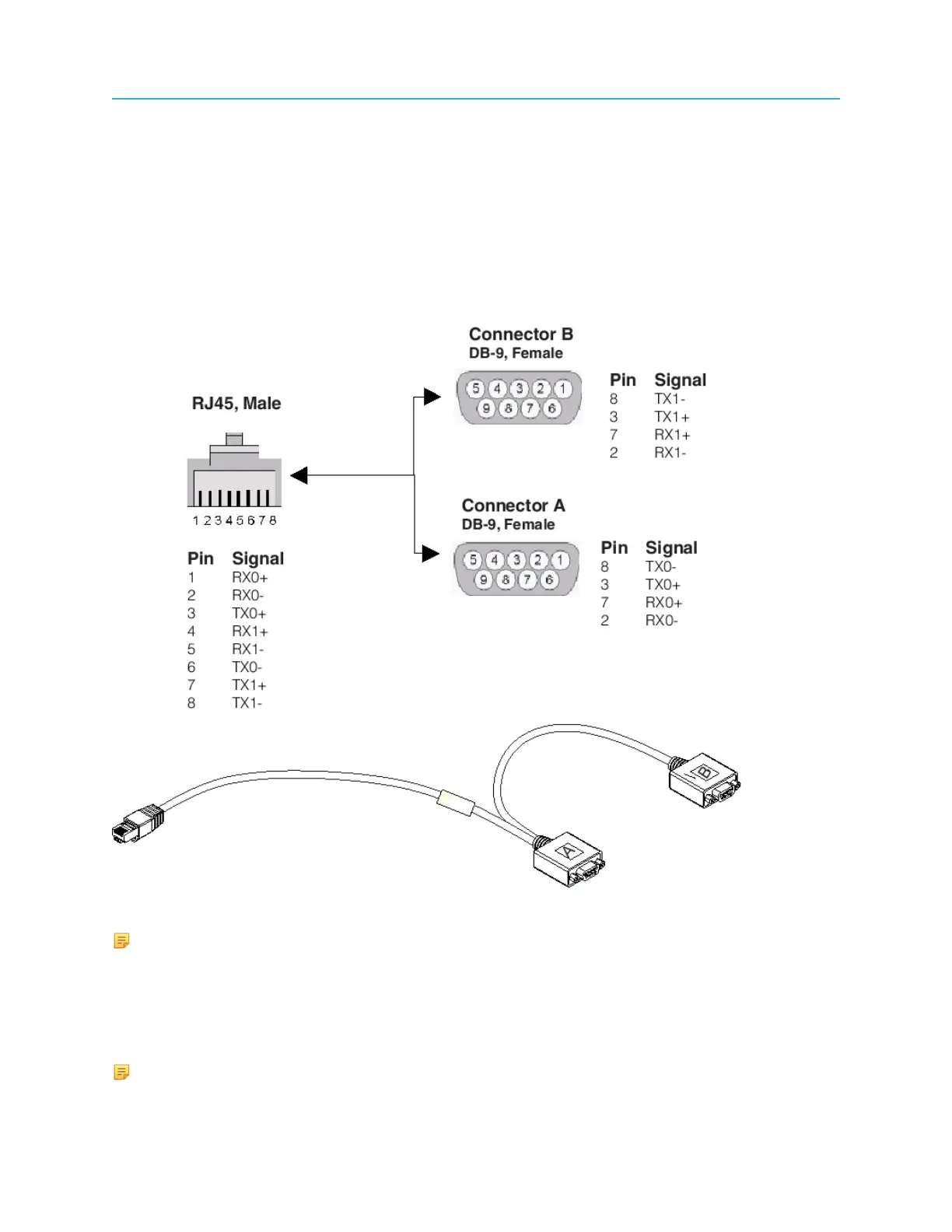
RJ-45/DB-9 splitter cable pinout
The MediaPort 7000 series and the ChannelPort modules ship with one integrated RJ-45 to DB-9
(Female) splitter cable. RS-422 connections for both channels A and B on the MediaPort 7000 series are
on one RJ-45 port. This cable splits the two sets of signals out to two DB-9 connectors.
Use the Harmonic RJ45/DB-9 splitter cable to interface with controllers (or cables) using standard
SMPTE/EBU ES bus wiring connections. This adapter converts the RJ45 connections on the back of the
MediaPorts to standard SMPTE/EBU ES Bus.
Figure 8-7: RJ-45/DB-9 Splitter Cable
NOTE: The RJ-45 to DB-9 (Female) splitter cable can be used in a single (Channel 0) port.
To obtain the necessary interconnection between the MediaPort or ChannelPort Module and the
controller, the following methods can be used:
• Harmonic RJ45/DB-9 Splitter Cable to Standard RS-422 extension cable
• Harmonic RJ45/DB-9 Splitter Cable to Automation System adapter cable
NOTE: Harmonic does not provide RS-422 extension cables or RJ45 (Ethernet) extension
cables.
183 Spectrum System 8.4 Installation Guide



 To Next Page