Breakout cable
MFIO connector Function in Standard
Channel mode
Function in Enhanced
Channel mode
MF #4 Channel B LTC Out Unused
Use the Attach Devices page in SystemManager to configure LTC or AES audio for a connector. For
instructions, see "Attaching Devices and Setting Conversion Options"in the Harmonic SystemManager
User Guide.
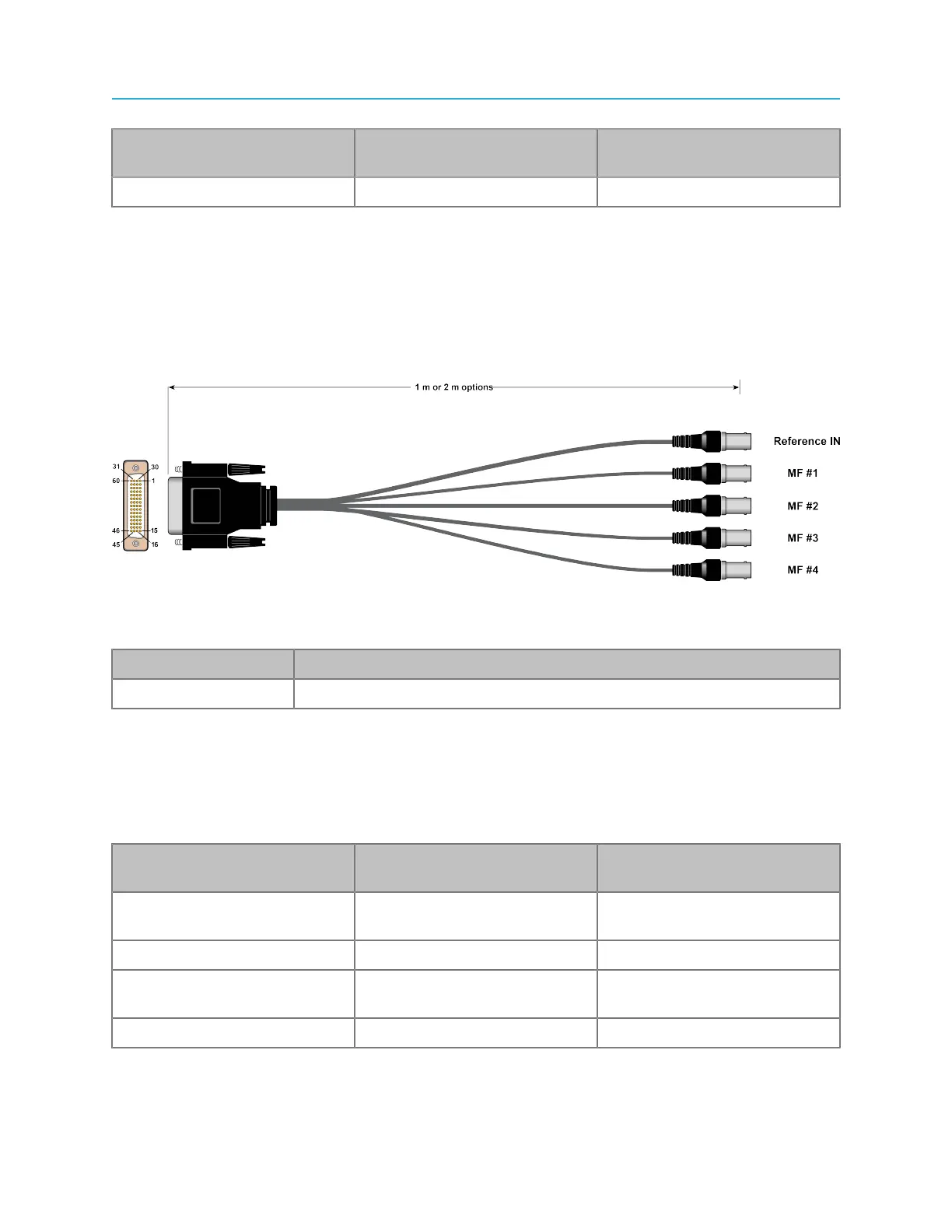
Reference breakout cable
Harmonic provides a partial breakout cable for use with the DSUB 60 connector, which includes a
Reference In connector and four multi-function I/O (MFIO) connectors.
Figure 4-15: Reference breakout cable overview
Table 4-15: Breakout cable connector use
Connector Description
Reference In Use for Reference video
For instructions on configuring a serial connection to control graphics, see "Configuring a Spectrum X
and ChannelPort Channel" in the Harmonic SystemManager User Guide.
For instructions on configuring GPIO, see "Configuring Spectrum X GPIO Triggers" in the Harmonic
SystemManager User Guide.
Table 4-16: MFIO connector use
MFIO connector Function in Standard
Channel mode
Function in Enhanced
Channel mode
MF# 1 Channel A AES In / Channel
A LTC In
AES In / LTC In
MF #2 Channel A LTC Out LTC Out
MF #3 Channel B AES In / Channel
B LTC In
Unused
MF #4 Channel B LTC Out Unused
117 Spectrum System 8.4 Installation Guide



 To Next Page