Chapter 9: MediaStore 5100 and 5000 series hardware reference
MediaStore 5100 and 5000 series operator panel components
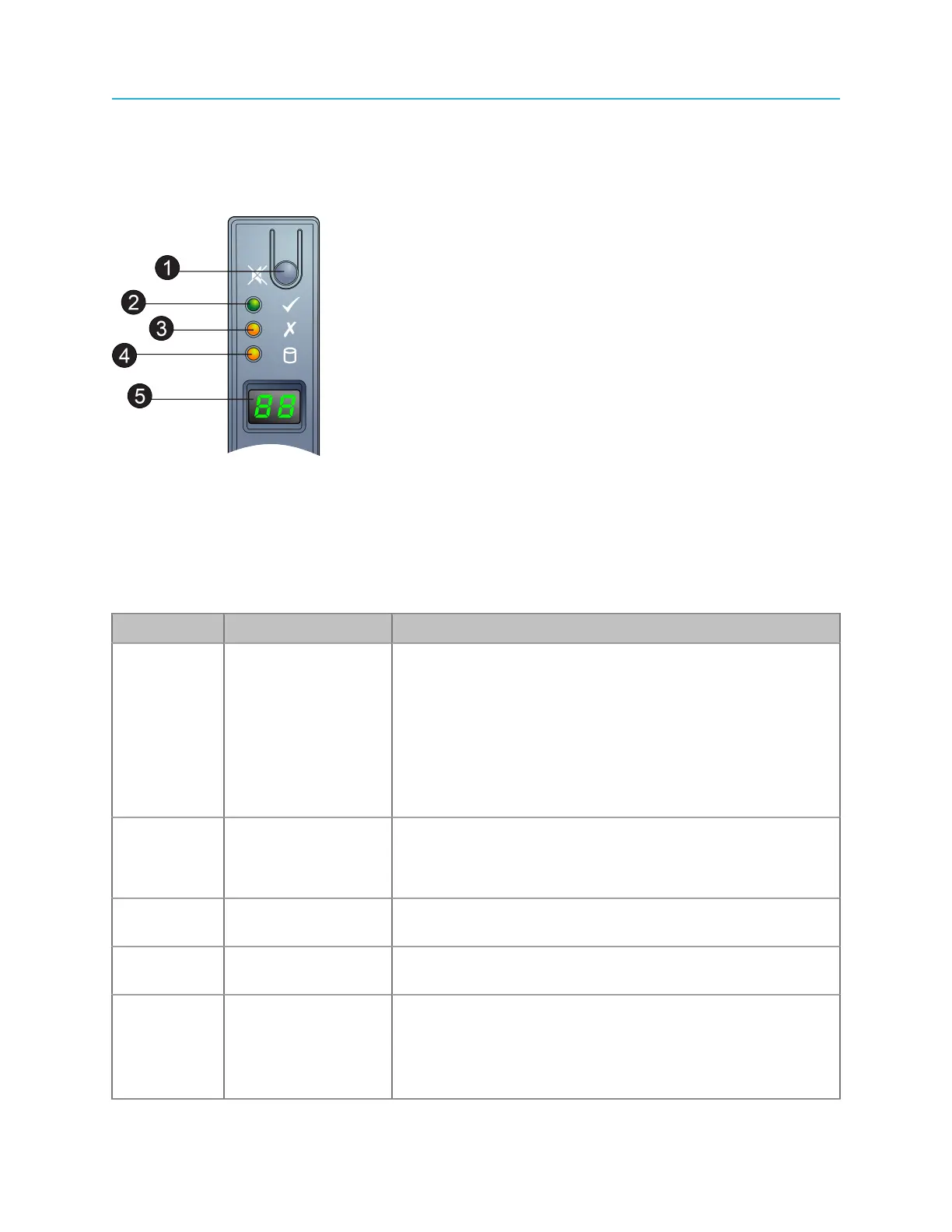
The operator panel provides a number of LEDs to help with troubleshooting.
Figure 9-4: MediaStore 5100/5000 series operator panel
Key Component Descriptions
1 Alarm Silence
Button
The Operators Panel incorporates an Audible Alarm that
indicates when a fault state is present. Push the Alarm
Silence Button to mute the audible alarm. Refer to
“MediaStore 5000 series audible alarms” for additional
details.
The Alarm Silence Button is also used to set the Unit
ID number. Refer to “Setting the unit ID number” for
instructions.
2 System Power LED The System Power LED indicates the status of the
system’s power.
Refer to “Powering up a MediaStore” for details.
4 Module Fault LED The Module Fault LED indicates a system hardware fault.
Refer to “Powering up a MediaStore” for details.
5 Logical Fault LED The System Fault LED indicates a variety of system states
and faults. Refer to “Powering up a MediaStore” for details.
6 Unit ID Display The primary function of the Unit ID Display is to display
a MediaStore unit identification number to assist users
in setting up and maintaining multiple MediaStores. For
instructions on setting the Unit ID number, refer to “Setting
the unit ID number”..
196



 To Next Page