Chapter 7: MediaPort 7000 series hardware reference
MediaPort 7000 Series module rear panel
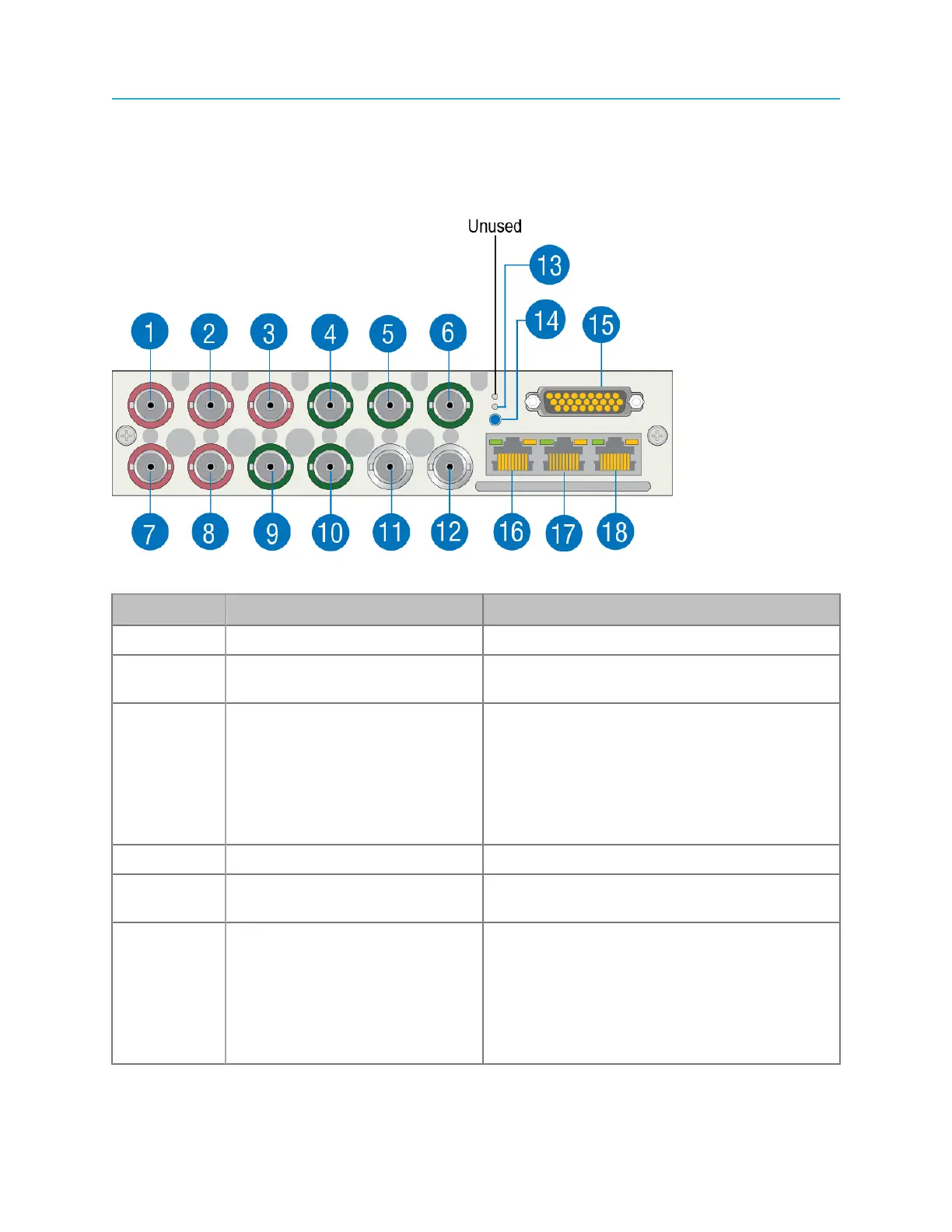
The MediaPort 7000 series modules share a common rear panel view.
Figure 7-4: MediaPort 7000 series module rear panel
Key Component Description
1 HD/SD SDI IN Channel A Use for SDI video input on Channel A.
2 HD/SD SDI OUT Channel A
(Primary)
Use for SDI video output on Channel A.
3 HD/SD SDI OUT Channel A
(Secondary)
Use for SDI video output on Channel A. By
default, output from this port is the same
as that of the Primary port. Note that the
port can be configured for simulcast from
the SystemManager application. Refer to
“Attaching Devices” in the SystemManager
User Guide for instructions.
4 HD/SD SDI IN Channel B Use for SDI video input on Channel B.
5 HD/SD SDI OUT Channel B
(Primary)
Use for SDI video output on Channel B.
6 HD/SD SDI OUT Channel B
(Secondary)
Use for SDI video output on Channel B. By
default, output from this port is the same
as that of the Primary port. Note that the
port can be configured for simulcast from
the SystemManager application. Refer to
“Attaching Devices” in the SystemManager
User Guide e for instructions.
154



 To Next Page