Chapter 2: Spectrum system installation
• Enable Char Gen Interface: Set to STD.
What to do next
For more information on configuring the TFT EAS 911T, refer to the documentation that came with your
TFT device.
Connecting to a Monroe DASDEC Encoder/Decoder
Set the Monroe DASDEC to emulate a Sage Digital ENDEC or a TFT EAS 911T Encoder/Decoder when
connecting to it.
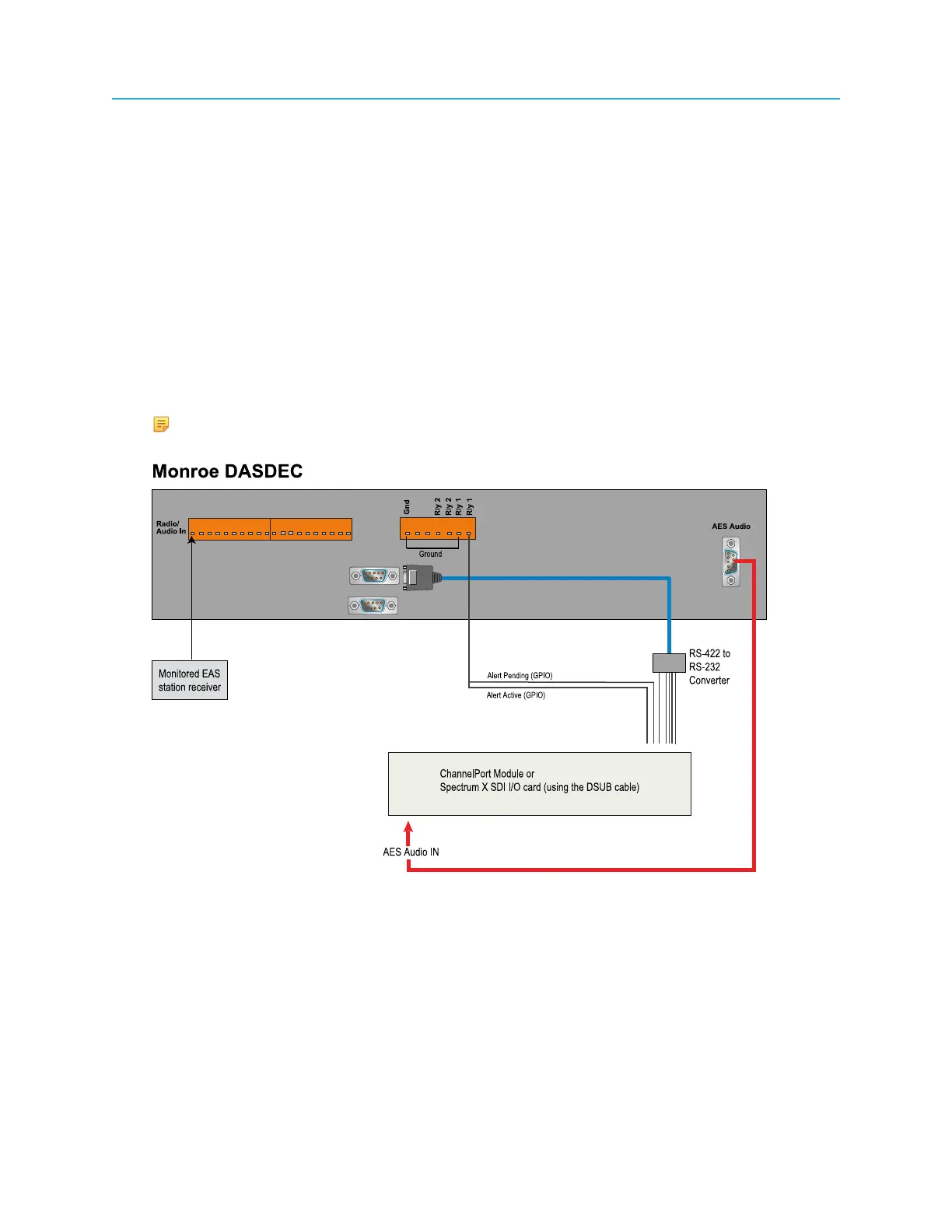
The diagrams in this section show a sample installation of a Monroe DASDEC set to emulate a Sage
Digital ENDEC.
1. Connect to the Monroe EAS as shown in the following example.
NOTE: When the Monroe DASDEC is set to emulate a TFT EAS 911T Encoder/
Decoder, only the “Alert Active” GPI is needed, not the “Alert Pending” GPI.
Figure 2-41: Detailed view of sample installation with Monroe DASDEC
2. The following table explains the pin signals and the assignments used in the detailed view of the
Monroe DASDEC installation. Use the following table for reference when connecting to the EAS.
74



 To Next Page