About the file system configuration for MediaCenter 2200B with MediaStore 7200
About the file system configuration for MediaCenter 2200B with
MediaStore 7200
The available file system configurations for the MediaCenter 2200B with a MediaStore 7200are described
here.
Table 10-1: MediaCenter 2200B (12 drives) with the MediaStore 7224 (24 drives)
# Drives RAID Set Capacity per Drive Raw Storage Capacity
36 6 x (4+2) 6 TB 144 TB
36 6 x (4+2) 4 TB 96 TB
36 6 x (4+2) 2 TB 48 TB
Table 10-2: MediaCenter 2200B (12 drives) with the MediaStore 7212 (12 drives)
# Drives RAID Set Capacity per Drive Raw Storage Capacity
24 4 x (4+2) 6 TB 96 TB
24 4 x (4+2) 4 TB 64 TB
24 4 x (4+2) 2 TB 24 TB
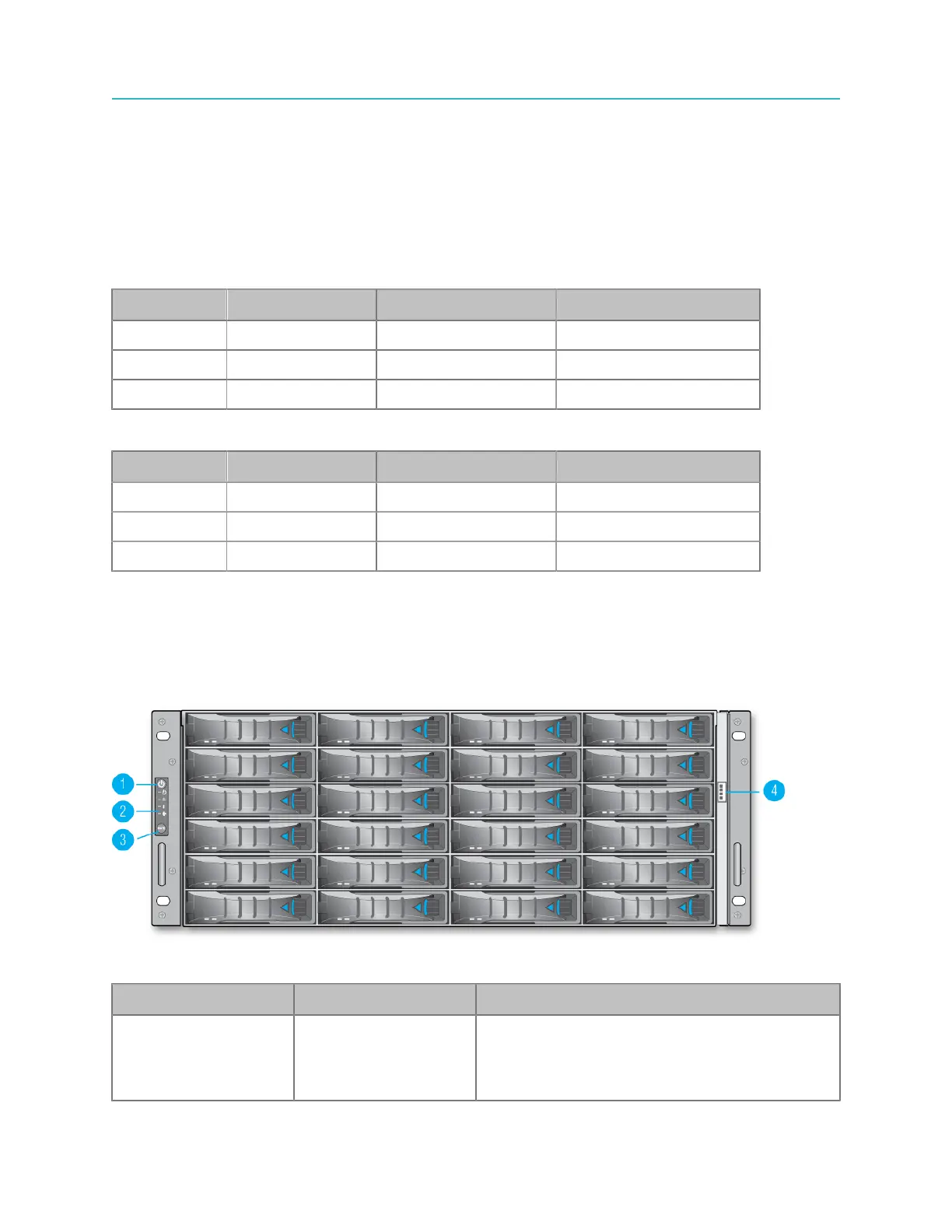
Front panel components
The front panel contains 12 or 24 hot-swappable disk drives, a bezel connector, and a control panel with
power button and system status LEDs.
Figure 10-1: MediaStore 7200 front panel
Key Component Description
1 Power button Depress this button to power both nodes on or
off. Powering off with this button removes the
main power but keeps standby power supplied
to the system.
219 Spectrum System 8.4 Installation Guide



 To Next Page