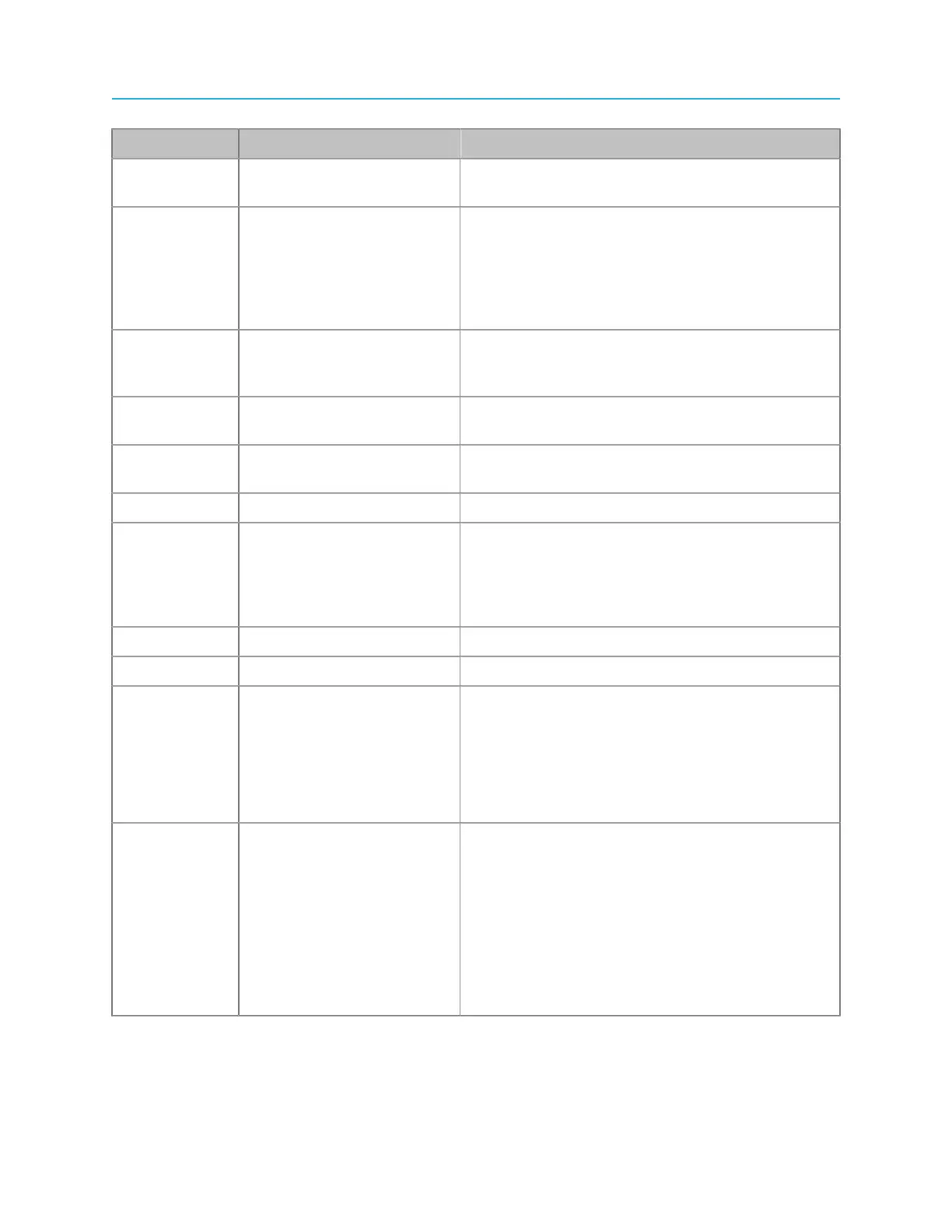
ChannelPort module rear panel
Key Component Description
2 External Input 2/External
Fill Input 1
Use for video input or External Fill input 1.
3 External Input 3/Video
Output (Secondary)
Use for video input, secondary video output, or for
SD-branded output when in Independent Branding
mode. Refer to “Configuring a ChannelPort
channel” in the Harmonic SystemManager User
Guide for instructions on configuring Independent
Branding mode.
4 Video Output (Primary) Use for primary video output or for HD-branded
output on Channel A when in Independent
Branding mode.
5 External Input 4/External
Key Input 2
Use for video input or External Key input 2.
6 External Input 5/External
Fill Input 2
Use for video input or External Fill input 2.
7 External Input 6 Use for video input.
8 Video Output Use for clean primary video output, secondary
video output, or for SD-branded output when in
Independent Branding mode. Note that if used for
clean primary video output, “clean” refers to video
output with no graphics or overlays.
9 AES Audio IN Use for AES input.
10 LTC OUT Use for LTC output.
11, 12 Reference In and
Reference Loop
Use these connectors to connect reference black
video to the ChannelPort. Reference black video
should be looped through these connectors and
then eventually terminated.
Refer to “About MediaPort module timing” for
additional information.
13 Soft Power button The Soft Power button, in the middle, is a
momentary switch that is used to perform a “soft”
reset of the ChannelPort. Once pressed, all
boards reset and code is re-loaded. The function
is similar to clicking the Reboot button on the
SystemManager ChannelPort Properties page.
The Status/Wink LED, on the bottom, is blue to
indicate power is ON. The LED will blink (wink)
when its wink mode is activated.
177 Spectrum System 8.4 Installation Guide



 To Next Page