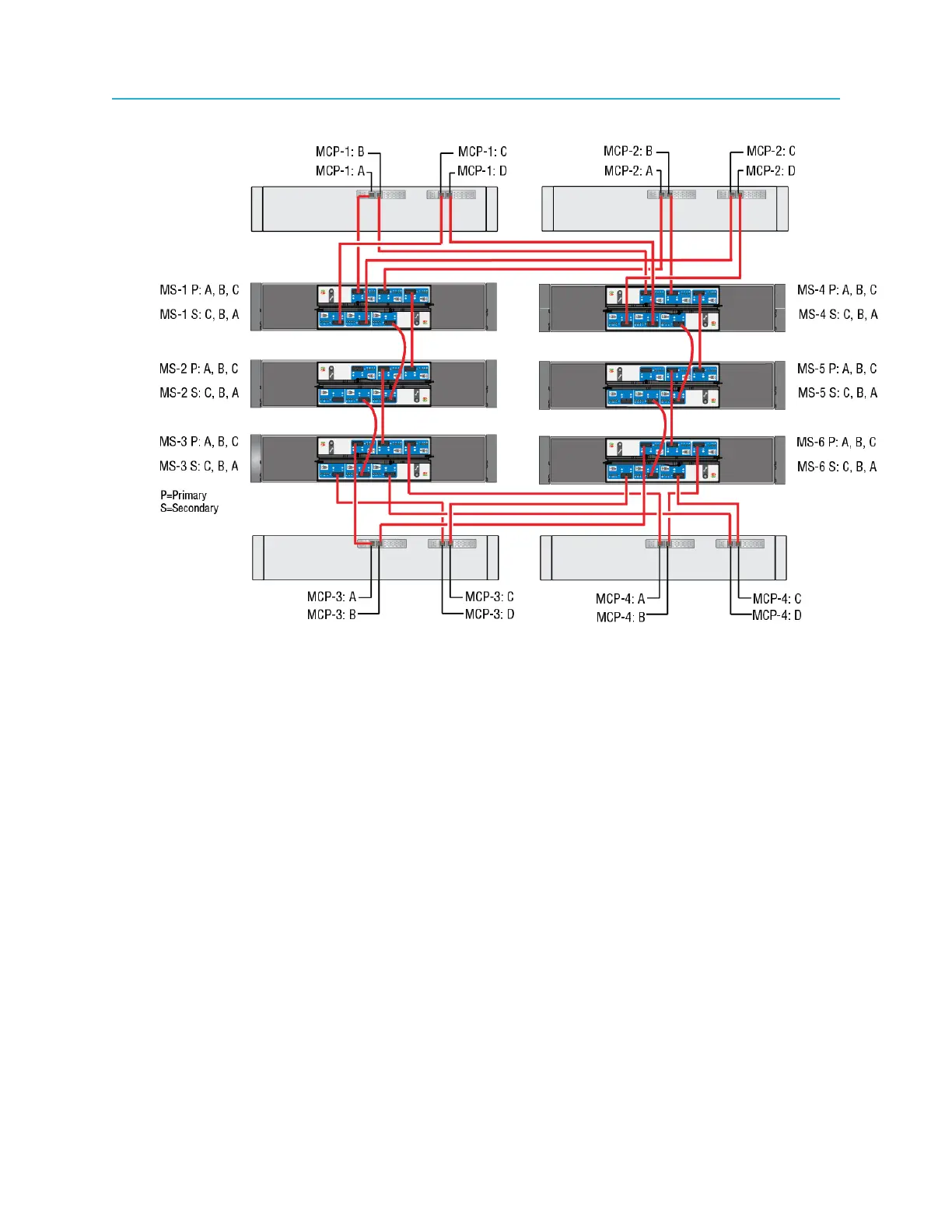
Connecting MediaDirectors and MediaStores using SAS
Figure 2-19: Four MediaDirectors 2252B-DS units connected to six MediaStore 5000 series units
with SAS
Using SAS cables, make the following connections.
1. Connect the first MediaDirector to MediaStores 1 and 4
a. MCP-1: A to MS-1 P: A
b. MCP-1 B: to MS-4 P: A
c. MCP-1 C: to MS-1 S: C
d. MCP-1 D: to MS-4 S: B
2. Connect the second MediaDirector to MediaStores 1 and 4
a. MCP-2 A: to MS-1 P: B
b. MCP-2 B to MS-4 P: B
c. MCP-2 C: to MS-1 S: B
d. MCP-2 D to MS-4 S: C
3. Connect MediaStores to each other.
a. MS-1 P: C to MS-2 P: C
b. MS-1 S: A to MS-2 S: A
c. MS-4 P: C to MS-5 P: C
d. MS-4 S: A to MS-5 S: A
e. MS-2 P: B to MS-3 P: B
f. MS-2 S: B to MS-3 S: B
49 Spectrum System 8.4 Installation Guide



 To Next Page