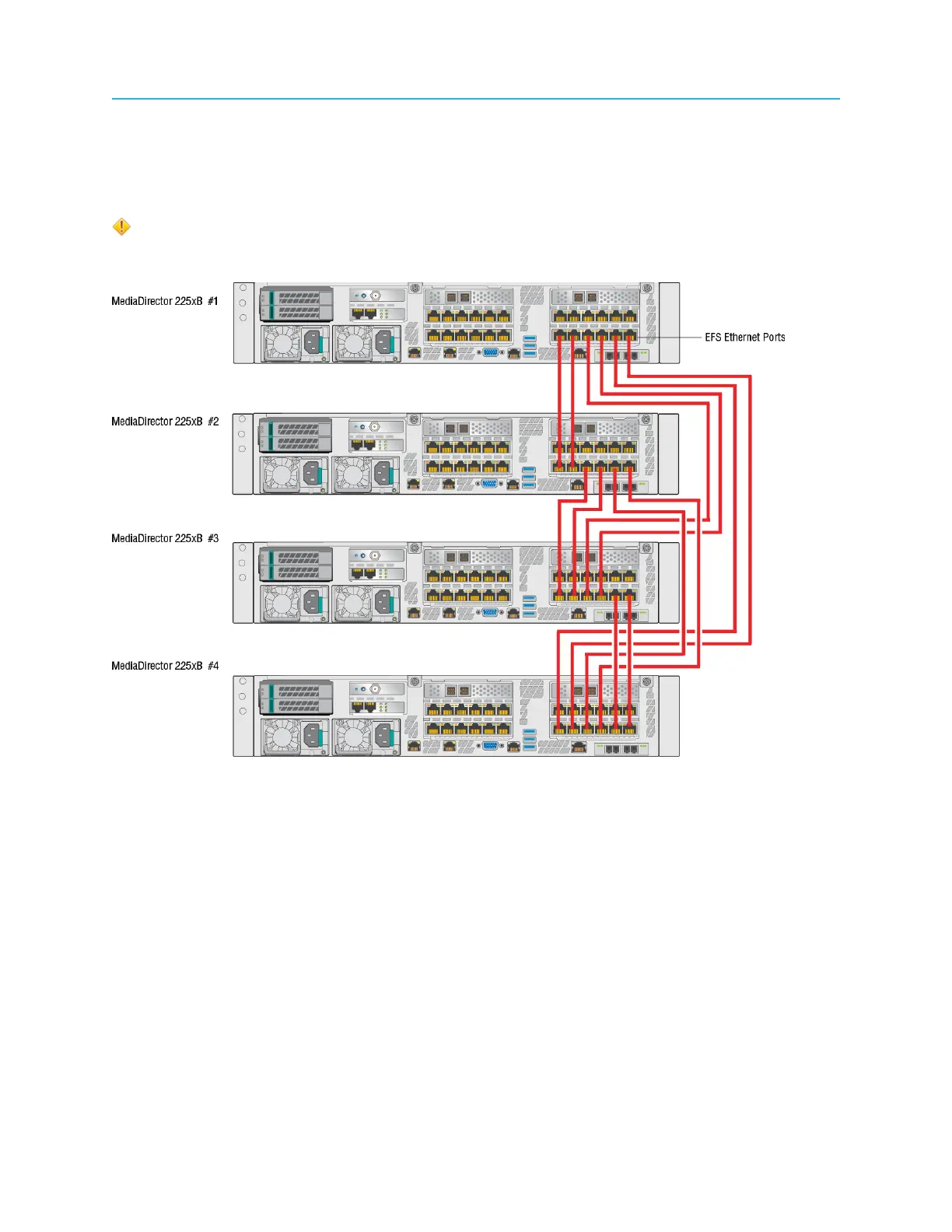
Connecting MediaDirectors in an EFS configuration
• When setting up an EFS Ethernet, you must connect your Ethernet cable between corresponding EFS
Ethernet ports on the MediaDirectors. Do not use any other Ethernet ports for this purpose.
• Refer to the Harmonic SystemManager User Guide for instructions on configuring a Spectrum system
with EFS.
CAUTION: Make sure each MediaDirector is running the same version of Spectrum
software and each has an EFS license installed BEFORE connecting the EFS Ethernet or
shared storage cables
Figure 2-22: Four MediaDirectors 2252B-DS in an EFS configuration
Before you begin
Make sure the MediaStores are connected via SAS.
1. From the first MediaDirector, on the Ethernet card assigned to EFS, connect Ethernet cables as
follows.
a. Connect the first two EFS Ethernet ports to the corresponding EFS Ethernet ports on the second
MediaDirector.
b. Connect the third and the fourth EFS Ethernet ports to the corresponding EFS Ethernet ports on
the third MediaDirector.
c. Connect the fifth and the sixth EFS Ethernet ports to the corresponding EFS Ethernet ports on the
fourth MediaDirector
2. From the second MediaDirector, on the Ethernet card assigned to EFS, connect Ethernet cables as
follows
53 Spectrum System 8.4 Installation Guide



 To Next Page