Connecting to an Emergency Alert System (EAS)
1. Follow the instructions in the previous section to connect the master Spectrum X/ChannelPort to the
EAS, leaving the Digital Audio Out unconnected.
2. Depending your EAS model, do one of the following:
For the Sage Digital ENDEC and Monroe DASDEC:
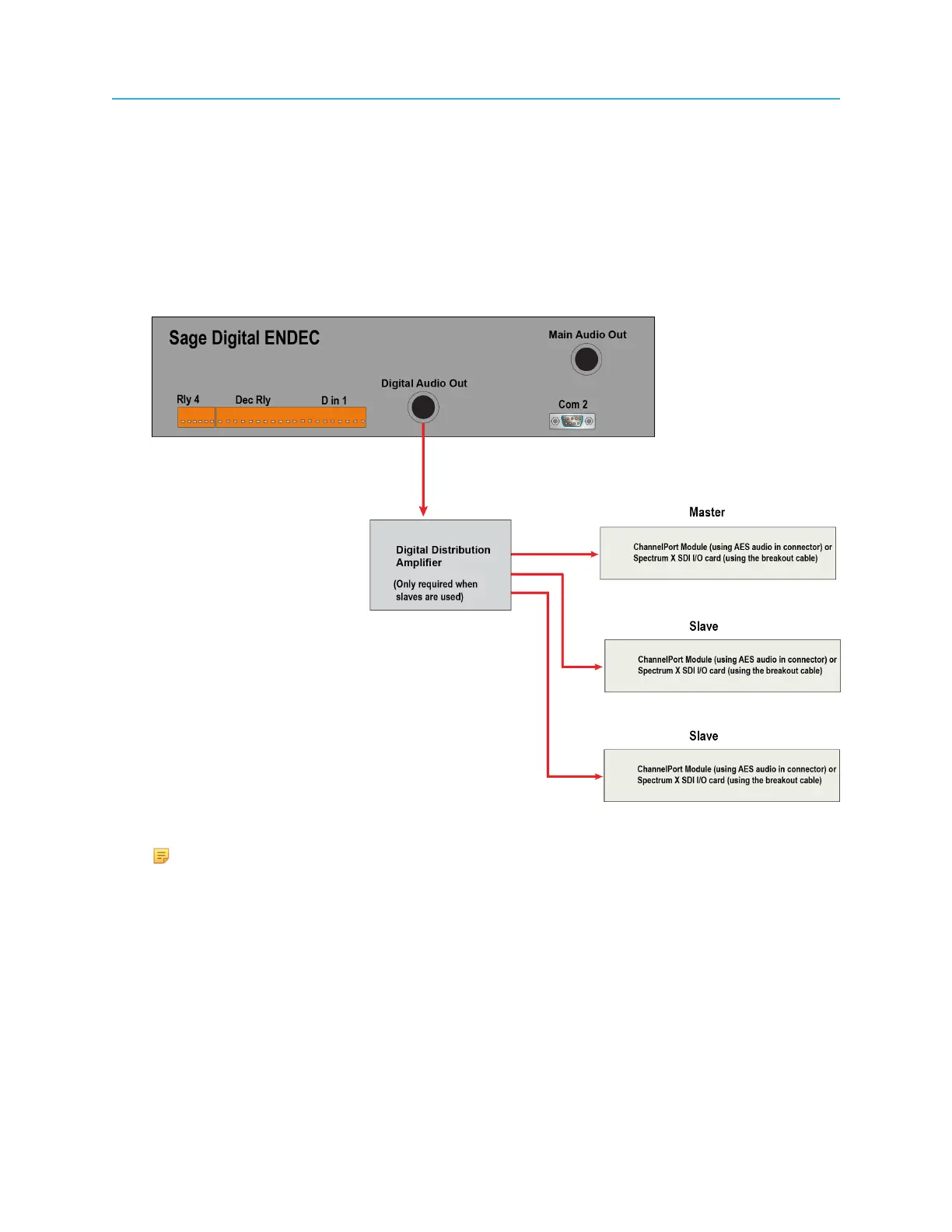
1. From the Digital Audio Out connector on the EAS, connect to a Digital Distribution Amplifier.
2. From the Digital Distribution Amplifier, make separate connections to the master Spectrum
X or ChannelPort and to the additional slave Spectrum Xs or ChannelPorts, as shown in the
following figure.
Figure 2-42: Connecting the Sage Digital ENDEC to Master and Slave Spectrum Xs orChannelPorts
NOTE: When using Channel B as a slave, make sure to connect the Digital
Distribution Amplifier to the AES Audio In connector for Channel B.
For the TFT EAS 911T:
1. From the Digital Audio Out connector on the EAS, connect to an Analog/AES Converter, and
then to a Digital Distribution Amplifier.
2. From the Digital Distribution Amplifier, make separate connections to the master Spectrum
X or ChannelPort and to the additional slave Spectrum Xs or ChannelPorts, as shown in the
following figure.
77 Spectrum System 8.4 Installation Guide



 To Next Page