HP-IB Interface Cards
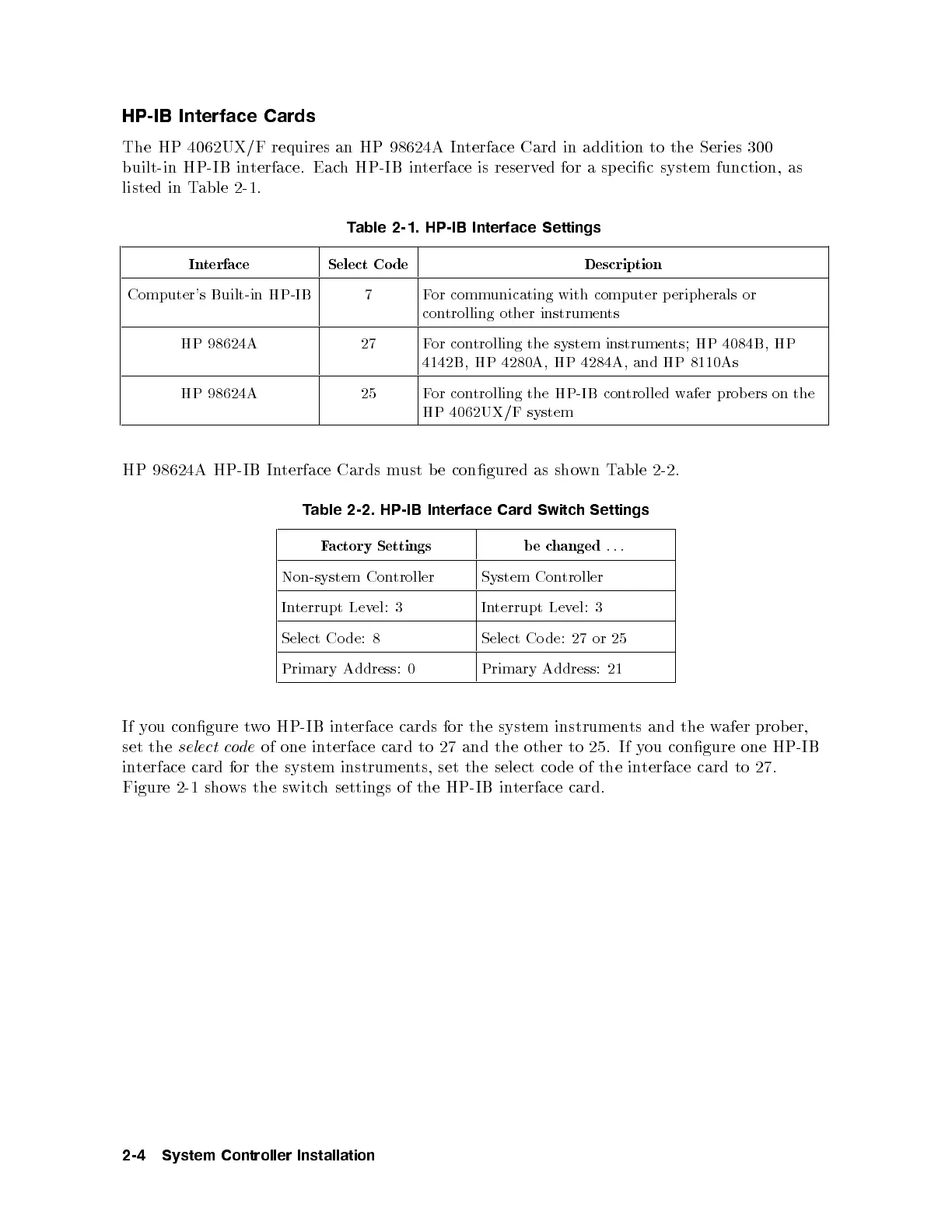
The HP 4062UX/F requires an HP 98624A Interface Card in addition to the Series 300
built-in HP-IB interface. Each HP-IB interface is reserved for a sp ecic system function, as
listed in Table 2-1.
Table 2-1. HP-IB Interface Settings
Interface Select Co de Description
Computer's Built-in HP-IB 7 For communicating with computer peripherals or
controlling other instruments
HP 98624A 27 For controlling the system instruments; HP 4084B, HP
4142B, HP 4280A, HP 4284A, and HP 8110As
HP 98624A 25 For controlling the HP-IB controlled wafer probers on the
HP 4062UX/F system
HP 98624A HP-IB Interface Cards must b e congured as shown Table 2-2.
Table 2-2. HP-IB Interface Card Switch Settings
Factory Settings be changed
...
Non-system Controller System Controller
Interrupt Level: 3 Interrupt Level: 3
Select Co de: 8 Select Co de: 27 or 25
Primary Address: 0 Primary Address: 21
If you congure two HP-IB interface cards for the system instruments and the wafer prob er,
set the
select code
of one interface card to 27 and the other to 25. If y
ou congure one HP-IB
interface card for the system instruments, set the select co de of the interface card to 27.
Figure 2-1 shows the switch settings of the HP-IB interface card.
2-4 System Controller Installation



 To Next Page