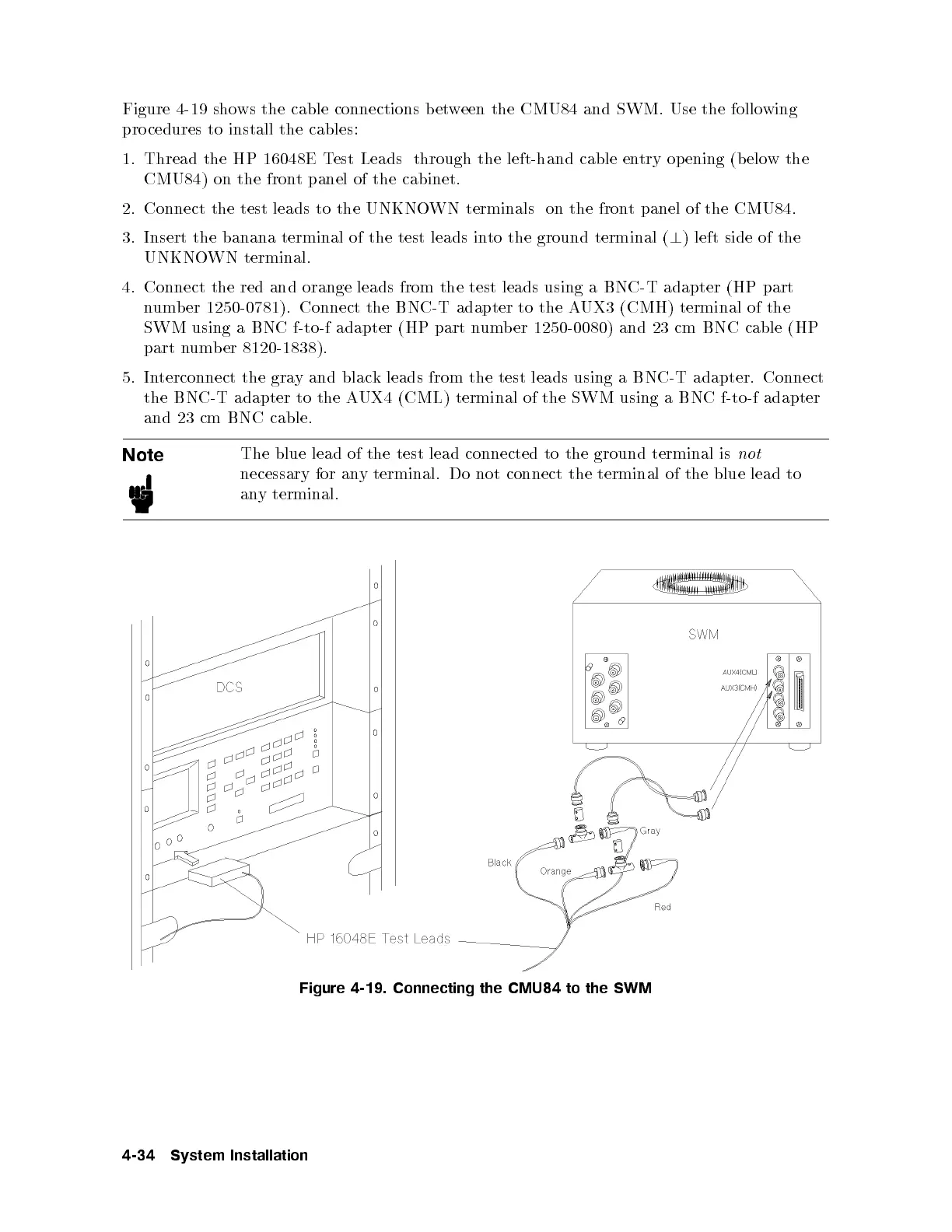
Figure 4-19 shows the cable connections between the CMU84 and SWM. Use the following
pro cedures to install the cables:
1. Thread the HP 16048E Test Leads through the left-hand cable entry op ening (b elow the
CMU84) on the front panel of the cabinet.
2. Connect the test leads to the UNKNOWN terminals on the front panel of the CMU84.
3. Insert the banana terminal of the test leads into the ground terminal (
?
) left side of the
UNKNOWN terminal.
4. Connect the red and orange leads from the test leads using a BNC-T adapter (HP part
number 1250-0781). Connect the BNC-T adapter to the AUX3 (CMH) terminal of the
SWM using a BNC f-to-f adapter (HP part number 1250-0080) and 23 cm BNC cable (HP
part number 8120-1838).
5. Interconnect the gray and black leads from the test leads using a BNC-T adapter. Connect
the BNC-T adapter to the AUX4 (CML) terminal of the SWM using a BNC f-to-f adapter
and 23 cm BNC cable.
Note
The blue lead of the test lead connected to the ground terminal is
not
necessary for any terminal. Do not connect the terminal of the blue lead to
any terminal.
Figure 4-19. Connecting the CMU84 to the SWM
4-34 System Installation



 To Next Page