System Configuration Verification for HP 4062F
The rst step in verifying correct system operation is to check the conguration of the HP
4062F system instruments. To do so, p erform the START.F program included in the system
software. Use the follo wing procedures to run the START.F program.
Verifying the System Configuration with START.F Program
Conrm the system conguration with the conguration page of START.F. Use the following
pro cedures to perform the START.F program. If problems o ccur, go to Appendix C.
1. Turn the system instruments on.
2. Turn the controller system on and start the HP-UX system.
3. Log in as a sup eruser.
4. Start HP BASIC/UX as follows:
# rmb
5. Load and run the START.F program as follows:
LOAD "/usr/pcs/bin/START.F"
4
Return
5
RUN
4
Return
5
or select the
NNNNNNNNNNN
RUN
softkey
The copyright message page is displayed.
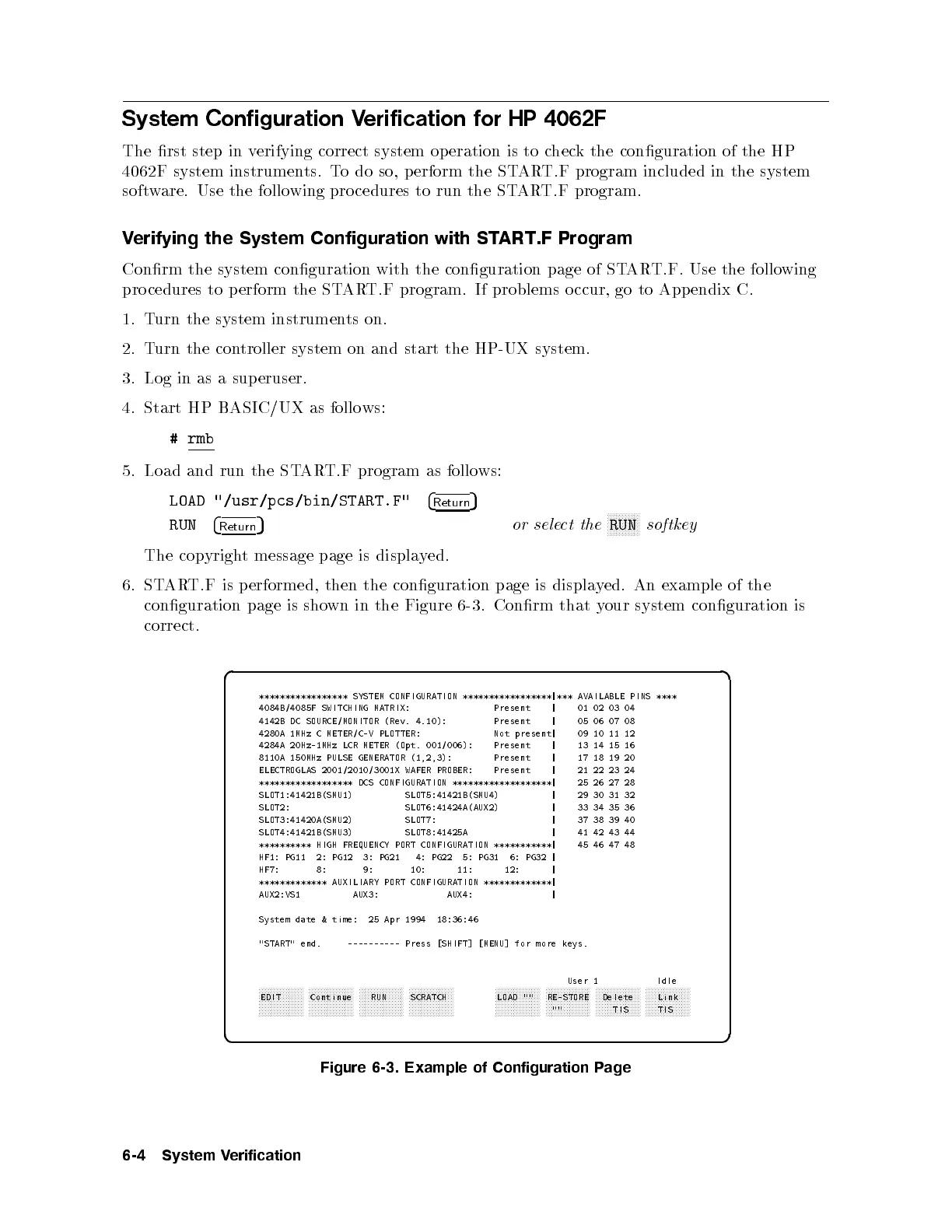
6. START.F is p erformed, then the conguration page is displa
yed. An example of the
conguration page is shown in the Figure 6-3. Conrm that y
our system conguration is
correct.
d a
c b
***************** SYSTEM CONFIGURATION *****************|*** AVAILABLE PINS ****
4084B/4085F SWITCHING MATRIX: Present | 01 02 03 04
4142B DC SOURCE/MONITOR (Rev. 4.10): Present | 05 06 07 08
4280A 1MHz C METER/C-V PLOTTER: Not present| 09 10 11 12
4284A 20Hz-1MHz LCR METER (Opt. 001/006): Present | 13 14 15 16
8110A 150MHz PULSE GENERATOR (1,2,3): Present | 17 18 19 20
ELECTROGLAS 2001/2010/3001X WAFER PROBER: Present | 21 22 23 24
****************** DCS CONFIGURATION *******************| 25 26 27 28
SLOT1:41421B(SMU1) SLOT5:41421B(SMU4) | 29 30 31 32
SLOT2: SLOT6:41424A(AUX2) | 33 34 35 36
SLOT3:41420A(SMU2) SLOT7: | 37 38 39 40
SLOT4:41421B(SMU3) SLOT8:41425A | 41 42 43 44
********** HIGH FREQUENCY PORT CONFIGURATION ***********| 45 46 47 48
HF1: PG11 2: PG12 3: PG21 4: PG22 5: PG31 6: PG32 |
HF7: 8: 9: 10: 11: 12: |
************* AUXILIARY PORT CONFIGURATION *************|
AUX2:VS1 AUX3: AUX4: |
System date & time: 25 Apr 1994 18:36:46
"START" end. ---------- Press [SHIFT] [MENU] for more keys.
User 1 Idle
aaaaaaaaaaaaaaa
EDIT
aaaaaaaaaaaaaaa
Continue
aaaaaaaaaaaaaaa
RUN
aaaaaaaaaaaaaaa
SCRATCH
aaaaaaaaaaaaaaa
LOAD ""
aaaaaaaaaaaaaaa
RE-STORE
""
aaaaaaaaaaaaaaa
Delete
TIS
aaaaaaaaaaaaaaa
Link
TIS
Figure 6-3. Example of Configuration Page
6-4 System Verification



 To Next Page