HP 4280A CMU Settings
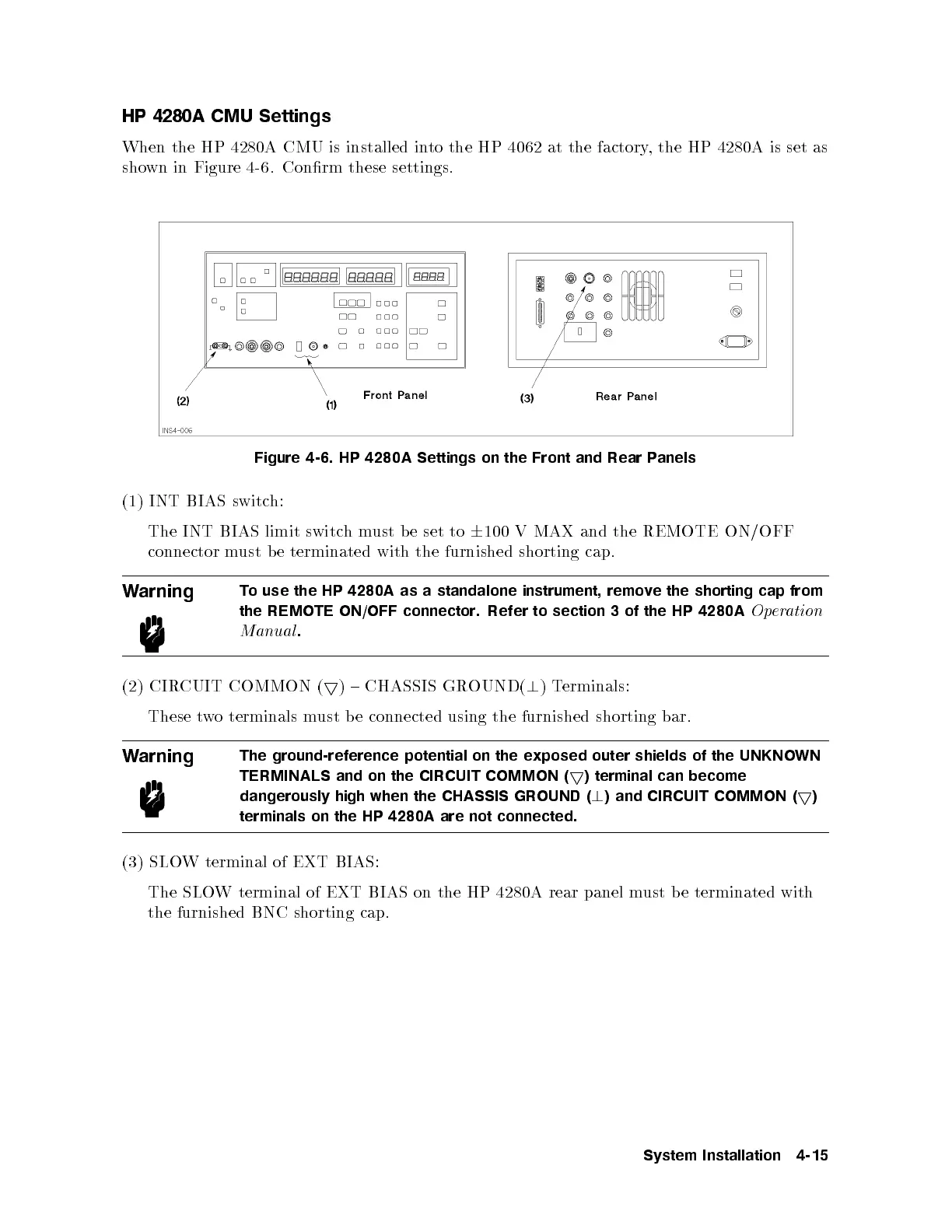
When the HP 4280A CMU is installed into the HP 4062 at the factory, the HP 4280A is set as
shown in Figure 4-6. Conrm these settings.
Figure 4-6. HP 4280A Settings on the Front and Rear Panels
(1) INT BIAS switch:
The INT BIAS limit switchmust b e set to
6
100 V MAX and the REMOTE ON/OFF
connector must be terminated with the furnished shorting cap.
Warning
To use the HP 4280A as a standalone instrument, remo
ve the shorting cap from
the REMOTE ON/OFF connector. Refer to section 3 of the HP 4280A
Operation
Manual
.
(2) CIRCUIT COMMON (
5
) { CHASSIS GROUND(
?
)Terminals:
These two terminals must b e connected using the furnished shorting bar.
Warning
The ground-reference potential on the exposed outer shields of the UNKNOWN
TERMINALS and on the CIRCUIT COMMON (
5
) terminal can become
dangerously high when the CHASSIS GROUND (
?
) and CIRCUIT COMMON (
5
)
terminals on the HP 4280A are not connected.
(3) SLOW terminal of EXT BIAS:
The SLOW terminal of EXT BIAS on the HP 4280A rear panel m
ust be terminated with
the furnished BNC shorting cap.
System Installation 4-15



 To Next Page