Installing the HP 4284A
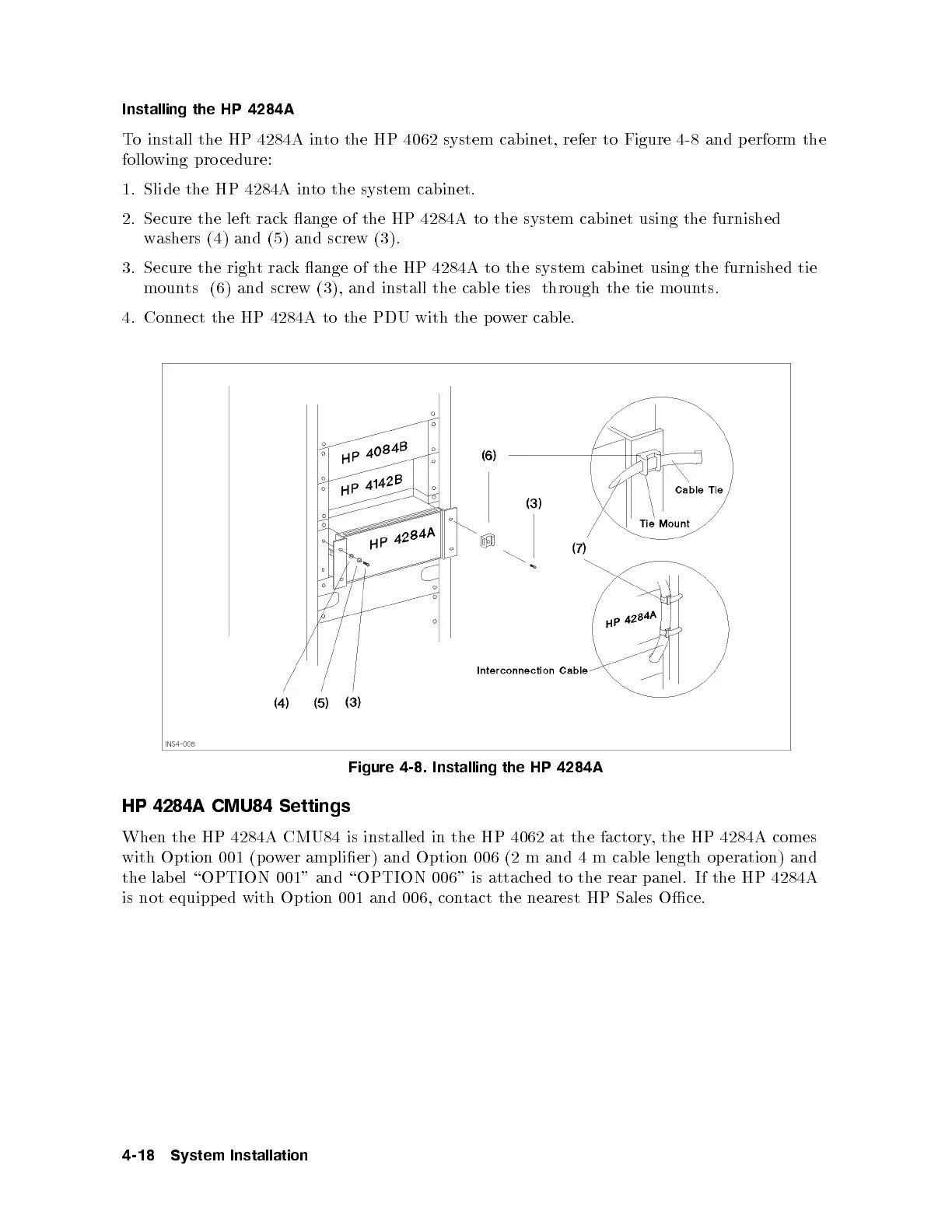
To install the HP 4284A into the HP 4062 system cabinet, refer to Figure 4-8 and p erform the
following pro cedure:
1. Slide the HP 4284A into the system cabinet.
2. Secure the left rack ange of the HP 4284A to the system cabinet using the furnished
washers (4) and (5) and screw (3).
3. Secure the right rack ange of the HP 4284A to the system cabinet using the furnished tie
mounts (6) and screw (3), and install the cable ties through the tie mounts.
4. Connect the HP 4284A to the PDU with the power cable.
Figure 4-8. Installing the HP 4284A
HP 4284A CMU84 Settings
When the HP 4284A CMU84 is installed in the HP 4062 at the factory, the HP 4284A comes
with Option 001 (p ower amplier) and Option 006 (2 m and 4 m cable length operation) and
the lab el \OPTION 001" and \OPTION 006" is attached to the rear panel. If the HP 4284A
is not equipped with Option 001 and 006, contact the nearest HP Sales Oce.
4-18 System Installation



 To Next Page