HP-IB Cables and Addresses
HP-IB Addresses and Connections of the Rack Mounted Instruments
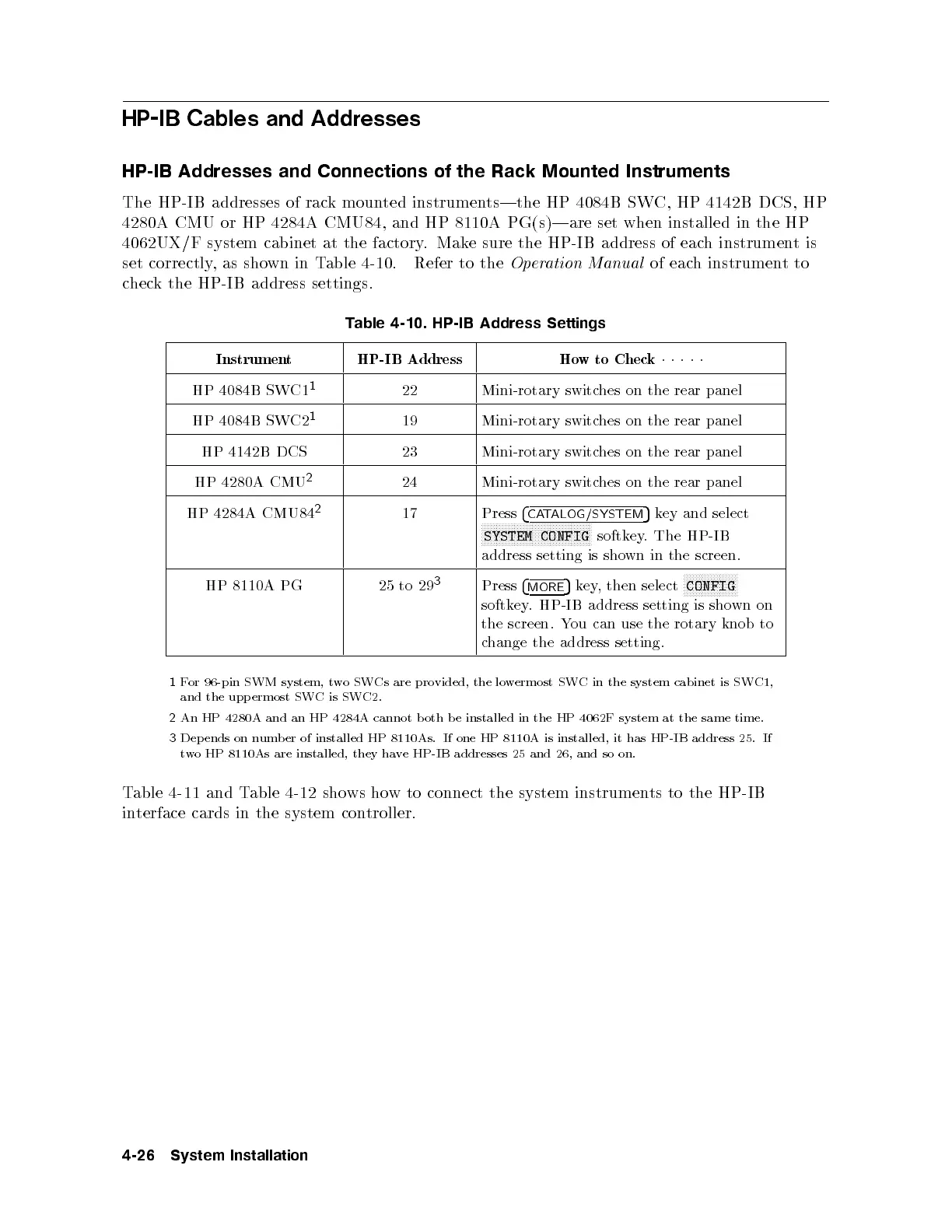
The HP-IB addresses of rack mounted instruments|the HP 4084B SWC, HP 4142B DCS, HP
4280A CMU or HP 4284A CMU84, and HP 8110A PG(s)|are set when installed in the HP
4062UX/F system cabinet at the factory. Make sure the HP-IB address of each instrumentis
set correctly, as shown in Table 4-10. Refer to the
Operation Manual
of each instrumentto
check the HP-IB address settings.
Table 4-10. HP-IB Address Settings
Instrument HP-IB Address How to Check
11111
HP 4084B SWC1
1
22 Mini-rotary switches on the rear panel
HP 4084B SWC2
1
19 Mini-rotary switches on the rear panel
HP 4142B DCS 23 Mini-rotary switches on the rear panel
HP 4280A CMU
2
24 Mini-rotary switches on the rear panel
HP 4284A CMU84
2
17 Press
4
CATALOG/SYSTEM
5
key and select
NNNNNNNNNNNNNNNNNNNNNNNNNNNNNNNNNNNNN
SYSTEM CONFIG
softkey. The HP-IB
address setting is shown in the screen.
HP 8110A PG 25 to 29
3
Press
4
MORE
5
key, then select
NNNNNNNNNNNNNNNNNN
CONFIG
softkey. HP-IB address setting is shown on
the screen. You can use the rotary knob to
change the address setting.
1
For 96-pin SWM system, twoSWCs are provided, the lowermost SWC in the system cabinet is SWC1,
and the upp ermost SWCisSWC2.
2
An HP 4280A and an HP 4284A cannot b oth b e installed in the HP 4062F system at the same time.
3
Dep ends on numb er of installed HP 8110As. If one HP 8110A is installed, it has HP-IB address 25. If
two HP 8110As are installed, they have HP-IB addresses 25 and 26, and so on.
Table 4-11 and Table 4-12 shows how to connect the system instruments to the HP-IB
interface cards in the system controller.
4-26 System Installation



 To Next Page