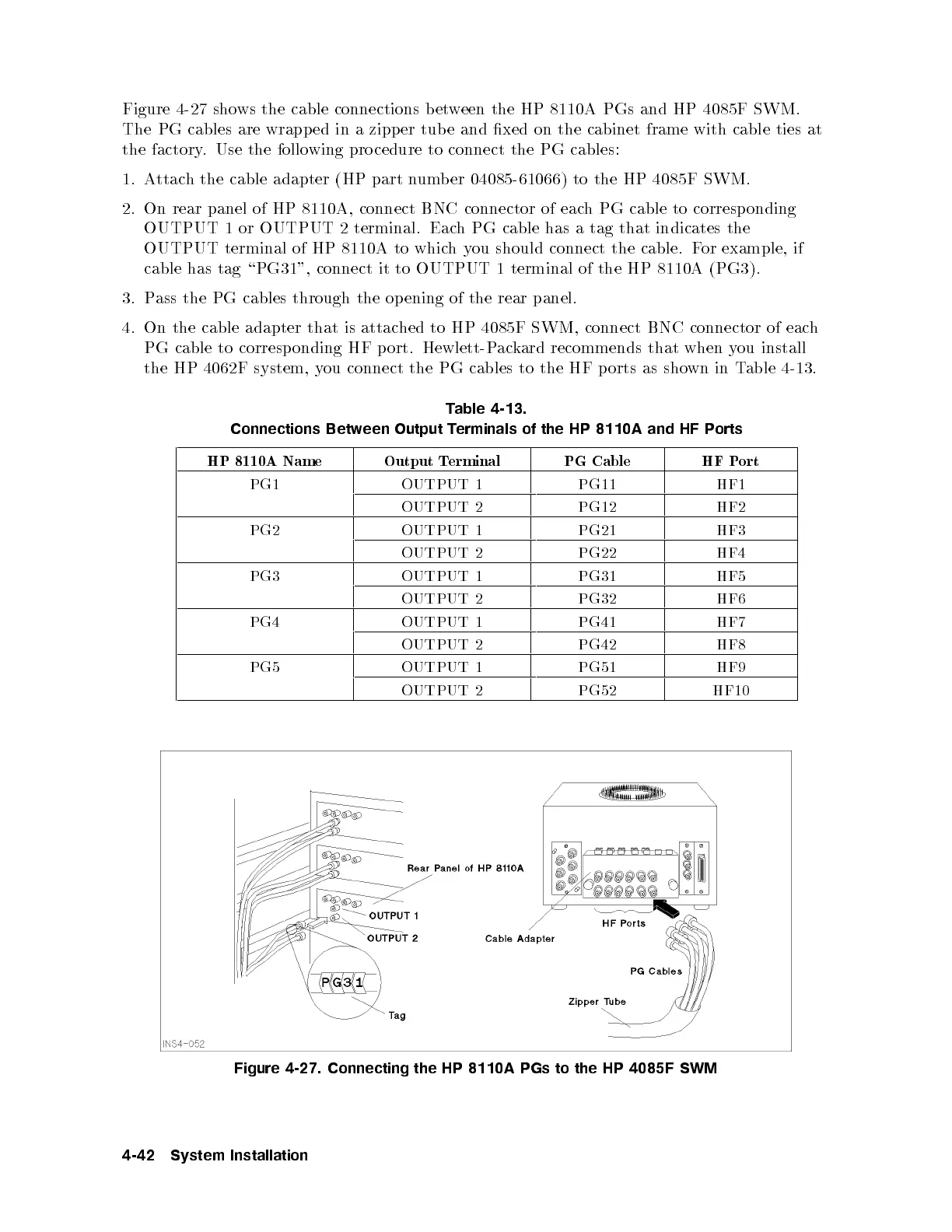
Figure 4-27 shows the cable connections between the HP 8110A PGs and HP 4085F SWM.
The PG cables are wrapp ed in a zipper tub e and xed on the cabinet frame with cable ties at
the factory. Use the following pro cedure to connect the PG cables:
1. Attach the cable adapter (HP part number 04085-61066) to the HP 4085F SWM.
2. On rear panel of HP 8110A, connect BNC connector of each PG cable to corresp onding
OUTPUT 1 or OUTPUT 2 terminal. Each PG cable has a tag that indicates the
OUTPUT terminal of HP 8110A to whichyou should connect the cable. For example, if
cable has tag \PG31", connect it to OUTPUT 1 terminal of the HP 8110A (PG3).
3. Pass the PG cables through the op ening of the rear panel.
4. On the cable adapter that is attached to HP 4085F SWM, connect BNC connector of each
PG cable to corresp onding HF p ort. Hewlett-Packard recommends that when you install
the HP 4062F system, you connect the PG cables to the HF p orts as shown in Table 4-13.
Table 4-13.
Connections Between Output Terminals of the HP 8110A and HF Ports
HP 8110A Name Output Terminal PG Cable HF Port
PG1 OUTPUT 1 PG11 HF1
OUTPUT 2 PG12 HF2
PG2 OUTPUT 1 PG21 HF3
OUTPUT 2 PG22 HF4
PG3 OUTPUT 1 PG31 HF5
OUTPUT 2 PG32 HF6
PG4 OUTPUT 1 PG41 HF7
OUTPUT 2 PG42 HF8
PG5 OUTPUT 1 PG51 HF9
OUTPUT 2 PG52 HF10
Figure 4-27. Connecting the HP 8110A PGs to the HP 4085F SWM
4-42 System Installation



 To Next Page