Entry Area
All function values are changed via the rotary knob and/or keys of
the entry area.
ENTRY
ENTRY ON
ON/OFF
LEO
ARROW KEYS
1
\
\,
ENTRY
/
ROTARY KNOB
TERMINATOR
KEYS
NUMERIC
NEGAM
SIGN/
ENTRY KMS
BACKSPACE
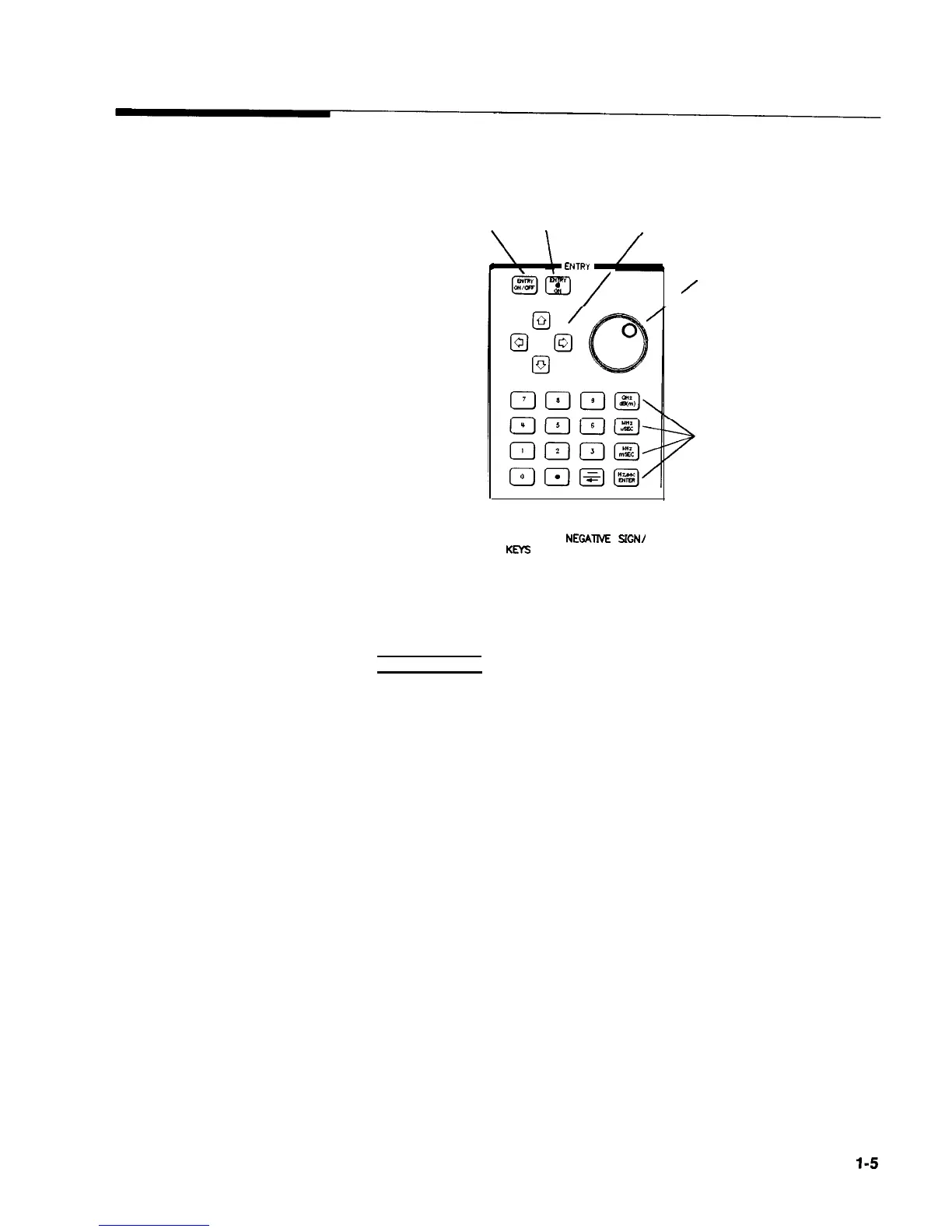
Figure 1-3. Entry Area
The following are active only when the swept signal generator
expects an input.
[ENTRY ON/OFF): This key lets you turn off or on the active entry
area. Turning off the entry area after a value is entered prevents
accidental changes.
ENTRY ON LED: This LED lights when the entry area is active.
Arrow Keys: The up/down arrow keys let you increase or decrease
a numeric value. The left/right arrow keys choose a significant
digit indicated by an underline.
Rotary Knob: The rotary knob increases or decreases a numeric
value. The rotary knob can be used in combination with the
left/right arrow keys to change the increment size.
Terminator Keys: After the numeric entry keys are used to enter a
value, these keys define the units.
Negative Sign/Backspace Key: If a data entry is in progress, this
key backspaces over the last digit entered, otherwise a negative
sign is entered.
Numeric Entry Keys: These keys enter specific numbers in the
active entry area and must be followed by one of the terminator
keys before the function value changes.
Getting Started Basic
l-5



 To Next Page
 Loading...








