WindO/I-NV4 User’s Manual 4-33
3 Project Settings Dialog Box
4
Project Settings
System Area 3
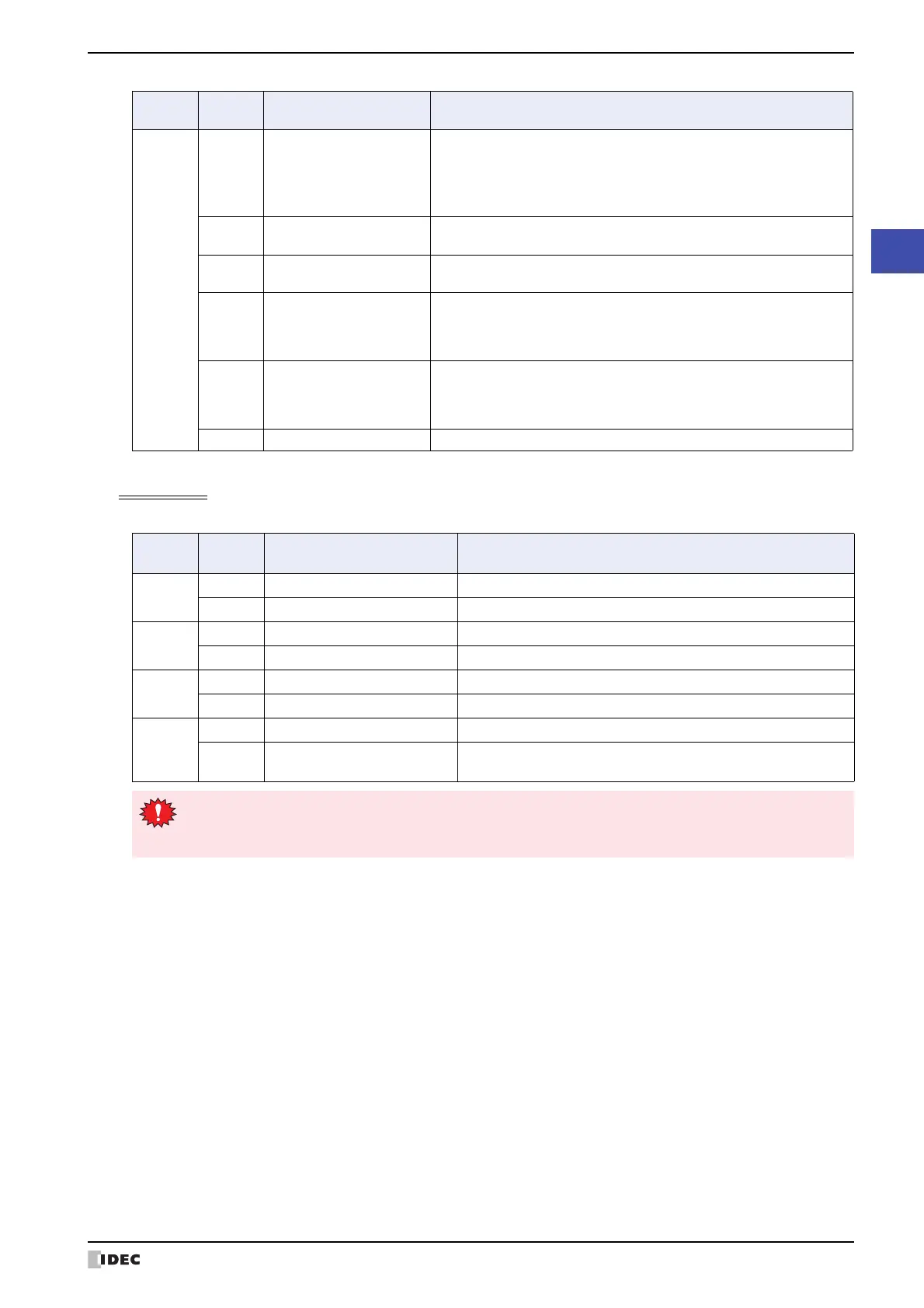
This area is for changing the MICRO/I internal clock data.
Address
number
Bit Function
Description
+3
2 Backlight auto off running
The value of this bit changes to 1 when
Auto OFF
is configured and the
backlight was turned off by this function. To configure
Auto OFF
, select
the
Auto OFF
check box under
Backlight
in the
Project Settings
dialog box. This bit automatically changes to 0 when the backlight turns
on.
3
Sending output to a
printer
This bit changes to 1 when sending output to the printer. This bit
automatically changes to 0 when finished sending output.
4 Transferring recipe
This bit changes to 1 when transferring recipe data. This bit automatically
changes to 0 when the transfer is finished.
5
Character input setting
complete
This bit changes to 1 when finished entering text with the Character
Input. This bit changes to 0 when entering text or when entering text has
been canceled. Write 1 to character input setting clear (address
number+1, bit 11) to clear this bit.
6
Character input setting
cancel
This bit changes to 1 when entering text with the Character Input is
canceled. This bit changes to 0 when entering text or when entering text
has been completed. Write 1 to character input setting clear (address
number+1, bit 11) to clear this bit.
7 to 15 Reserved
Address
number
Bit Function Description
+4
0 to 7 Clock data Month Enter Month (01 to 12) as a 2 digit BCD.
8 to 15 Clock data Year Enter Year (00 to 99) as a 2 digit BCD.
+5
0 to 7 Clock data Hour Enter Hour (00 to 23) as a 2 digit BCD.
8 to 15 Clock data Day Enter Day (01 to 31) as a 2 digit BCD.
+6
0 to 7 Clock data Second Enter Second (00 to 59) as a 2 digit BCD.
8 to 15 Clock data Minute Enter Minute (00 to 59) as a 2 digit BCD.
+7
0 to 14 Reserved Enter 0 in the reserved area.
15 Update
Write 1 to this bit to write the entered data (address number+4 to
+6, bits 0 to 15) to the MICRO/I internal clock data.
When the value of the update bit (address number+7, bit 15) becomes 1, the clock data is updated as a
whole.
Year, month, day, hour, minute, and second cannot be set individually.



 To Next Page
 Loading...