10 Parameter List
140 of
212
PumpDrive 2
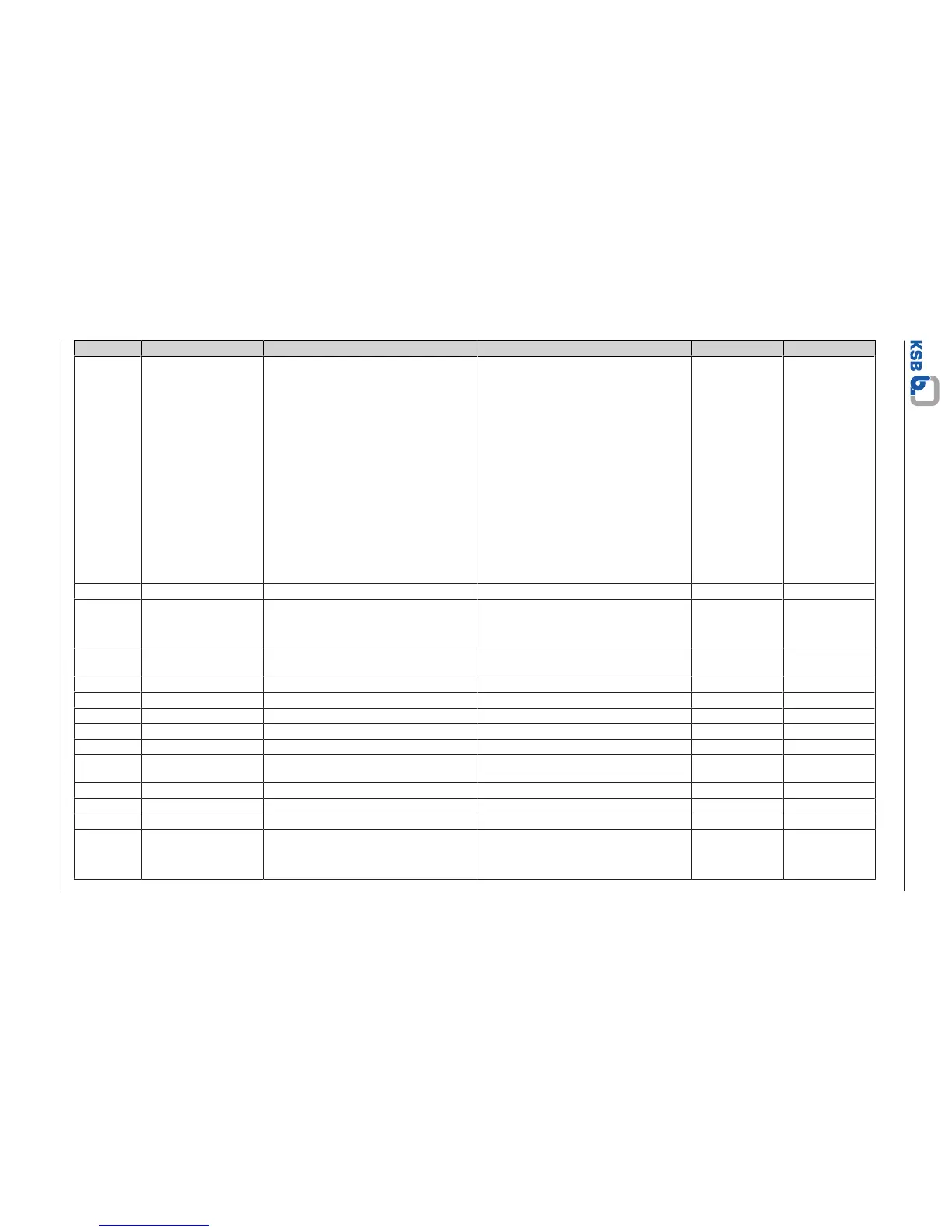
Parameter Description Help text Possible settings Unit Factory setting
3-1-2-3 Function Key
Assignment
Assigning a freely selectable function to the
FUNC key
▪ No Function
System Start / Stop
▪ Setpoint (Closed-loop Control)
▪ Control Value (Open-loop Control)
▪ Alternative Setpoint (Closed-loop
Control)
▪ Alternative Control Value (Open-loop
Control)
▪ Immediate Pump Changeover
▪ Immediate Functional Check Run
▪ Language
▪ Fixed Speed 1
▪ PumpMeter Upload
▪ Remote/Local Control Point
Language
3-1-2-4 Display Contrast Configurable contrast for display 0…100 % 50
3-1-2-5 Display Backlight Configuring the display backlight ▪ OFF
▪ ON
▪ Automatic
Automatic
3-1-2-6 Display Backlight
Duration
Display backlight on period in automatic
mode
0,00 … 600,00 s 30
3-1-3 Parameter Sets
3-1-3-1 Load User Settings 1 Run
3-1-3-2 Load User Settings 2 Run
3-1-3-3 Save User Settings 1 Run
3-1-3-4 Save User Settings 2 Run
3-1-3-5 Load Factory Settings This function is used to reset the drive or
system to the factory settings.
Run
3-1-4 Date and Time
3-1-4-1 Set Date Setting the date 01.01.2000 ... 31.12.2099 Current Date
3-1-4-2 Set Time Setting the time of day 00:00…23:59 Current Time
3-1-4-3 Time Format Selecting the format for displaying the time ▪ AM
▪ PM
▪ 24h
24h



 To Next Page