Calibration of the Back Section
KVAL 994-X Operation/Service Manual
3-18
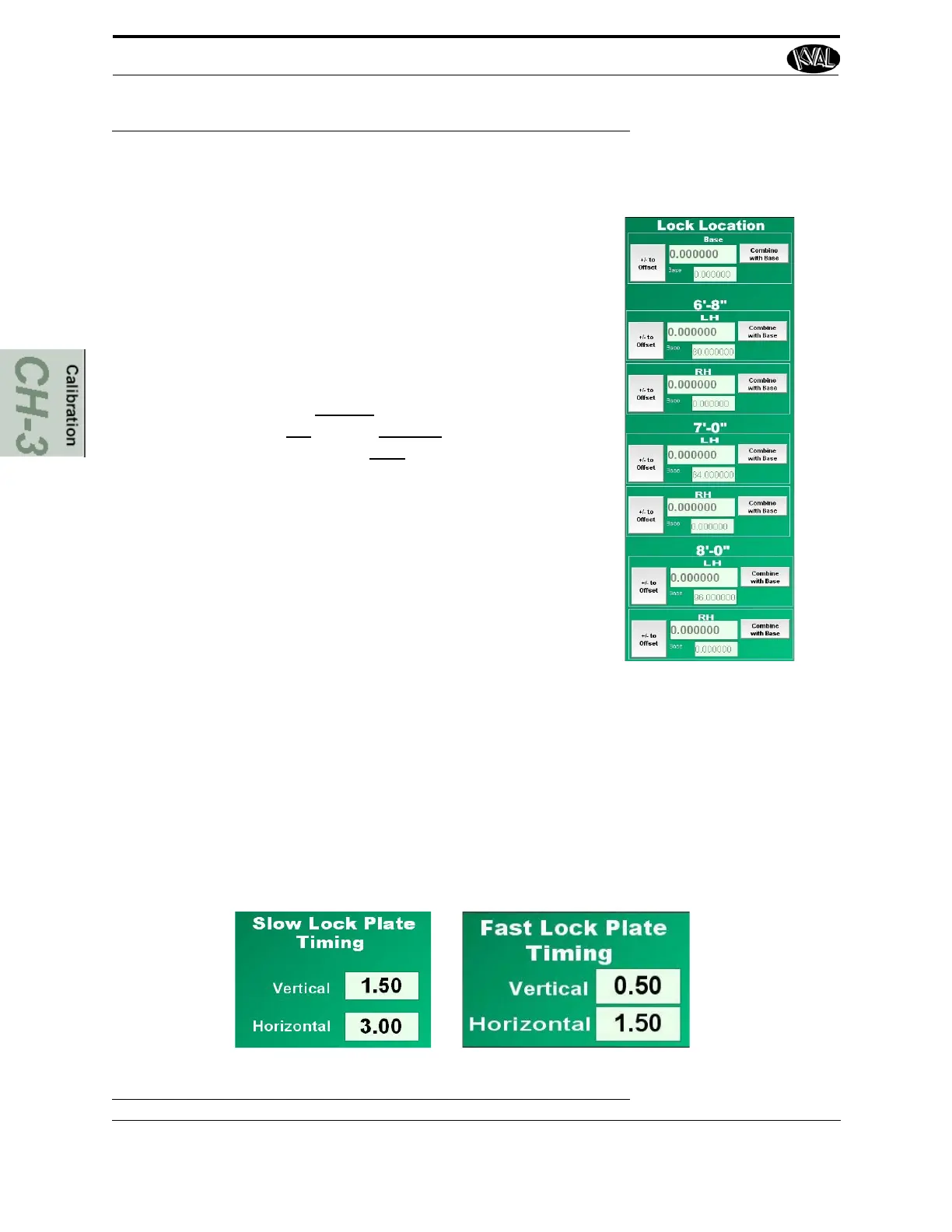
FIGURE 3- 11. Reference Door Lock
Adjusting Lock Location
1. Select the size door (6'8''-7'0''-8'0'') or Base.
2. Select Right Hand or Left Hand depending on
the door run through process.
3. Under Base, select the Combine with Base but-
ton.
4. Enter a positive number to move the lock cut to
the left. Enter a negative number to move the
lock cut to the right.
5. Re-run the lock cut.
6. Measure again and repeat steps 3 to 4 until the
center of the lock is at the desired cut location.
7. Once the completed with calibration, select the
Combine with Base button to store the data.
8. Exit Main Calibration Screen.
Fast and Slow Lock Plate Timing
Adjust Fast Lock Plate Timing under normal operating (No Extend Time), the router time can be
adjusted to match the flow controls on the machine. Before adjusting these times, make sure the
flow controls are set properly.
Note: Before adjusting the Slow Lock Plate Timing, make sure the Fast Plate Routine
is set properly adjusted.
If the settings are in Extend Time, adjust the Slow Lock Plate Timing.
FIGURE 3- 12. Fast and Slow Lock Plate Timing Menu



 To Next Page