About the Setup Screens
2-47
KVAL 994-X Operation/Service Manual
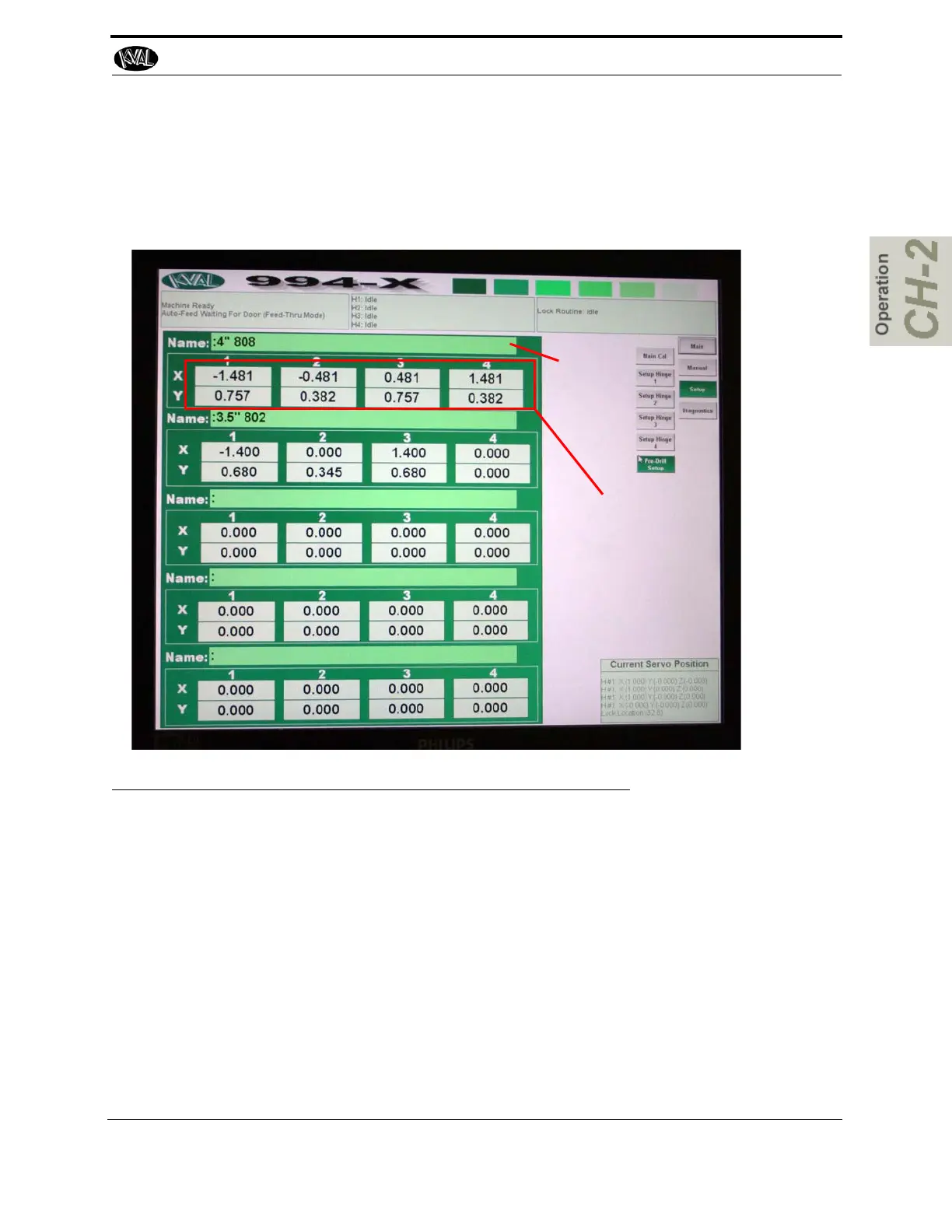
About the Pre-Drill Screen
From this screen, you can adjust and store up to five pre-drill screw patterns in memory. From the
Setup menu select the Predrill Setup button.
Name the
Template
Enter Drill Hole Loca-
tions
FIGURE 2- 22. Pre-Drill Screen
The X and Y valves are referenced off the bottom of the hinge on the door to the center of the
hinge
The jamb pre-drill holes are equal to the mirror image of the parameters entered. This allows for
less time entering data and keeps precision drilling patterns.
The number '0' entered in both X and Y are equal to no drill.
Important: Never enter a negative number in the 'Y' parameter. The pre-drill will try
to drill off the door into the Delrin.
See the Figure on the next page.



 To Next Page