Check Specifications of the Front Section
KVAL 994-X Operation/Service Manual
3-8
General Instructions to Adjust Parameters
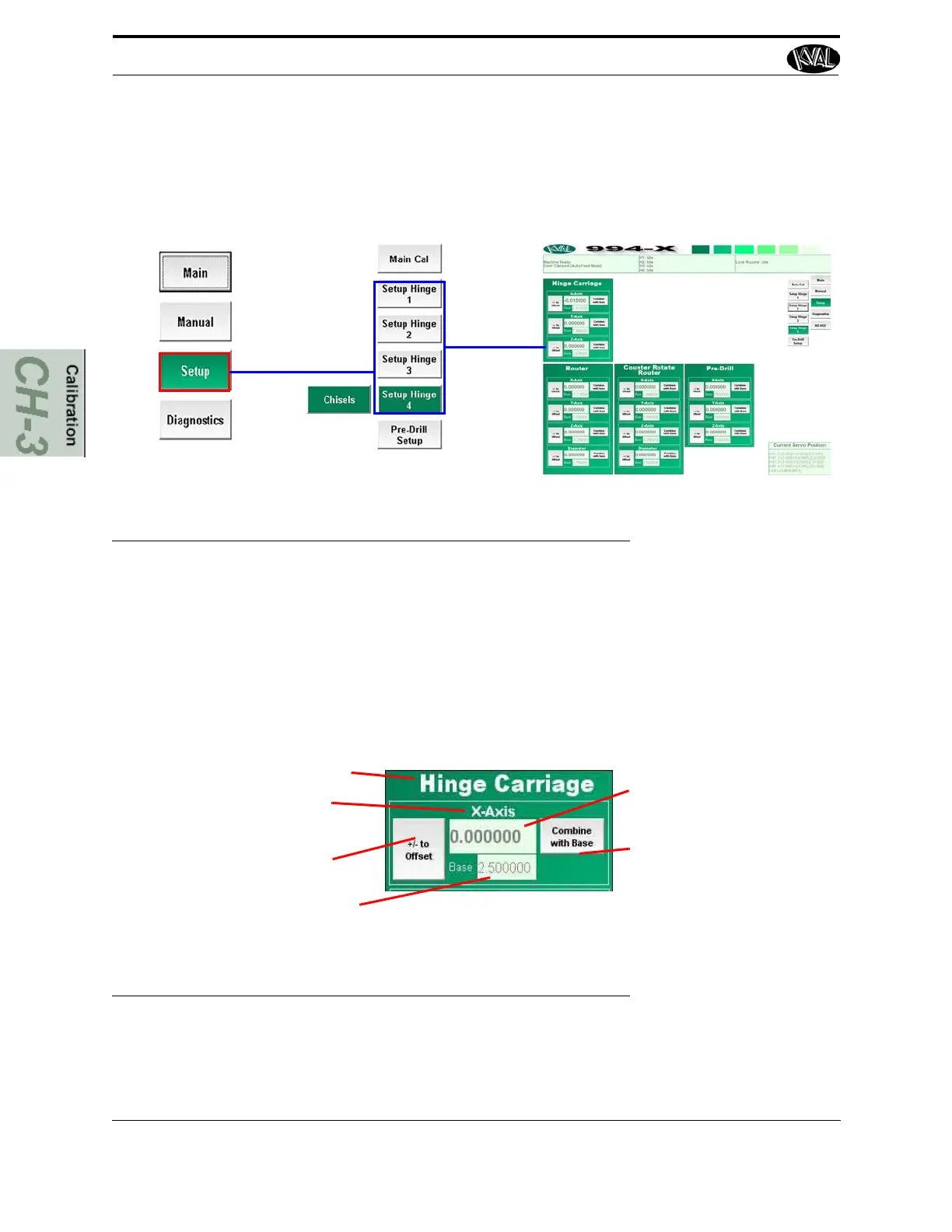
From the Main Screen select Setup---Setup Hinge 1. 2, 3, or 4 to get to the Hinge Setup
screens.See “About the Setup Hinges 1-4 Screens” on page 2-45 for further detail.
FIGURE 3- 4. Path to Setup Hinge Screens
Located in the setup screens are adjustment menus. In these menus you can add negative or posi-
tive adjustments to move a cutting assembly to the desired position. Enter the data in the white
box below the parameter. The Base display box keeps a running total of data entered to help keep
track of the changes. The Combine with Base button stores data in memory and should be used at
first to set a reference and at final to store data. See “Check Specifications of the Front Section”
on page 3-7 for information on direction of servo motors.
Title: of assembly to adjust
Parameter: to adjust (X,Y,and or Z
axis.)
Offset: Select this button to add or
subtract the measured number
entered.
Base: Keeps a Running Total of
measured numbers entered.
Enter: Type in measured
data
Combine Base: Select this
button at start of adjustment
to set a reference and end
of adjustment to store it.
FIGURE 3- 5. Sample of an Adjustment Menu



 To Next Page