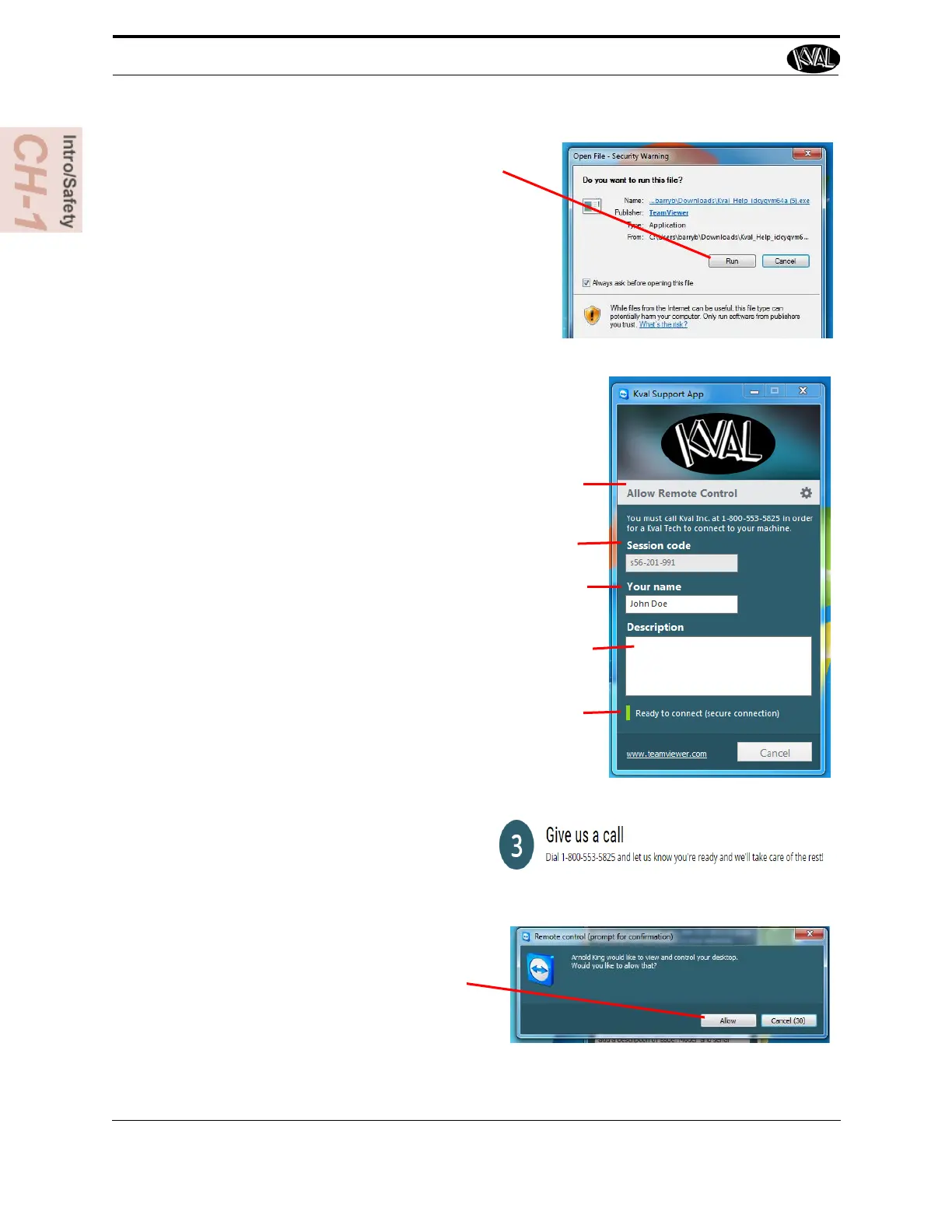
5. A pop-up window is displayed.
Accept the request to run the program.
Note: Security settings may differ from plant to
plant. If issues occur, contact your IT depart-
ment.
6. The interface of the KVAL Support App will be dis-
played. Enter your name in the Your Name field.
The fields are described below:
Session code: An internal number to track this
machine. It is auto filled.
Allow Remote Control: Program is ready to allow
technicians to access machine computer
Your Name Field: Enter your name. The KVAL tech-
nician will use this field to identify this machine.
Description: Enter machine Serial number and
issue.
Indicator: Green indicates there is a good connec-
tion to the service center. If red, there could be an
issue with a LAN connection. Check the connections
in the plant.
7. After the KVAL Support App is
loaded and completed, call the
KVAL service center(1-800-553-
5825) and have the technician con-
nect to the machine computer.
8. Click the Allow button to give the
KVAL service technician permis-
sion to access the operator station.
We are now ready to troubleshoot.
How to Download the Service Application
KVAL 994-X Operation/Service Manual
1-18



 To Next Page